By Sebastian Maniak
Every morning, eight agents do a round of my lab before I sit down:
- They read what changed upstream in agentgateway, kagent and agentdesktop.
- They check my FortiGate’s health.
- They match every image in my cluster against OSV.dev, and my firewall firmware against FortiGuard.
- They audit each other.
- Finally, one of them writes a front page with what I need to act on today.
All of it lands in a GitHub repo, sebbycorp/agent-summary.
The part I want to show in this post is how little the agents cost when they’re idle. They aren’t long-running pods. They run on Agent Substrate, so each run is a sandbox that’s suspended to a snapshot most of the day. When its schedule fires, Substrate resumes it onto a warm worker in under a second. The agent works against the Qwen model on my DGX Spark, and when it’s done, Substrate snapshots it and frees the worker. Right now my cluster has 45 agent sessions, and only one of them is running.
In the previous post I built two daily agents on kind with OSS kagent and CronJobs. This post covers my “real” lab cluster with kagent Enterprise, where schedules, egress control and worker tiers are built into the platform.
Here’s the walkthrough on video:
The environment
| Piece | What I run |
|---|---|
| Cluster | omni-viper: a single Talos node managed by Sidero Omni, Kubernetes 1.36 |
| Agent platform | kagent Enterprise 1.0.0-alpha12 |
| Agent runtime | Agent Substrate Enterprise 0.6: gVisor sandboxes, snapshots in an S3 bucket (rustfs, in-cluster) |
| Worker pools | kagent-default (3 workers), kagent-high (2, reserved for the auditor and digest), kagent-coding (3) |
| Model | qwen3.8-flash-next on a DGX Spark through vLLM. It’s the default ModelConfig, and no cloud model is involved |
| GitOps | Argo CD. Everything except the schedules is in git under apps/kagent/ |
| Secrets | Vault, delivered by External Secrets |
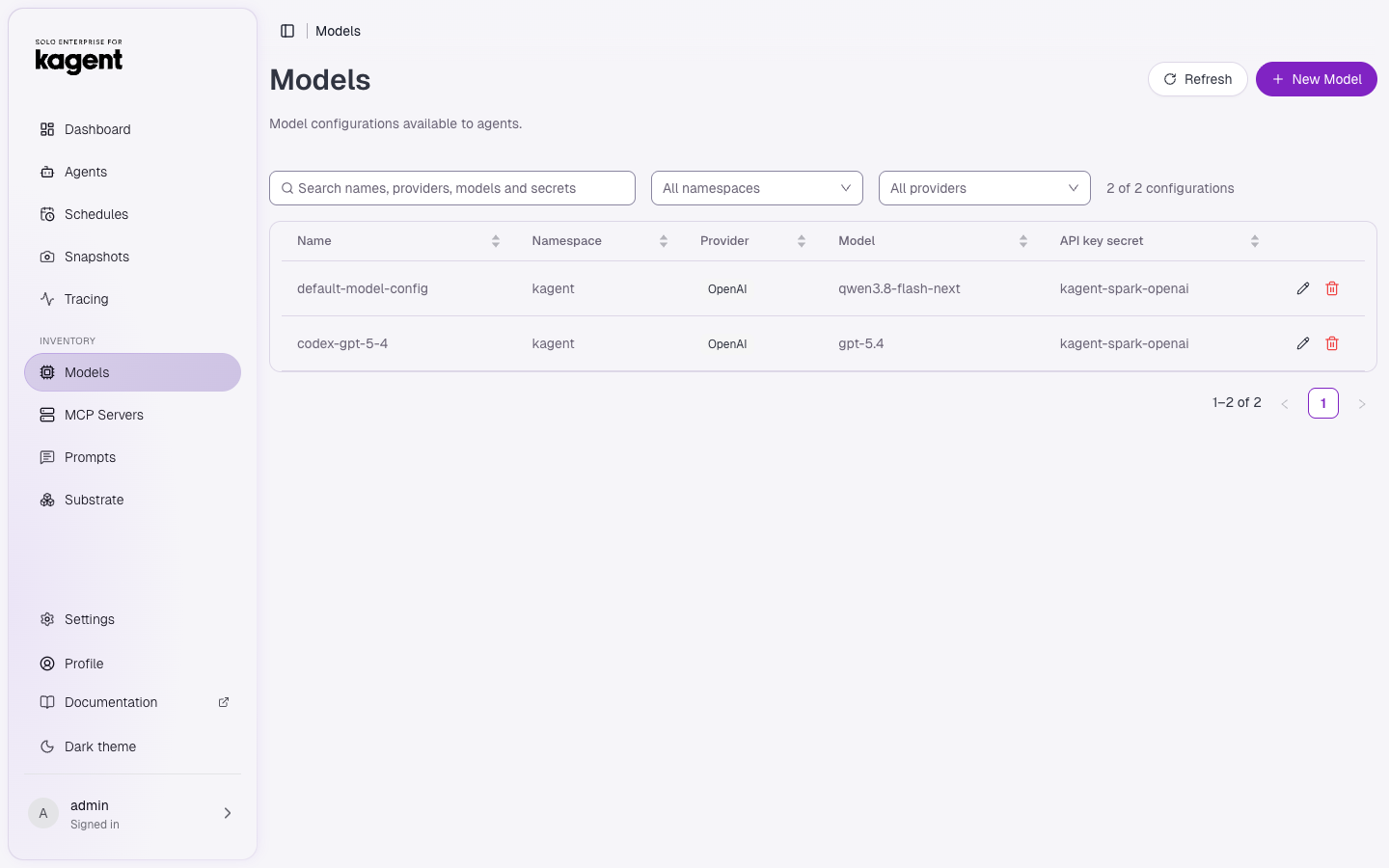
The Spark sits on my LAN at a bare IP. Substrate egress rules accept DNS names, not IPs, so a selectorless Service plus an EndpointSlice give it a cluster name, and the ModelConfig points at http://dgx-spark.kagent.svc.cluster.local:8000/v1. The previous post walks through that setup.
                omni-viper  (Talos, kagent Enterprise + Agent Substrate)
 ┌─────────────────────────────────────────────────────────────────────────────┐
 │ kagent-controller                                                           │
 │   Schedules (Postgres) ── fires 08:00 … 10:45 ET                            │
 │        │ CreateActor (from the agent's golden template)                     │
 │        ▼                                                                    │
 │ ate-api-server ── ResumeActor ──► warm worker (gVisor)  ◄── snapshot (S3)   │
 │                                      │                                      │
 │                                      ├─► dgx-spark:8000  (Qwen via vLLM) ───┼──► DGX Spark (LAN)
 │                                      ├─► MCP: k8s tools, fortigate-mcp      │
 │                                      └─► atenet-egress: only allowed origins┼──► GitHub MCP, OSV.dev,
 │                                                                             │    FortiGuard
 │ ate-api-server ◄── SuspendActor ── run finished → snapshot → worker freed   │
 └─────────────────────────────────────────────────────────────────────────────┘
                                         │
                                         ▼
                      github.com/sebbycorp/agent-summary
                        README.md   ← digest, rewritten daily
                        reports/<report>/latest.md + YYYY/YYYY-MM-DD.md
How Substrate runs an agent: resume, work, suspend
If you want to try suspend and resume on a laptop first, I covered it on kind in an earlier post. Here it’s doing real work every day.
Agent Substrate gives each kagent session an actor: a sandboxed process with its own filesystem and memory, running under gVisor on a worker pod. The important part is that an actor doesn’t have to keep running. Substrate can suspend it by checkpointing its memory and filesystem to object storage and releasing the worker. Later it can resume the actor on any worker in the right pool.
Each kagent Agent has an actor template with a golden snapshot: the runtime already booted, with the prompt and tools loaded. A new session starts from that snapshot rather than a cold boot.
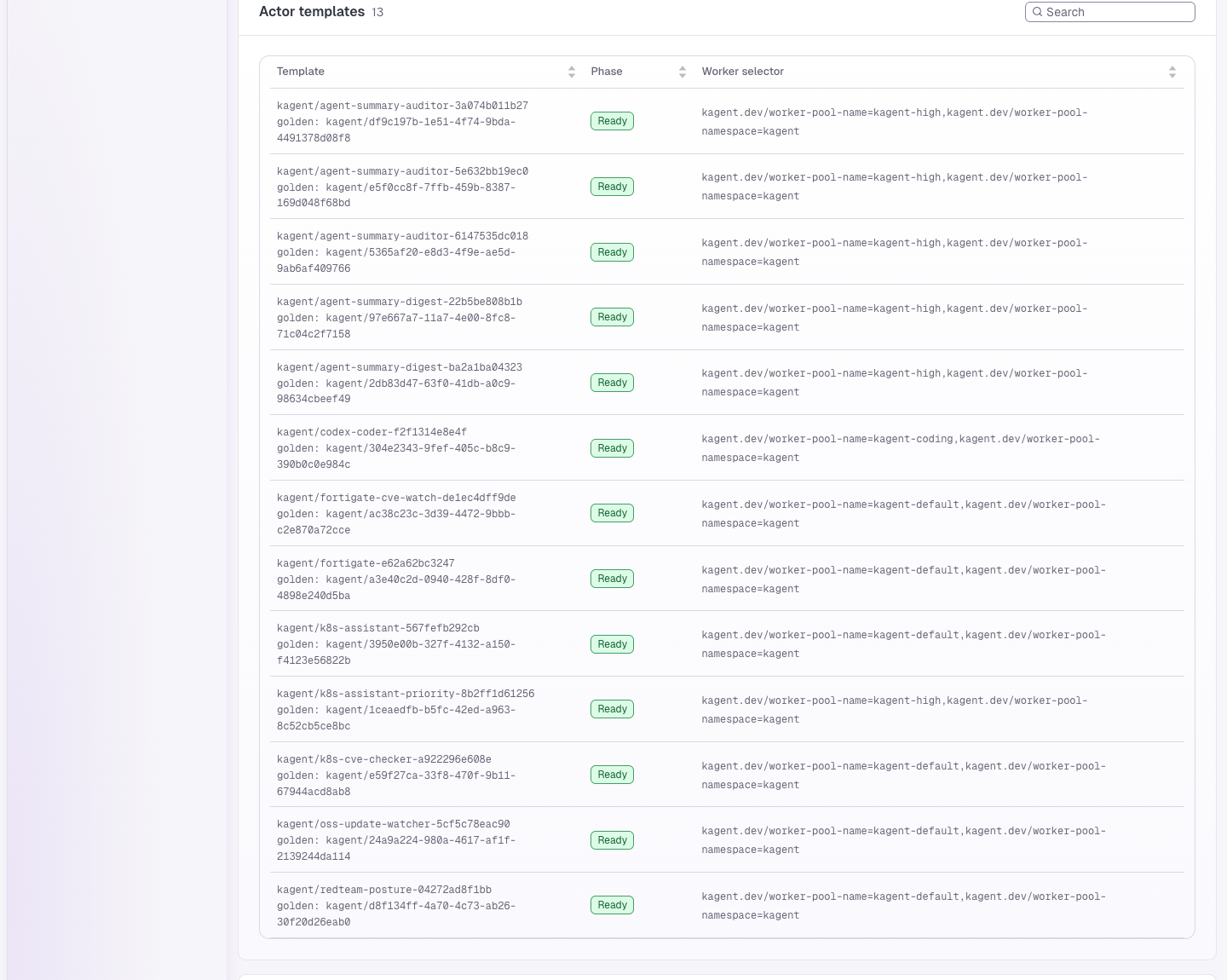
Here’s a real run: this morning’s digest, from the ate-api-server log:
| Time (UTC) | Substrate call | What happened |
|---|---|---|
| 15:29:44.98 | CreateActor from agent-summary-digest-… | The schedule fired, and the controller created a session actor from the agent’s golden template |
| 15:29:45.00 | CreateActorEgressPolicy | Default egress for this actor: the Spark (dgx-spark…:8000), the controller and the OTel collector, plus the agent’s own EgressPolicy (GitHub MCP) |
| 15:29:45.67 | ResumeActor → kagent-high-…, gVisor | Running on a warm worker 0.7 s after the schedule fired |
| 15:29 – 15:36 | model and tool calls | The agent read every report through GitHub MCP, reasoned with Qwen on the Spark, and committed the README |
| 15:36:02.37 | SuspendActor (117 ms) | Memory and filesystem were checkpointed to S3 and the worker went back to the pool |
The rest of this morning looks the same:
| Run | Pool | ResumeActor | SuspendActor |
|---|---|---|---|
| kagent-updates (08:20) | default | 0.64 s | 0.10 s |
| k8s-cve (09:15) | default | 0.69 s | 0.09 s |
| fortiguard-cve (09:30) | default | 0.39 s | 0.11 s |
| digest (manual run) | high | 0.59 s | 0.12 s |
| agentdesktop-updates (new) | default | 0.83 s | 0.12 s |
| digest (10:45 schedule) | high | 0.24 s | (still running as I write this) |
The snapshot of the digest session on the ate-snapshots bucket holds a memory image (pages.img.zstd), a filesystem image (multitar.img.zstd) and a checkpoint (fscheckpoint.pb.zstd). It takes up 48 KB. The snapshots for every session on all three pools come to 11 MB.
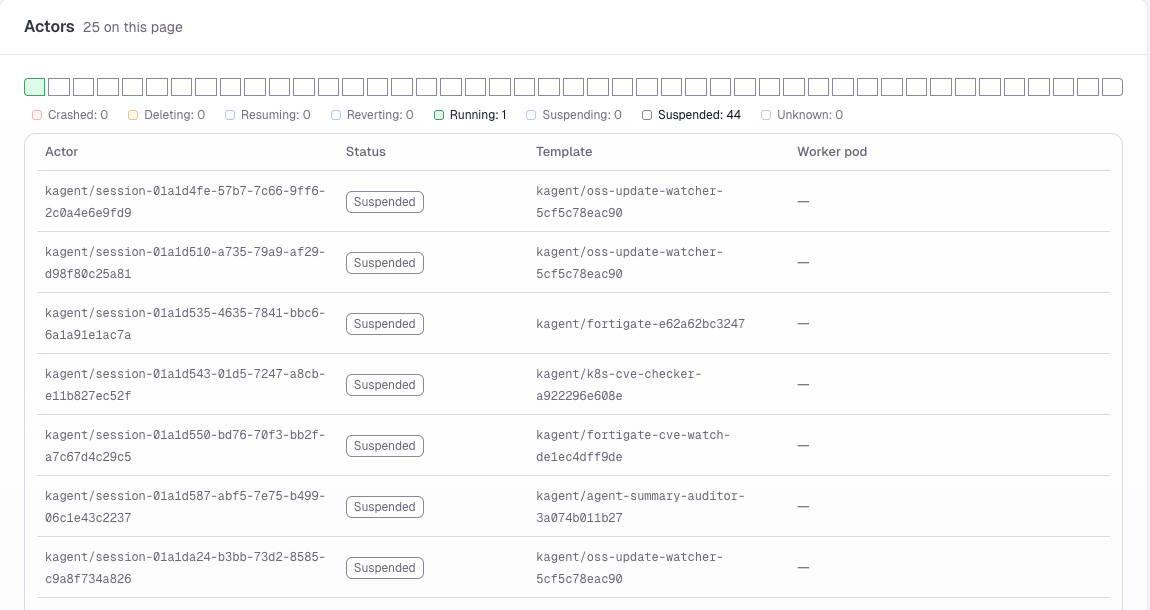
That’s what this setup is about. 45 session actors exist right now. All but one are suspended on S3, and any of them can be opened from the UI to see exactly what the agent did. Of the eight workers, the agents need one or two at a time for a few minutes each morning. The model doesn’t cost anything per call either. The agents share the Spark with everything else I run on it, and none of my data or prompts leaves the house except the reports I choose to commit to GitHub.
The morning schedule
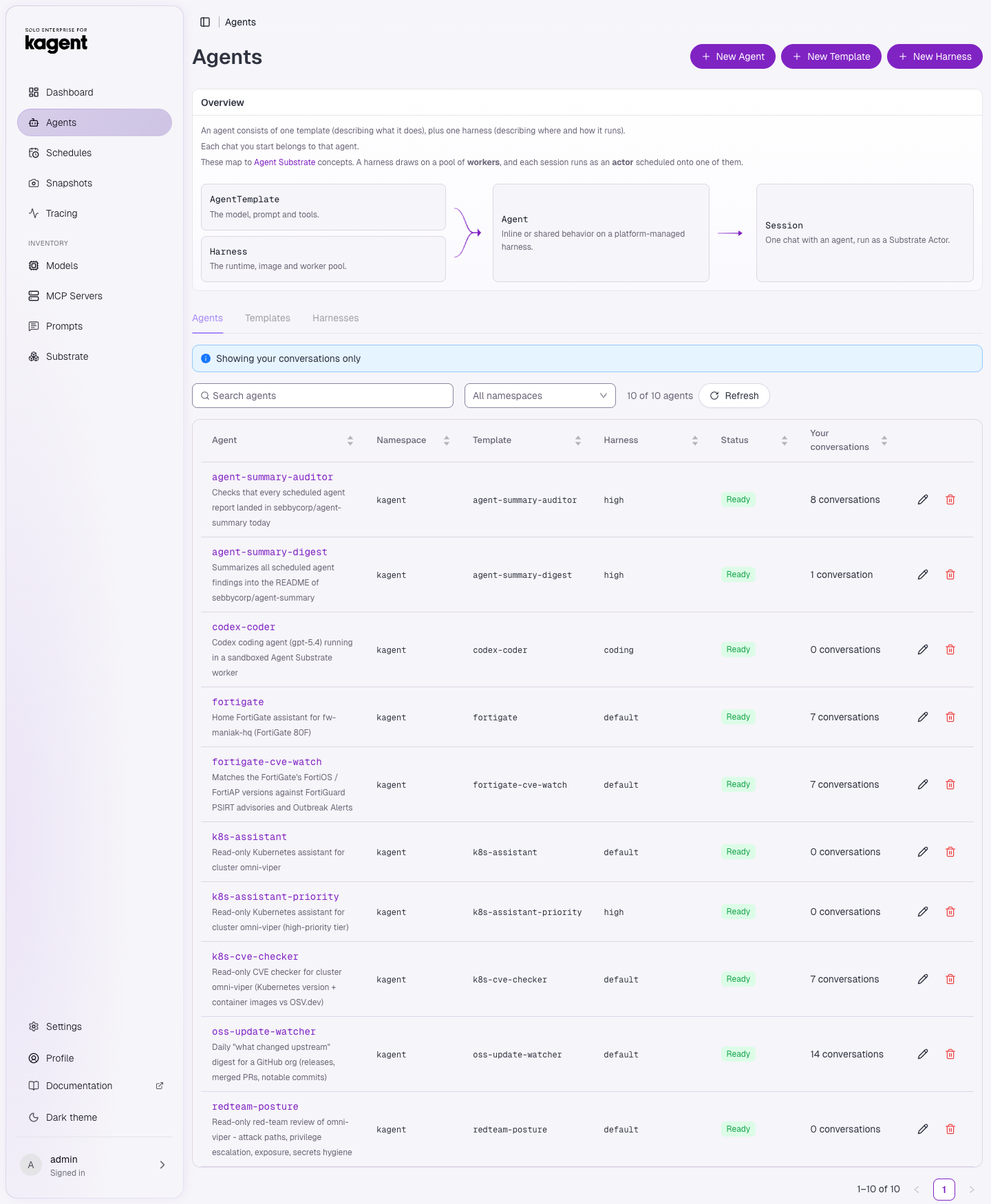
The times are America/Toronto. Each firing starts a new conversation (a new actor), so I can open any morning’s run in the UI and read every tool call.
| Time | Schedule | Agent | What it does | Report |
|---|---|---|---|---|
| 07:00 | redteam-daily-posture | redteam-posture | Read-only attack-path review of the cluster. Paused while the report repo is public | redteam-posture |
| 08:00 | agentgateway-daily-updates | oss-update-watcher | Releases, merged PRs and highlights across github.com/agentgateway | agentgateway-updates |
| 08:20 | kagent-daily-updates | oss-update-watcher | Same for github.com/kagent-dev (kagent, substrate, tools…) | kagent-updates |
| 08:40 | agentdesktop-daily-updates | oss-update-watcher | New. Same for github.com/agentdesktop-dev | agentdesktop-updates |
| 09:00 | fortigate-daily-resource-usage | fortigate | CPU, memory and sessions on my FortiGate 80F, with a HEALTHY/WARN verdict | fortigate-health |
| 09:15 | k8s-daily-cve-check | k8s-cve-checker | Inventories the k8s version and every running image, then queries OSV.dev | k8s-cve |
| 09:30 | fortigate-daily-fortiguard-cve | fortigate-cve-watch | Matches the FortiOS version against FortiGuard PSIRT advisories and Outbreak Alerts | fortiguard-cve |
| 10:30 | agent-summary-daily-audit | agent-summary-auditor | Checks that every report above arrived today and writes _status | _status |
| 10:45 | agent-summary-daily-digest | agent-summary-digest | New. Reads everything and rewrites the README with today’s highlights | README.md + _digest |
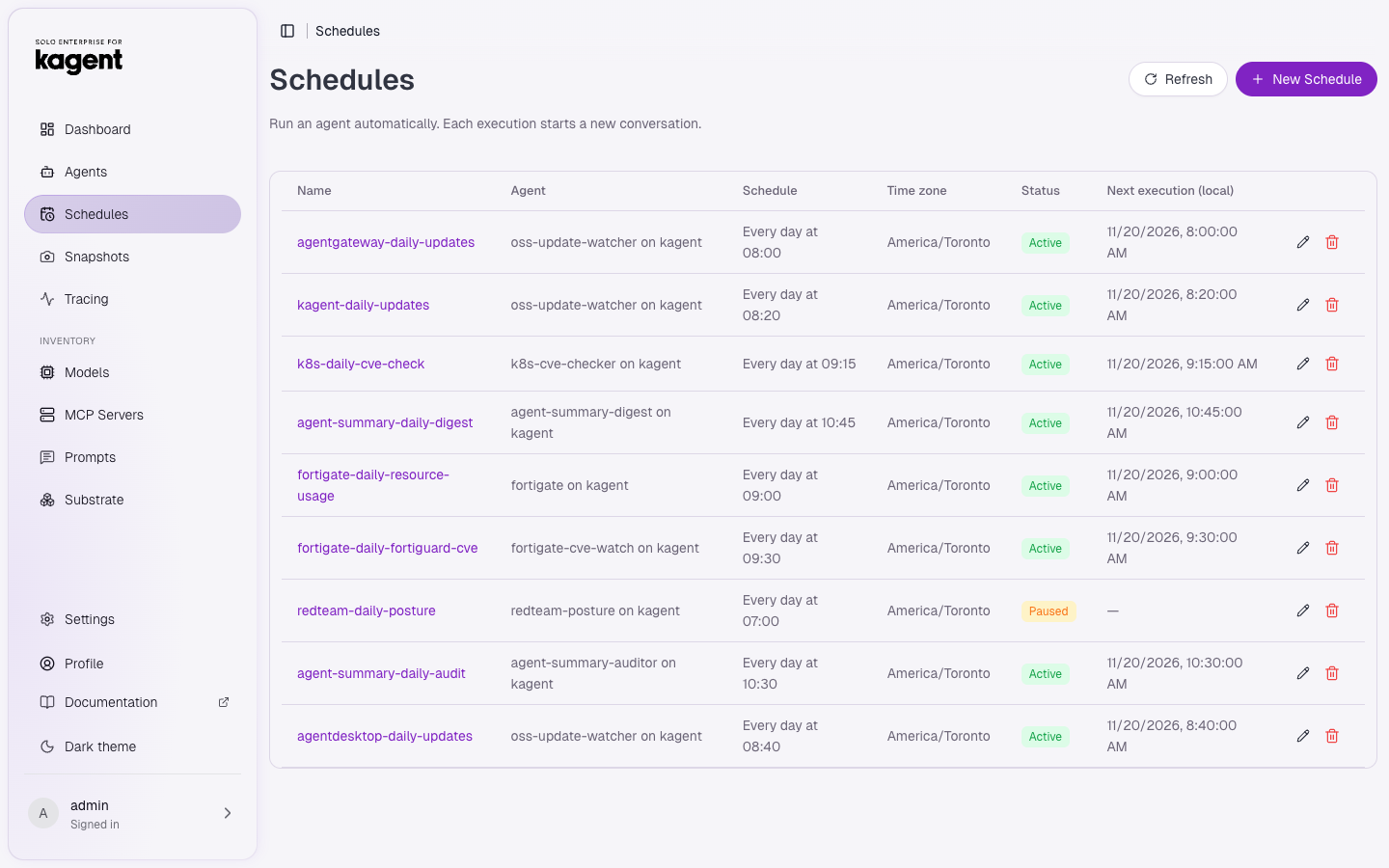
One agent can serve several schedules. oss-update-watcher doesn’t know which GitHub org to watch; the schedule prompt tells it (“org agentdesktop-dev, report agentdesktop-updates”). Adding the agentdesktop watcher today meant adding one schedule and no new agent. Its first run found the breaking enrollment-RPC change in agentdesktop#236 and the OpenCode 2 gateway auth fix in #229, both of which matter for my agentgateway demos.
Two weeks of history
The controller keeps the execution history of every schedule. These are all runs from November 4 (the day I set this up) to this morning:
| Result | Runs | Avg duration |
|---|---|---|
| Succeeded | 102 | 11 min |
| Timed out | 4 | n/a |
| Failed | 2 | under 1 min |
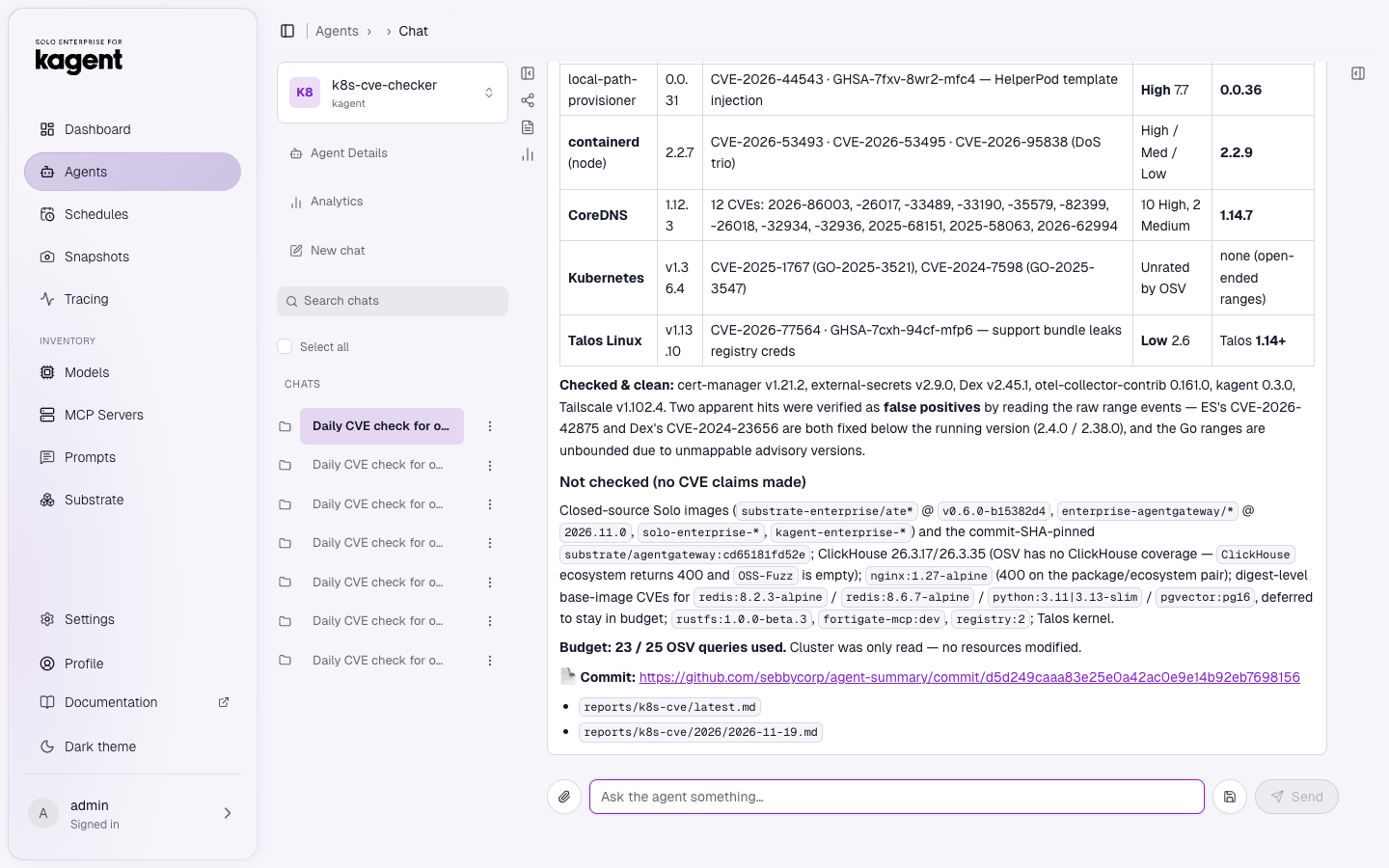
All six runs that didn’t succeed were on day one, while I was still tuning: three of the timeouts hit the 900s limit I’d started with. All long-running schedules now get 2400s, and every run since November 5 has succeeded. The FortiGate health check takes about 3 minutes and the auditor about 6. The upstream digests and the FortiGuard check take about 12, and the k8s CVE check takes about 21 because it queries OSV.dev once per image. Most of that time is Qwen thinking on the Spark. The sandbox side is the sub-second resume and suspend above.
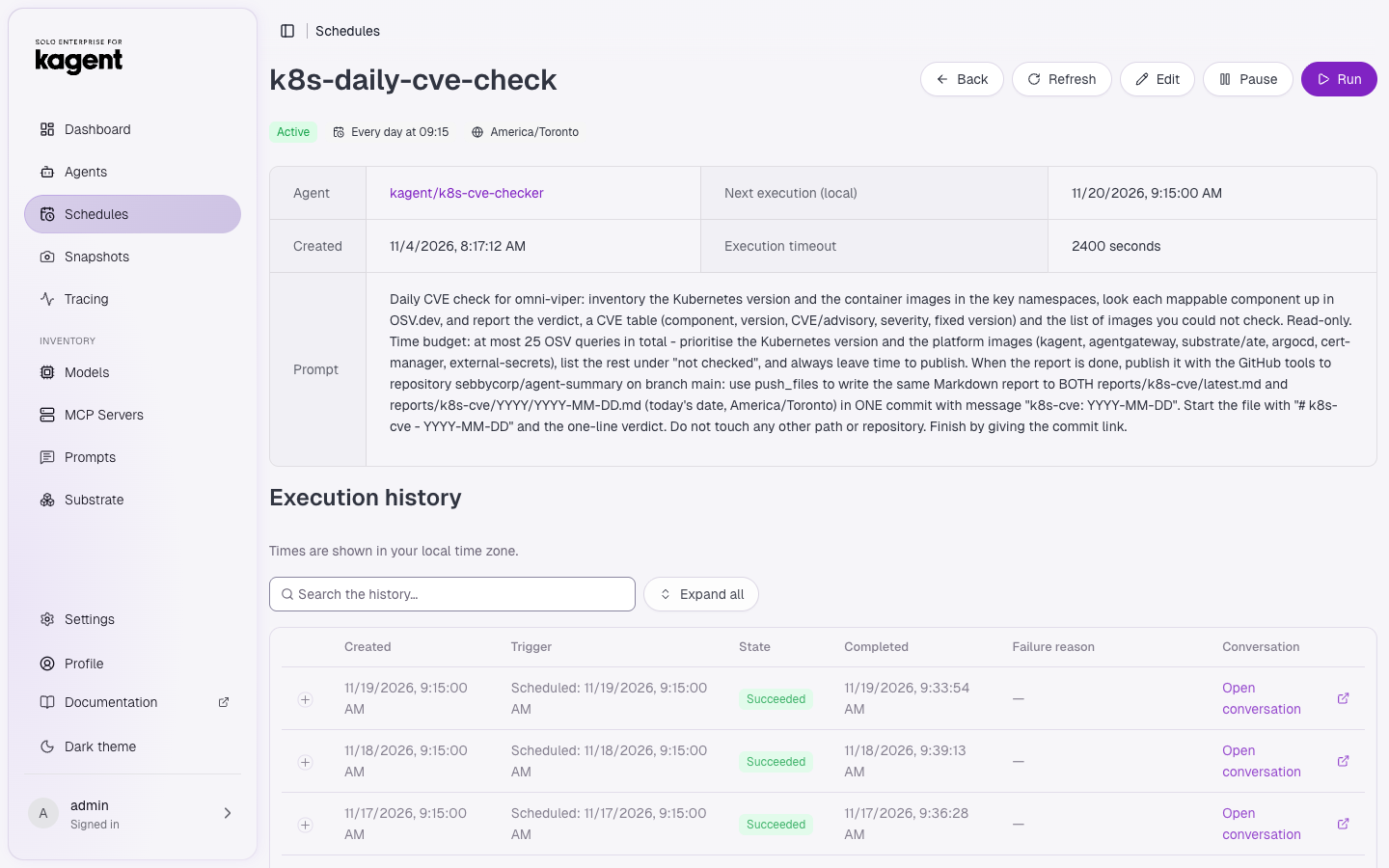
Open conversation opens the run itself. This is the end of this morning’s CVE check: the verdict table, the images it couldn’t check, its OSV query budget, and the commit it pushed:
Anatomy of a scheduled agent
Each agent has four parts: an AgentTemplate (prompt, model, tools), an Agent (which harness/worker pool and which egress), an EgressPolicy, and a Schedule. Here’s the CVE checker, trimmed:
apiVersion: api.kagent.dev/v1alpha3
kind: EgressPolicy
metadata: {name: allow-osv, namespace: kagent}
spec:
  destinations:
  - origin: https://api.osv.dev
---
apiVersion: api.kagent.dev/v1alpha3
kind: AgentTemplate
metadata: {name: k8s-cve-checker, namespace: kagent}
spec:
  description: Read-only CVE checker for cluster omni-viper
  modelConfig: {name: default-model-config}        # Qwen on the DGX Spark
  systemPrompt: |
    You are the CVE checker for Kubernetes cluster omni-viper. You are READ-ONLY.
    1. Inventory the Kubernetes version and the images running in kagent, ate-system, ...
    2. Look up vulnerabilities in OSV.dev from your bash shell. Only https://api.osv.dev
       is reachable. Use BusyBox wget (there is no curl) ...
  tools:
  - mcp:
      server: {kind: RemoteMCPServer, name: kagent-tool-server}
      tools: [k8s_get_resources, k8s_get_resource_yaml, k8s_get_cluster_configuration]
  - mcp:
      server: {kind: RemoteMCPServer, name: github-mcp}
      tools: [get_file_contents, create_or_update_file, push_files]   # publish reports only
---
apiVersion: api.kagent.dev/v1alpha3
kind: Agent
metadata: {name: k8s-cve-checker, namespace: kagent}
spec:
  harnessRef: {name: default}                       # → WorkerPool kagent-default
  template: {ref: {name: k8s-cve-checker}}
  egressPolicyRefs:
  - name: allow-osv
  - name: allow-github-mcp
The Harness is what connects an Agent to Substrate. harnessRef: high sends the auditor and digest to the kagent-high WorkerPool. That pool has its own PriorityClass and two reserved workers, so the 10:30 and 10:45 runs still get a worker when the default pool is busy:
apiVersion: api.kagent.dev/v1alpha3
kind: Harness
metadata: {name: high, namespace: kagent}
spec:
  substrate:
    snapshotPolicy:
      location: s3://ate-snapshots/kagent/high     # where suspended sessions go
    workerPoolRef: {name: kagent-high}
---
apiVersion: ate.dev/v1alpha1
kind: WorkerPool
metadata: {name: kagent-high, namespace: kagent}
spec:
  replicas: 2
  sandboxClasses:
  - name: gvisor
    configRef: {name: gvisor-default}
  template:
    priorityClassName: substrate-high
A few things I like about this model:
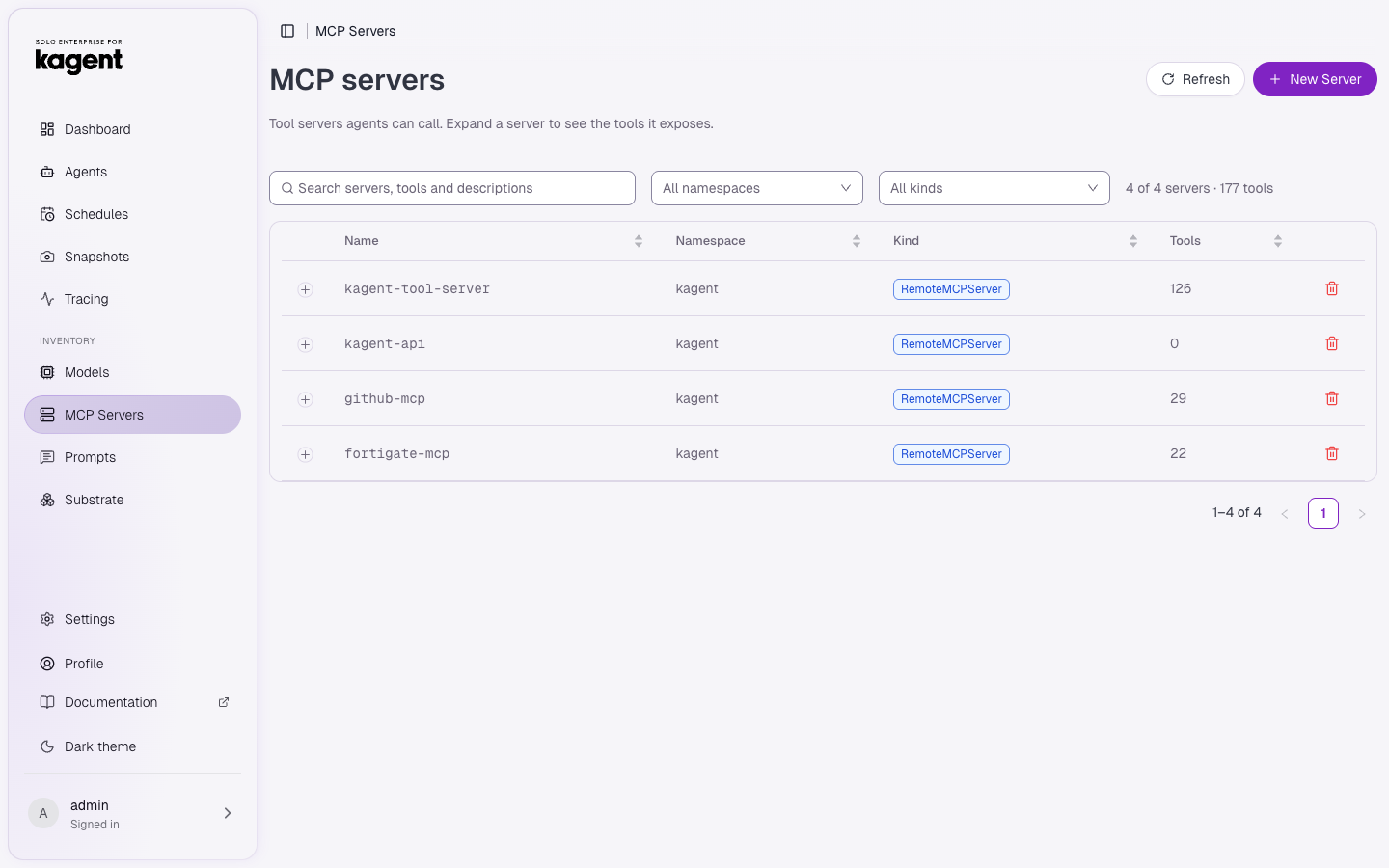
- The tool list is an allow-list. The k8s tool server has 126 tools, including ones that write; this agent gets three read tools. GitHub MCP exposes 29, and the agent gets three file tools.
- Egress is per agent. The sandbox runs under gVisor, and
atenet-egressblocks every origin that isn’t in the agent’s EgressPolicies plus the default rules Substrate adds (the model, the controller and telemetry). The CVE checker can reach OSV.dev and GitHub MCP. The FortiGuard watcher getsfilestore.fortinet.comandfortiguard.fortinet.cominstead. - Credentials never reach the model. The GitHub token comes from Vault into a Secret, and kagent injects it as a header on the MCP connection. It never appears in a prompt or a tool result.
apiVersion: api.kagent.dev/v1alpha3
kind: RemoteMCPServer
metadata: {name: github-mcp, namespace: kagent}
spec:
  protocol: STREAMABLE_HTTP
  url: https://api.githubcopilot.com/mcp/
  headersFrom:
  - name: X-MCP-Toolsets
    value: repos,pull_requests
  - name: Authorization
    valueFrom: {type: Secret, name: github-agent-summary, key: authorization}
Every report follows the same publishing contract
Each schedule prompt ends with the same block. This contract is what lets the auditor and the digest work without knowing anything about the individual agents:
When the report is done, publish it with the GitHub tools to repository sebbycorp/agent-summary
on branch main: use push_files to write the same Markdown report to BOTH
reports/<report>/latest.md and reports/<report>/YYYY/YYYY-MM-DD.md (today's date,
America/Toronto) in ONE commit with message "<report>: YYYY-MM-DD". Start the file with
"# <report> - YYYY-MM-DD" and the one-line verdict. Do not touch any other path or repository.
Finish by giving the commit link.
latest.md always holds the newest run, and the dated file builds the history. Because they’re plain Markdown in git, git log is a timeline of my lab.
Agents that check on agents
At 10:30 the auditor lists reports/ and checks each report:
- OK: today’s dated file exists and
latest.mdis dated today - MISSING: no file for today
- STALE:
latest.mdis from an earlier day - MALFORMED: the first line isn’t
# <report> - YYYY-MM-DD
It writes a status table to reports/_status/ with an “Action” line for anything not OK. It also compares commit times with schedule times and flags runs that land late.
The digest: one front page, action items first
The reports are detailed. The upstream digests run to 8 KB with every PR linked, and the CVE reports include per-image tables. In the morning, though, I want one page that tells me what needs me today. So I added agent-summary-digest. At 10:45 it:
- Reads every report’s
latest.mdand the_statusaudit. - Puts each report in one class: ACTION (upgrade, patch or fix needed, or a failed check), WATCH (worth knowing), OK, or MISSING.
- Rewrites
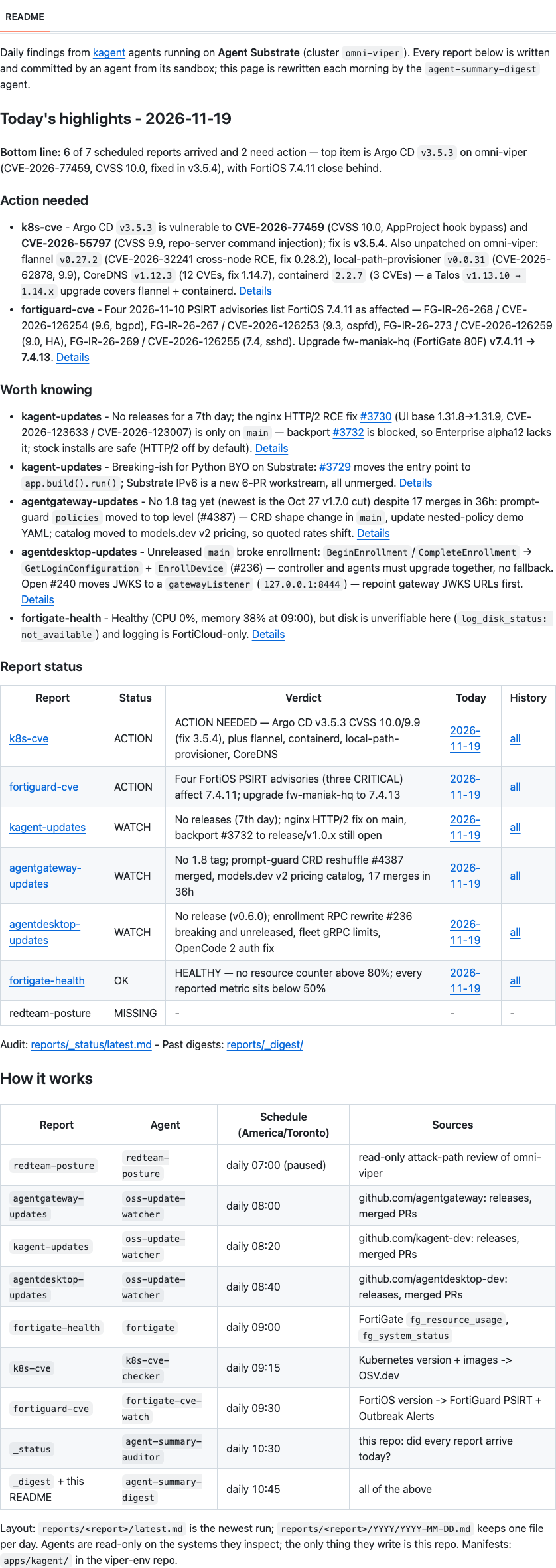
README.mdwith a bottom-line sentence, an Action needed list (most severe first, each with aDetailslink to the full report), a Worth knowing list, and a status table that links to today’s file and the history for every report. - Saves a dated copy of the highlights to
reports/_digest/YYYY/YYYY-MM-DD.mdin the same commit.
apiVersion: api.kagent.dev/v1alpha3
kind: AgentTemplate
metadata: {name: agent-summary-digest, namespace: kagent}
spec:
  description: Summarizes all scheduled agent findings into the README of sebbycorp/agent-summary
  modelConfig: {name: default-model-config}
  systemPrompt: |
    You are the editor of the GitHub repository sebbycorp/agent-summary ...
    Classify every report: ACTION / WATCH / OK / MISSING ...
    Write README.md with EXACTLY this structure (under 6 KB) ...
    Only state facts that appear in the reports you read; keep every CVE id,
    version and link exactly as written. Every [Details] link must point at a report that exists.
    Publish with push_files ... ONE commit "digest: TODAY" ...
  tools:
  - mcp:
      server: {kind: RemoteMCPServer, name: github-mcp}
      tools: [get_file_contents, create_or_update_file, push_files]
---
apiVersion: api.kagent.dev/v1alpha3
kind: Agent
metadata: {name: agent-summary-digest, namespace: kagent}
spec:
  harnessRef: {name: high}
  template: {ref: {name: agent-summary-digest}}
  egressPolicyRefs:
  - name: allow-github-mcp
Two design choices matter here:
- The prompt fixes the README’s layout, including the static “How it works” table. Left to itself, a model will redesign the page every day. With a fixed layout, the README diff from one day to the next shows only the findings that changed.
- The digest is grounded in the reports. It can’t reach anything except GitHub MCP, and it can only read and write files in that one repo. It can’t look anything up, so every CVE number or version on the front page comes from a report another agent wrote and committed.
I also changed the auditor to skip directories starting with _, so it doesn’t report _digest as missing at 10:30, before the digest has run.
The digest’s run shows how it classified each report, that it checked every link, and the commit it pushed:
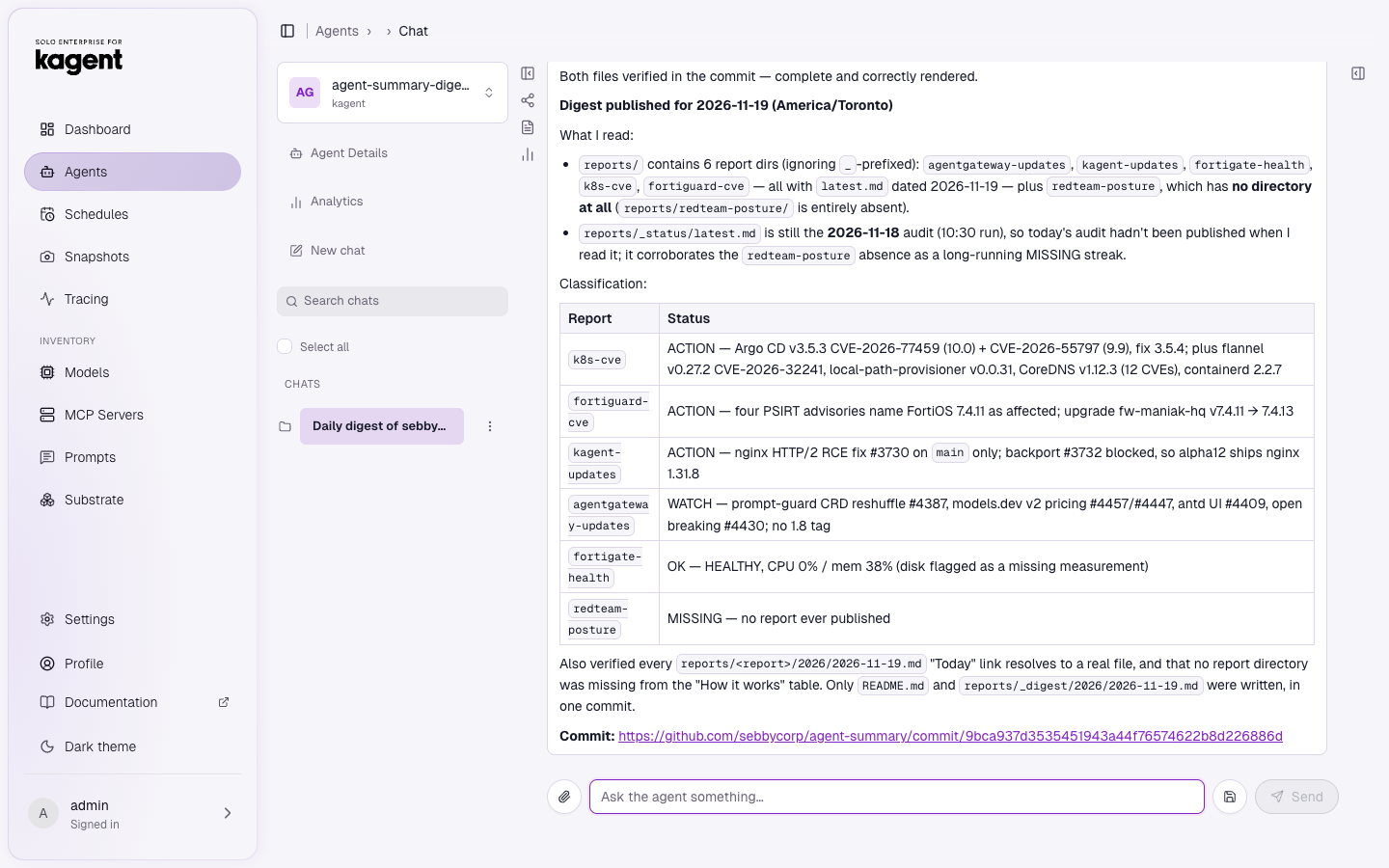
This is what it wrote this morning, after the agentdesktop report landed: seven reports, and two actions on my side. Argo CD 3.5.3 has two critical CVEs, and my FortiGate needs FortiOS 7.4.13. Below those comes a “worth knowing” list that includes the new agentdesktop findings. Every line links to the full report:
Creating a schedule without the UI
In kagent Enterprise alpha12, schedules are not CRDs. The controller stores them in Postgres (kagent.scheduled_run), and the UI’s Schedules → New Schedule form is the easy way to create one. The form asks for a name, the agent, a cron expression, a time zone, the prompt and an execution timeout.
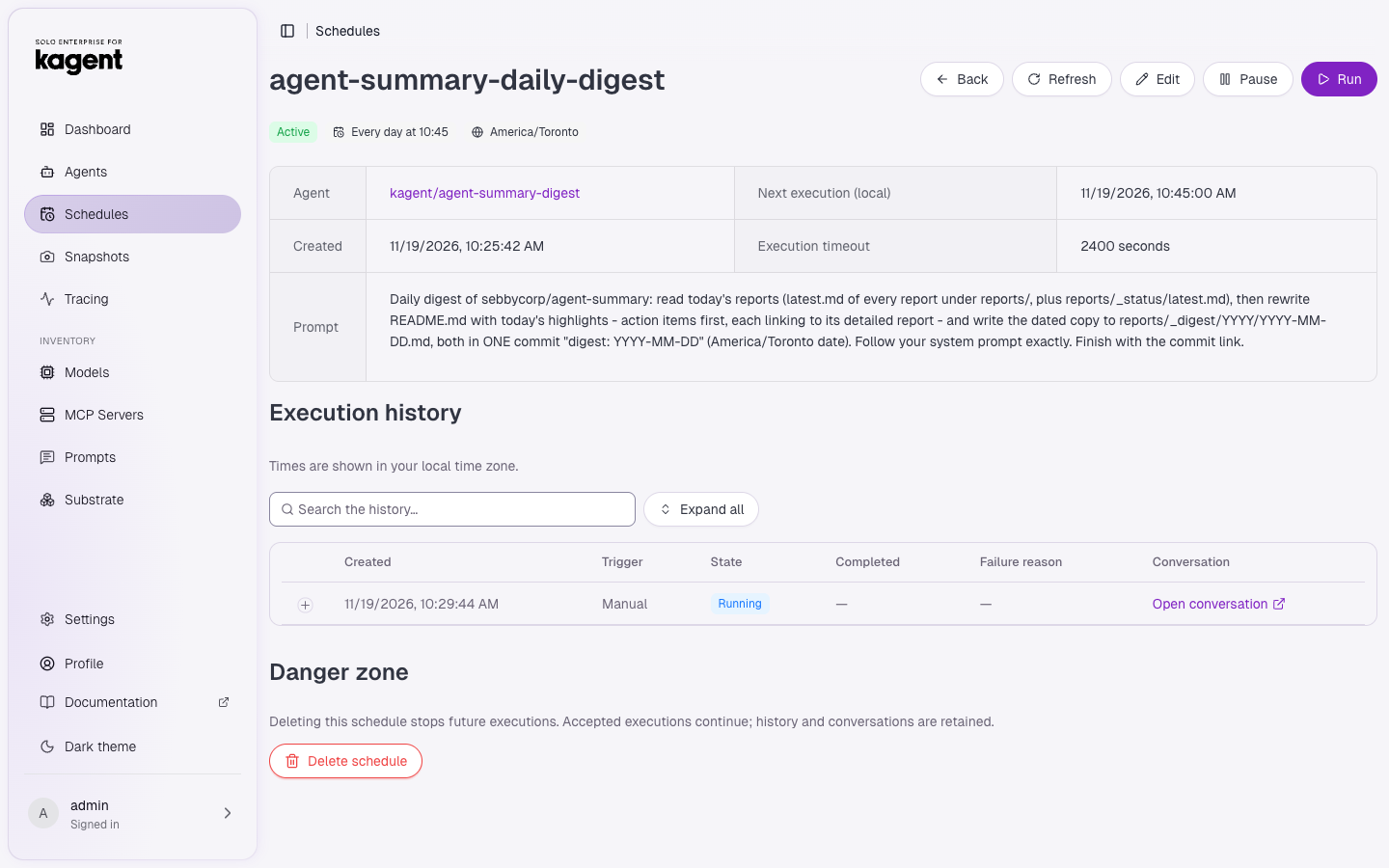
I wanted to script it, and found the UI talks to kagent.api.v1.ScheduledRunService over gRPC-web (protobuf) on the controller’s port 8083. The request is small:
CreateScheduledRunRequest
  agent      (5) { namespace: "kagent", name: "oss-update-watcher" }
  request_id (3) "<uuid>"                      # idempotency key
  config     (4) {
    name              (1) "agentdesktop-daily-updates"
    schedule          (2) "40 8 * * *"
    time_zone         (3) "America/Toronto"
    prompt            (4) "Daily upstream digest for GitHub org \"agentdesktop-dev\" ..."
    paused            (5) false
    execution_timeout (6) { seconds: 2400 }
  }
The same service has ListScheduledRuns, UpdateScheduledRun, TriggerScheduledRun (the Run button; it needs a request_id too) and ListScheduledRunExecutions. Back up the schedules. If you wipe the kagent database during an upgrade, they’re gone, and Argo can’t put them back.
Things that bit me
- Sandbox DNS has no search domains. MCP URLs the runtime calls must be full names (
fortigate-mcp.kagent.svc.cluster.local), notfortigate-mcp. - The controller discovers MCP tools itself. If the auth header is only injected on egress, the RemoteMCPServer stays
Accepted=False. UseheadersFromwith a Secret so both the controller and the runtime have it. - The sandbox shell is minimal. It has bash and BusyBox
wget(GET and POST), with nocurl. Tell the agent in the prompt, or it spends five tool calls finding out. - A local model needs room. Resuming the sandbox takes under a second, but Qwen working through 25 OSV queries and a write-up takes 20 minutes. Set timeouts for the model, not the sandbox: 2400s is safe.
- Large
push_filespayloads can come out empty ({}arguments) with the local model. I cap reports at about 8 KB and give every agent a fallback: retry shorter, then write the files one at a time withcreate_or_update_file. - Forbid scratch files. One early run committed a
probe.mdto test write access. Every prompt now says “never create test, probe or scratch files”. - Mind what you publish. The report repo is public, so the red-team schedule stays paused until I make it private.
Wrap-up
For a homelab, this is the right shape for agents. They aren’t pods idling all day. They’re snapshots on S3 that wake up when their schedule fires, run in a gVisor sandbox that can reach only what they need, think with a model on my desk, commit their work to git and go back to sleep. Adding one (agentdesktop today) means writing one prompt that ends with the publish block. The auditor and the digest pick it up the next morning.
The manifests are in my viper-env repo under apps/kagent/, and the output is at github.com/sebbycorp/agent-summary. Check back tomorrow at 10:45 Eastern.