By Sebastian Maniak
kagent has grown up! 1.0 is out, and it’s here to power my agent substrates. In this quick guide, we’ll use a DGX Spark and configure a kind cluster that uses it as the model provider.
The result is a kind cluster on my Mac that uses a DGX Spark on the LAN as its only model provider. Two agents on that cluster do real work every day:
agentgateway-trackerreads the last 24 hours of commits, merged PRs, and releases in the agentgateway repos and on agentgateway.dev, and commits a digest to GitHub.fortinet-cve-watchcompares the last 30 days of Fortinet CVEs (NVD plus CISA KEV) against the firmware my FortiGate is actually running, and commits a triage report to GitHub.
No cloud model is involved. Inference stays on the Spark, and the GitHub token and FortiGate token never reach the model.
The full guide, with every YAML file and a Playwright script that regenerates the screenshots, is at sebbycorp/kagent-getting-started. This post follows the same steps and explains the choices along the way.
Architecture
 macOS (Docker Desktop)                                   LAN
┌──────────────────────────────────────────────────┐
│ kind cluster "kagent" (k8s 1.35)                 │      ┌───────────────────────────┐
│                                                  │      │ DGX Spark 172.16.10.173   │
│  ns kagent                                       │      │ vLLM :8000  /v1           │
│   ├─ kagent-controller  :8083 (API/A2A/MCP)      │      │ model qwen3.8-flash-next  │
│   ├─ kagent-ui  (LoadBalancer via cpk)           │      └─────────────▲─────────────┘
│   ├─ postgres (bundled, dev only)                │                    │
│   ├─ Service dgx-spark ──EndpointSlice───────────┼────────────────────┘
│   ├─ Harness kagent ─► WorkerPool kagent-default │
│   ├─ Agent agentgateway-tracker ─► GitHub MCP ───┼──► api.githubcopilot.com/mcp
│   ├─ Agent fortinet-cve-watch   ─► GitHub MCP    │
│   └─ CronJobs (daily) ─► kagent CLI ─► A2A       │──► FortiGate API, NVD, CISA KEV
│  ns ate-system  (Substrate control plane/router) │
└──────────────────────────────────────────────────┘
        ▲ sudo cloud-provider-kind (host process)
One detail drives the network design. Substrate egress rules accept DNS names only, not IP addresses, and URLs the runtime uses must be full cluster DNS names. The Spark is a bare IP on my LAN, so it goes behind a selectorless Service, and the ModelConfig points at http://dgx-spark.kagent.svc.cluster.local:8000/v1.
What you need
| Tool | Version |
|---|---|
| Docker Desktop | 8+ CPUs, 16 GB+ RAM assigned |
| kind | ≥ v0.31 (needs kindest/node:v1.35.0) |
| kubectl, helm, jq | recent |
| cloud-provider-kind | recent (brew install cloud-provider-kind) |
| kagent CLI | v1.0.0-rc3 |
I tested this on an M-series Mac with kind v0.33.0. kind v0.30 can’t run the 1.35 node image, and rc3 uses Kubernetes 1.35 feature gates (PodCertificateRequest, ClusterTrustBundle*) that Substrate depends on, so run brew upgrade kind first.
Step 0: Make sure the Spark can do tool calling
Agents call tools. A model that replies only in text gives you an agent that chats well and does nothing. Check that vLLM returns structured tool_calls before you touch Kubernetes:
export DGX_IP=172.16.10.173
export DGX_MODEL=qwen3.8-flash-next

curl -s http://$DGX_IP:8000/v1/chat/completions -H 'Content-Type: application/json' -d '{
  "model":"'$DGX_MODEL'",
  "messages":[{"role":"user","content":"What is the weather in Toronto?"}],
  "tools":[{"type":"function","function":{"name":"get_weather","description":"Get weather",
    "parameters":{"type":"object","properties":{"city":{"type":"string"}},"required":["city"]}}}],
  "chat_template_kwargs":{"enable_thinking":false}}' | jq '.choices[0].message.tool_calls'
If you get null, restart vLLM with tool parsing enabled. kagent’s ModelConfig can’t send chat_template_kwargs, so if you want thinking off for agents, set it on the server:
vllm serve <model-path> --served-model-name qwen3.8-flash-next \
  --enable-auto-tool-choice --tool-call-parser hermes \
  --default-chat-template-kwargs '{"enable_thinking": false}' \
  --host 0.0.0.0 --port 8000
Use the parser that matches your Qwen variant, for example qwen3_coder for Qwen3-Coder models.
Step 1: kind cluster with the Substrate feature gates
# cluster/kind-config.yaml
kind: Cluster
apiVersion: kind.x-k8s.io/v1alpha4
name: kagent
networking:
  apiServerAddress: "127.0.0.1"
# Substrate WorkerPools project pod identities and trust bundles into the sandbox.
featureGates:
  ClusterTrustBundle: true
  ClusterTrustBundleProjection: true
  PodCertificateRequest: true
runtimeConfig:
  "api/alpha": "false"
  "certificates.k8s.io/v1beta1": "true"
nodes:
  - role: control-plane
kind create cluster --config cluster/kind-config.yaml --image kindest/node:v1.35.0 --wait 120s
Step 2: Start cloud-provider-kind before you install
Open a second terminal and leave this running:
sudo cloud-provider-kind --enable-lb-port-mapping
It gives every type: LoadBalancer Service an address. On macOS, --enable-lb-port-mapping also publishes each LB port on localhost through a kindccm-* container.
The order matters. kagent install runs Helm with --wait, and Helm waits for the kagent-ui LoadBalancer to get an address. If cloud-provider-kind isn’t running, every pod still comes up, but the install fails after about five minutes with failed to install kagent: failed to run helm … exit status 1, and helm history kagent -n kagent shows context deadline exceeded. Start cloud-provider-kind and re-run the install.
Step 3: The rc3 CLI
curl -fsSL https://raw.githubusercontent.com/kagent-dev/kagent/v1.0.0-rc3/scripts/get-kagent \
  | DESIRED_VERSION=v1.0.0-rc3 bash
kagent version     # → "kagent_version":"1.0.0-rc3"
If you have a 0.x kagent from Homebrew, run which kagent to make sure the rc3 binary comes first on your PATH.
Step 4: Point kagent at the Spark and install
First give the Spark a cluster DNS name with a Service that has no selector, plus a hand-written EndpointSlice:
kubectl create namespace kagent

kubectl apply -f - <<EOF
apiVersion: v1
kind: Service
metadata:
  name: dgx-spark
  namespace: kagent
spec:
  ports:
    - name: http
      port: 8000
      targetPort: 8000
---
apiVersion: discovery.k8s.io/v1
kind: EndpointSlice
metadata:
  name: dgx-spark-1
  namespace: kagent
  labels:
    kubernetes.io/service-name: dgx-spark
addressType: IPv4
ports:
  - name: http
    port: 8000
    protocol: TCP
endpoints:
  - addresses: ["${DGX_IP}"]
EOF
Then the values and install config. vLLM speaks the OpenAI API, so the provider is OpenAI with a custom baseUrl:
# install/kagent-values.yaml
providers:
  default: openAI
  openAI:
    provider: OpenAI
    model: qwen3.8-flash-next
    apiKeySecretRef: kagent-openai
    apiKeySecretKey: OPENAI_API_KEY
    config:
      baseUrl: http://dgx-spark.kagent.svc.cluster.local:8000/v1
      timeout: 600
ui:
  service:
    type: LoadBalancer
cat > install/config.yaml <<EOF
install:
  defaultModelProvider: OpenAI
  kagent:
    version: 1.0.0-rc3
    valuesFiles:
      - $PWD/install/kagent-values.yaml
EOF

export OPENAI_API_KEY=sk-dgx-spark-local   # vLLM ignores it unless started with --api-key
kagent --config install/config.yaml install
kagent install handles more than Helm does on its own. It installs kagent-crds → substrate-crds → substrate-podcert → substrate-atelet → substrate → kagent, deploys a dev PostgreSQL, creates the Substrate CAs and identities and the kagent-rustfs-credentials Secret, enables the Substrate preview gates kagent needs (PerTemplateSnapshotLocation, GoldenEgressPolicy), and labels the namespace ate.dev/api-access=true. To see exactly what it will apply, add --dry-run --output-dir ./kagent-install.
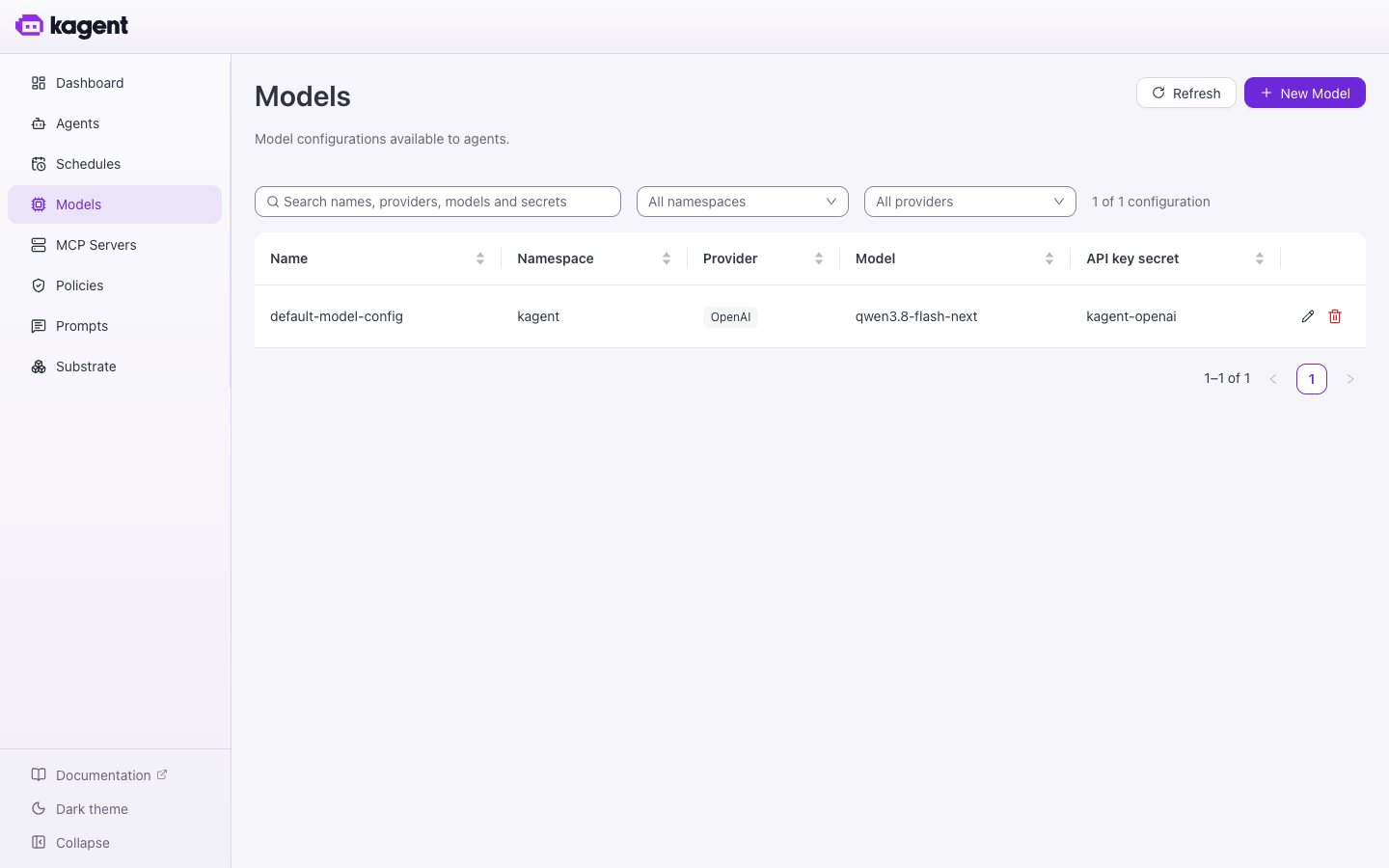
Once it finishes, the Models page shows the DGX model and the kagent-openai key Secret:
Step 5: Open the UI
kubectl get svc kagent-ui -n kagent
docker ps --filter name=kindccm --format '{{.Names}}\t{{.Ports}}'   # host port on macOS
Open http://localhost:<mapped-port>, or skip cloud-provider-kind and run kubectl -n kagent port-forward svc/kagent-ui 8080:8080. The CLI and A2A calls from your Mac need the controller too: kubectl -n kagent port-forward svc/kagent-controller 8083:8083.
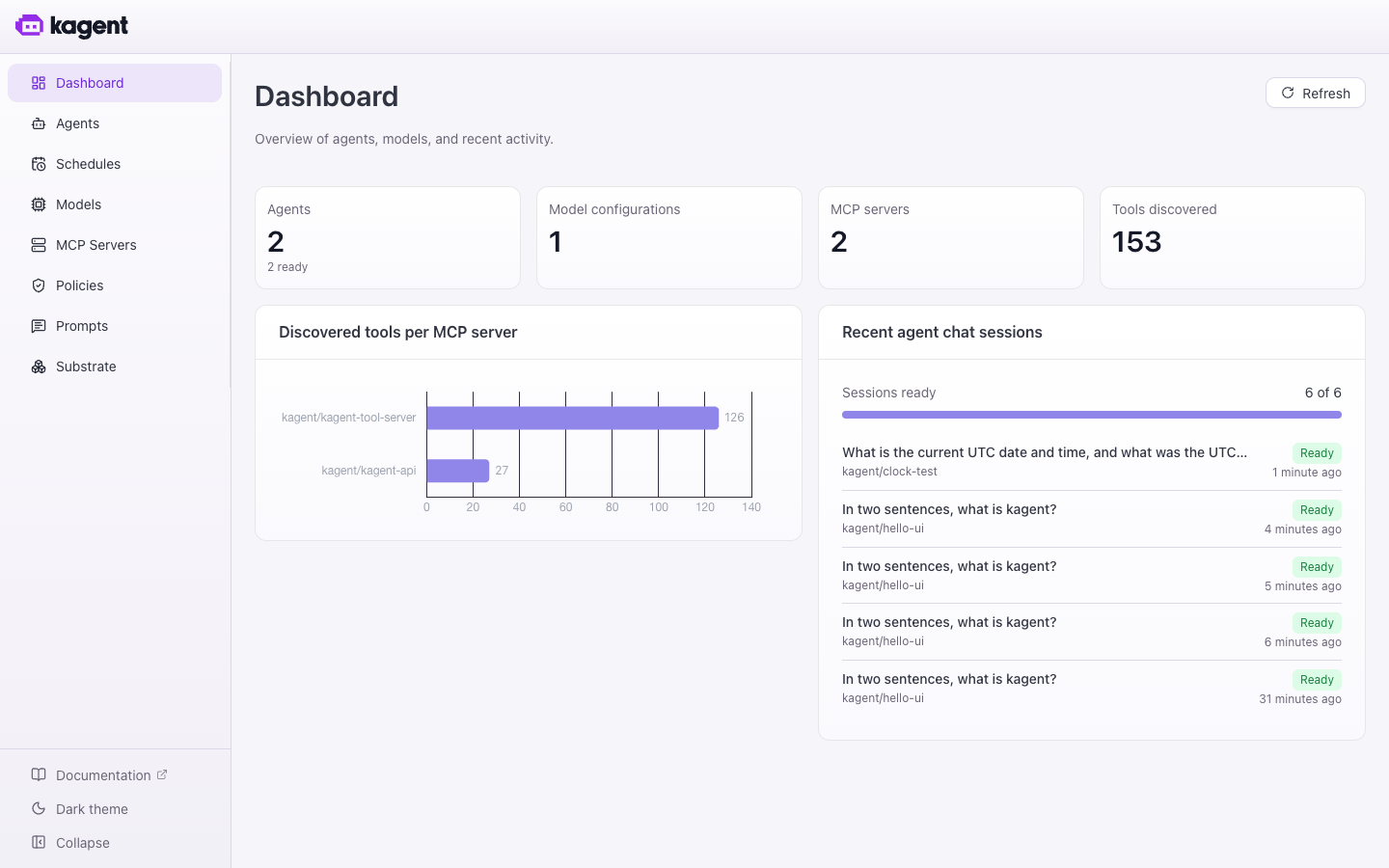
The sidebar has Agents, Schedules, Models, MCP Servers, Policies (egress), and Substrate (worker pools, actor templates, running actors). Open pages from the sidebar. Going to /mcp directly returns Method Not Allowed, because the UI proxies that path to the controller’s MCP endpoint.
Step 6: A Harness and a smoke-test agent
In 1.0 every Agent runs on a Harness. The Harness picks the runtime (kagent is the Go ADK) and the Substrate WorkerPool. The install already created the kagent-default WorkerPool.
apiVersion: api.kagent.dev/v1alpha3
kind: Harness
metadata:
  name: kagent
  namespace: kagent
spec:
  kagent: {}
  substrate:
    workerPoolRef:
      name: kagent-default
    snapshotPolicy:
      location: s3://ate-snapshots/kagent
---
apiVersion: api.kagent.dev/v1alpha3
kind: Agent
metadata:
  name: hello
  namespace: kagent
spec:
  harnessRef:
    name: kagent
  template:
    inline:
      description: Smoke test agent on the DGX Spark.
      modelConfig:
        name: default-model-config
      systemPrompt: You are a concise assistant running on kagent with a local Qwen model.
# Ready = Substrate booted and snapshotted the golden actor (about 1–2 min)
kubectl wait agent/hello -n kagent --for=condition=Ready --timeout=10m

SID=$(kagent agent session create --agent hello -o json | jq -r '.session.id // .id')
kagent agent invoke --session "$SID" --task "Say hello in five words."
“Ready” means something new in 1.0. The agent isn’t a Deployment that rolled out. Substrate booted it once in a gVisor worker and snapshotted that state as the golden snapshot, and every new session restores from that snapshot instead of cold-booting.
The same agent from the GUI
Use YAML for the Harness. Agents can be built on top of it in the UI: Agents → New Agent, choose an inline template, pick kagent/default-model-config, select the shared harness kagent, and leave Egress policies at No extra hosts. Hosts for the model and MCP servers are allowed automatically.
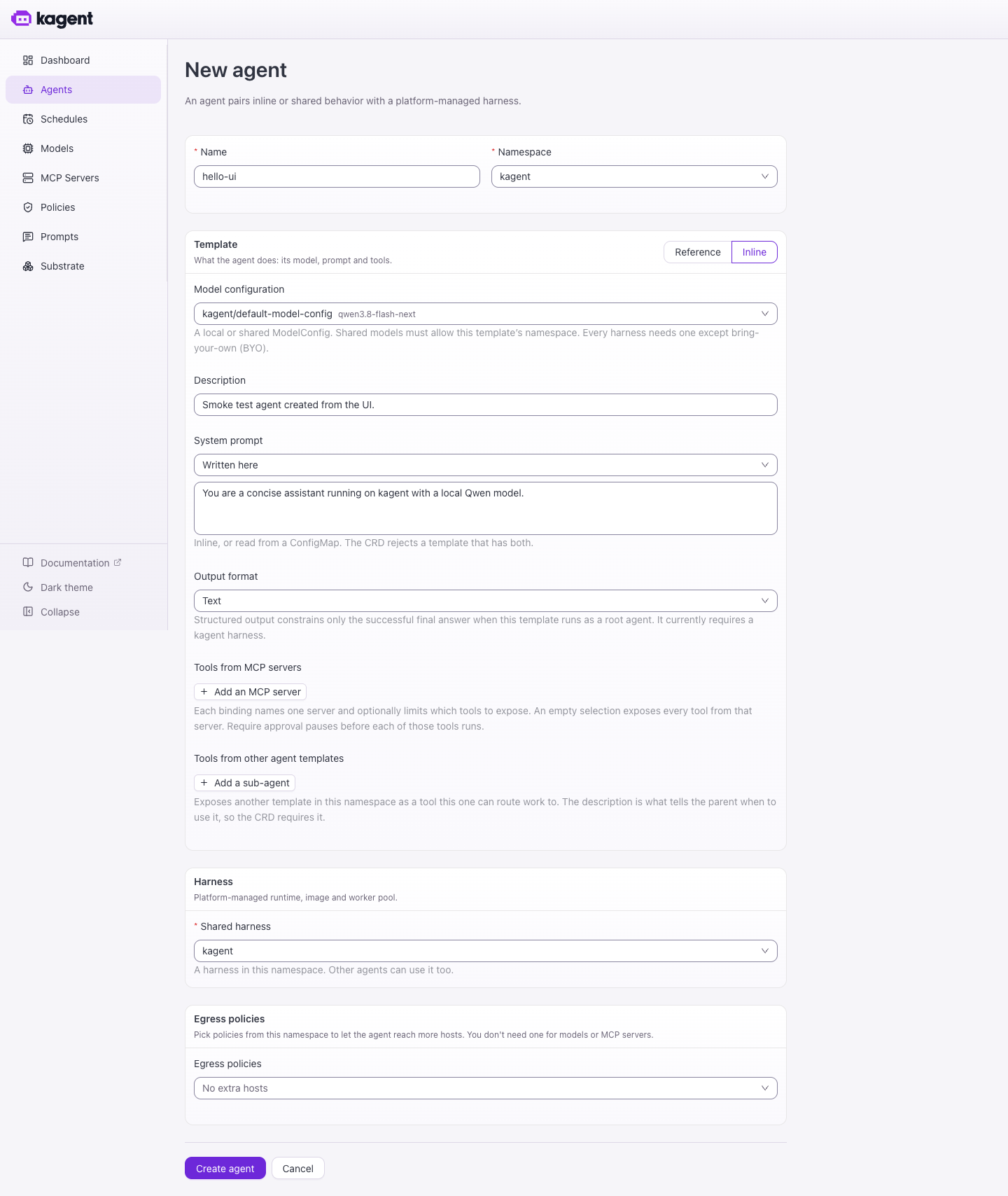
The form writes the same Agent resource as the YAML. Click the agent name to chat with it:
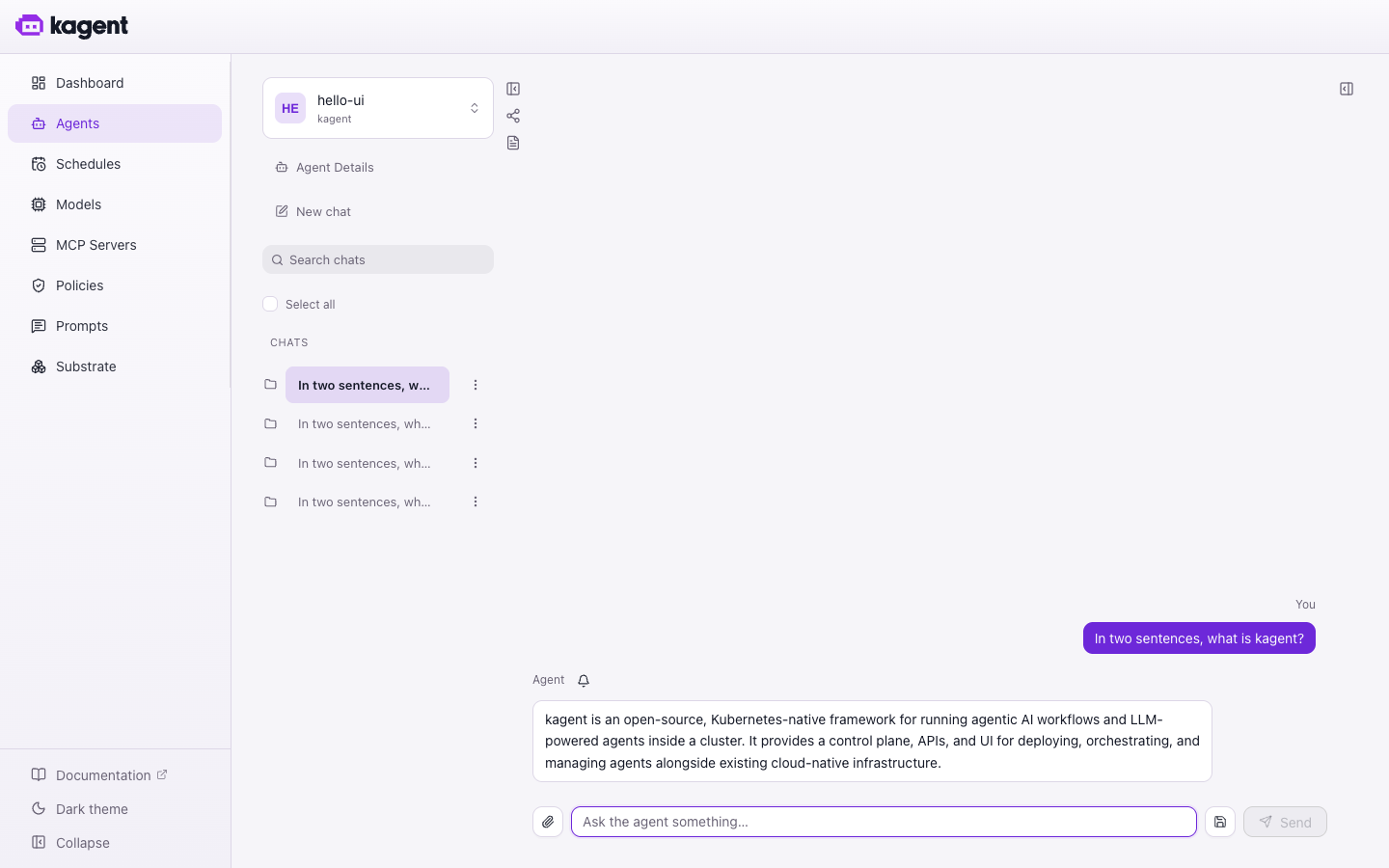
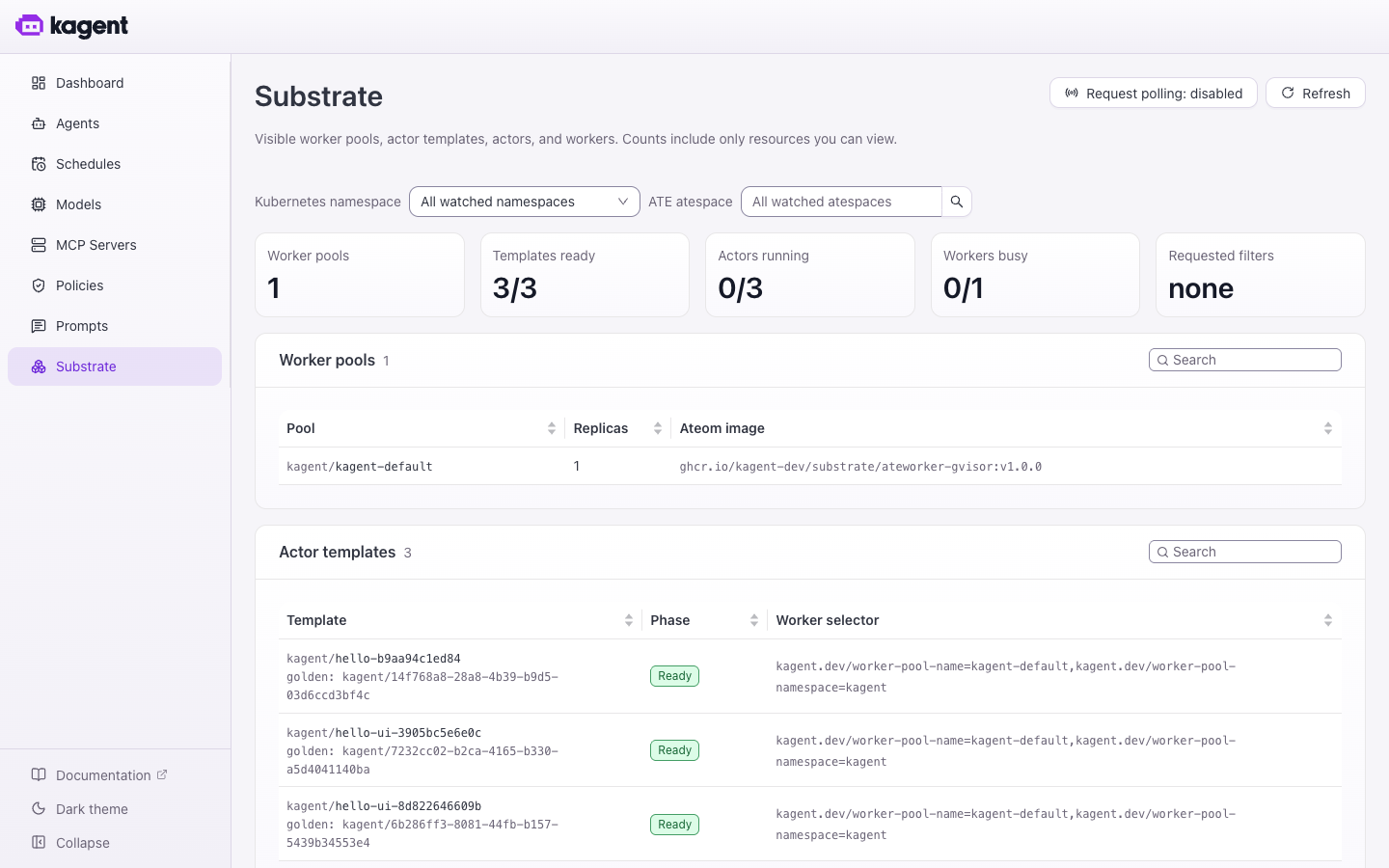
The Substrate page shows the kagent-default WorkerPool running ateworker-gvisor:v1.0.0, and one Ready actor template (golden snapshot) per agent:
Agent #1: a daily agentgateway digest
GitHub MCP, with the token kept out of the sandbox
I use GitHub’s hosted MCP server. The PAT needs public repo read, plus Contents: Read and write on the repo the reports go to.
kubectl -n kagent create secret generic github-mcp \
  --from-literal=authorization="Bearer ${GITHUB_PAT}"
apiVersion: api.kagent.dev/v1alpha3
kind: RemoteMCPServer
metadata:
  name: github
  namespace: kagent
spec:
  description: GitHub hosted MCP server
  url: https://api.githubcopilot.com/mcp/
  protocol: STREAMABLE_HTTP
  timeout: 60s
  headersFrom:
    - name: Authorization
      valueFrom:
        type: Secret
        name: github-mcp
        key: authorization
    - name: X-MCP-Toolsets
      value: repos,pull_requests
The Substrate egress gateway injects secret-backed headers, so the agent process never sees the token. kagent infers egress to api.githubcopilot.com from the RemoteMCPServer, so you don’t need an EgressPolicy.
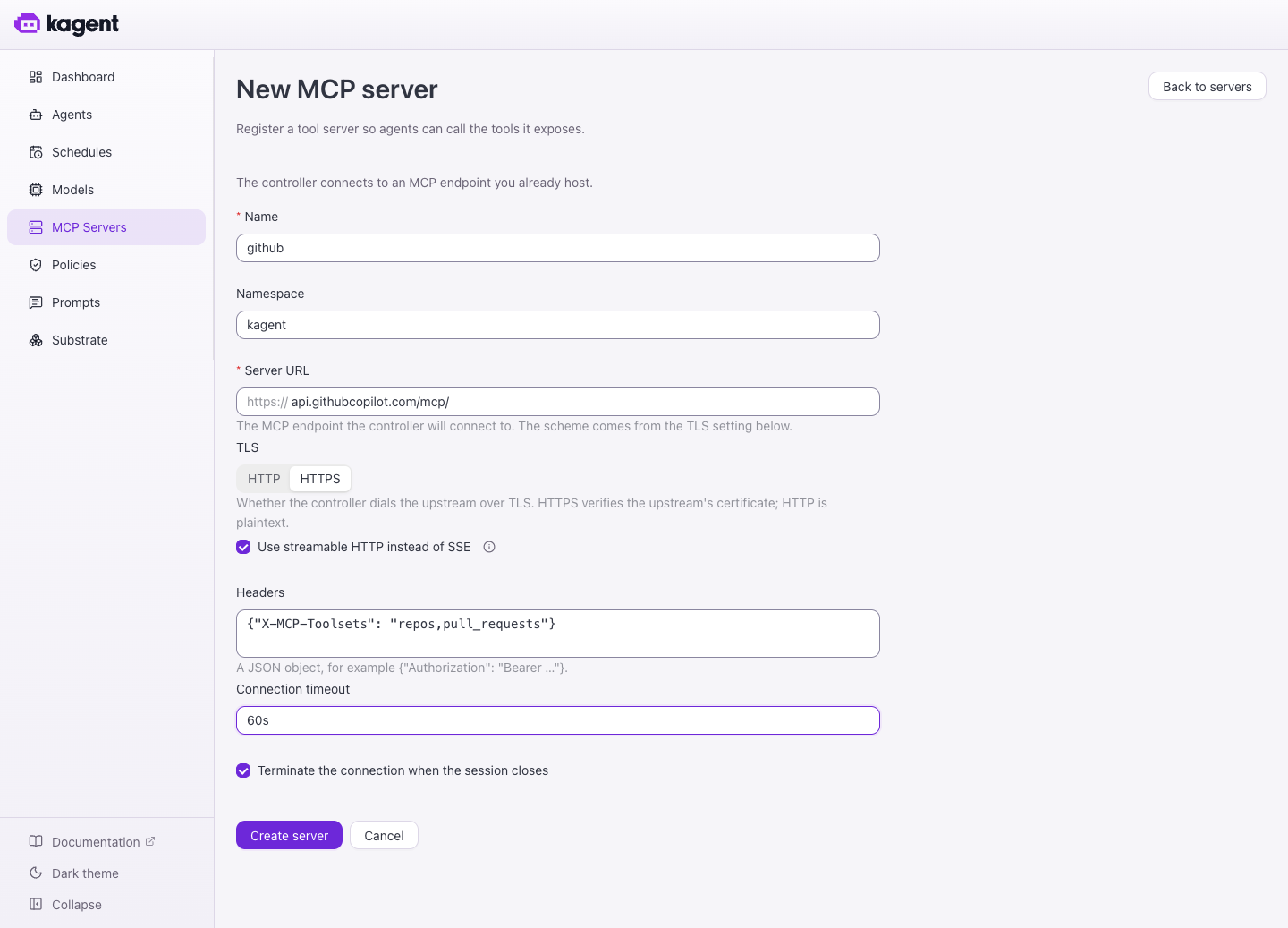
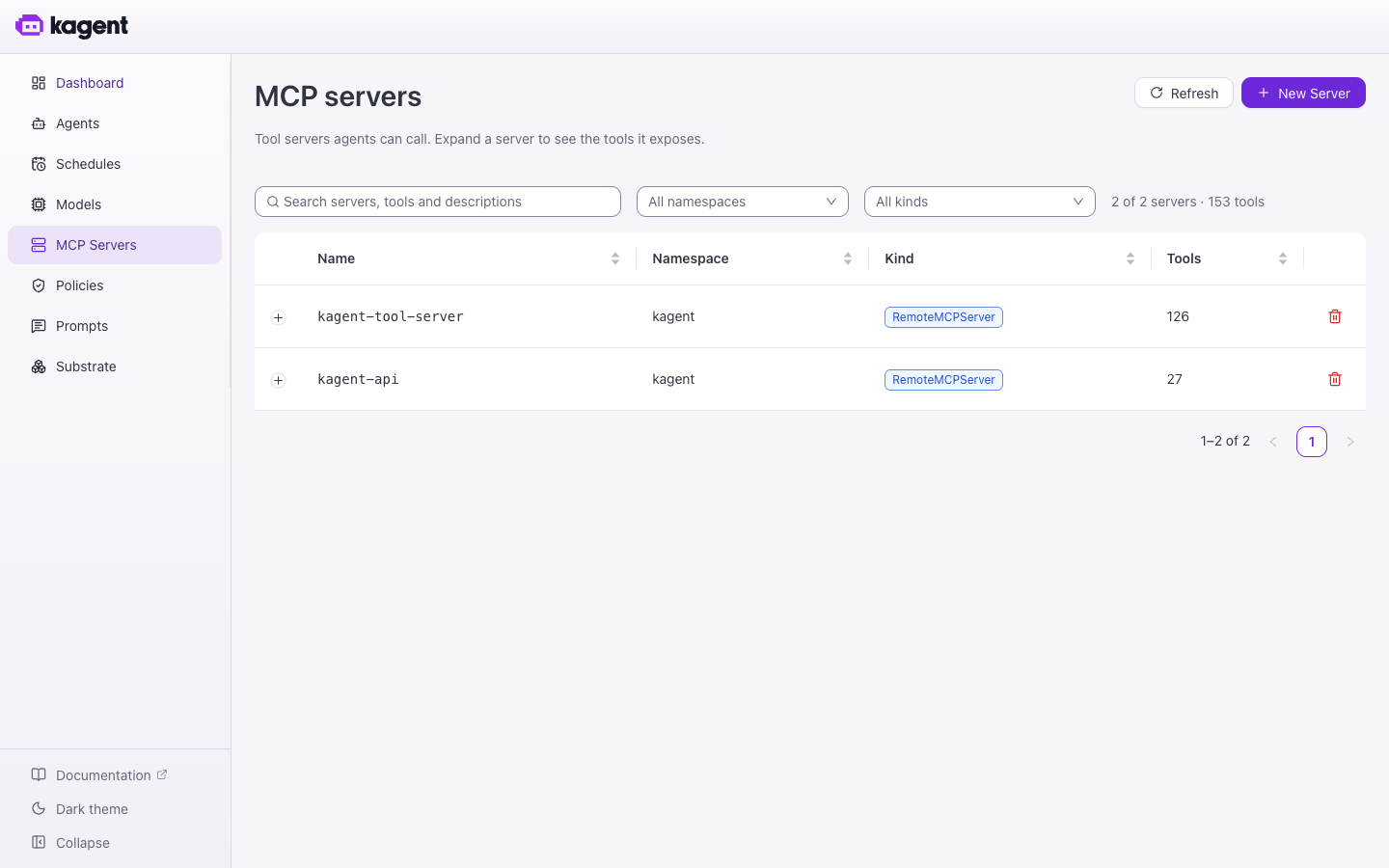
Don’t put tokens in the UI form. MCP Servers → New Server has the same fields, but its Headers box stores a plain-text JSON object in the RemoteMCPServer, where anyone who can read the resource can read the PAT. The form is fine for unauthenticated servers. Use the Secret-backed YAML for anything with a token.
The agent
The system prompt does most of the work. It names the sources, tells the agent how to compute its time window, fixes the report layout, and forbids inventing PR numbers or versions. Here’s the shape (the full prompt is in the repo):
apiVersion: api.kagent.dev/v1alpha3
kind: Agent
metadata:
  name: agentgateway-tracker
  namespace: kagent
spec:
  harnessRef:
    name: kagent
  template:
    inline:
      description: Daily change digest for agentgateway (code, releases, docs site).
      modelConfig:
        name: default-model-config
      systemPrompt: |
        You track changes to the agentgateway project and publish a daily digest.
        Sources: agentgateway/agentgateway (commits, merged PRs, releases)
                 agentgateway/website (source of https://agentgateway.dev)
        Time window: use the one given in the task. If none, call
        datetime_get_current_time and use the 24 hours before it.
        ... report: TL;DR / Releases / Notable changes / Docs / Links ...
        Never invent PRs, numbers, or versions; only use tool results.
        Publish with create_or_update_file to
          reports/agentgateway/<YYYY-MM-DD>.md
      tools:
        - mcp:
            server:                   # no apiGroup: the CRD rejects it
              kind: RemoteMCPServer
              name: github
            tools: [list_commits, get_commit, search_pull_requests, list_pull_requests,
                    pull_request_read, list_releases, get_latest_release, list_tags,
                    get_file_contents, create_or_update_file]
        - mcp:                        # built-in tool server; a clock for UI Schedules
            server:
              kind: RemoteMCPServer
              name: kagent-tool-server
            tools: [datetime_get_current_time]
The agent gets an explicit tool allow-list, not every tool the GitHub MCP server exposes. create_or_update_file is its only write tool, and the prompt restricts it to one path in one repo.
The tracker’s GitHub org is agentgateway. agentgateway-dev doesn’t exist.
Running it daily: Schedule or CronJob
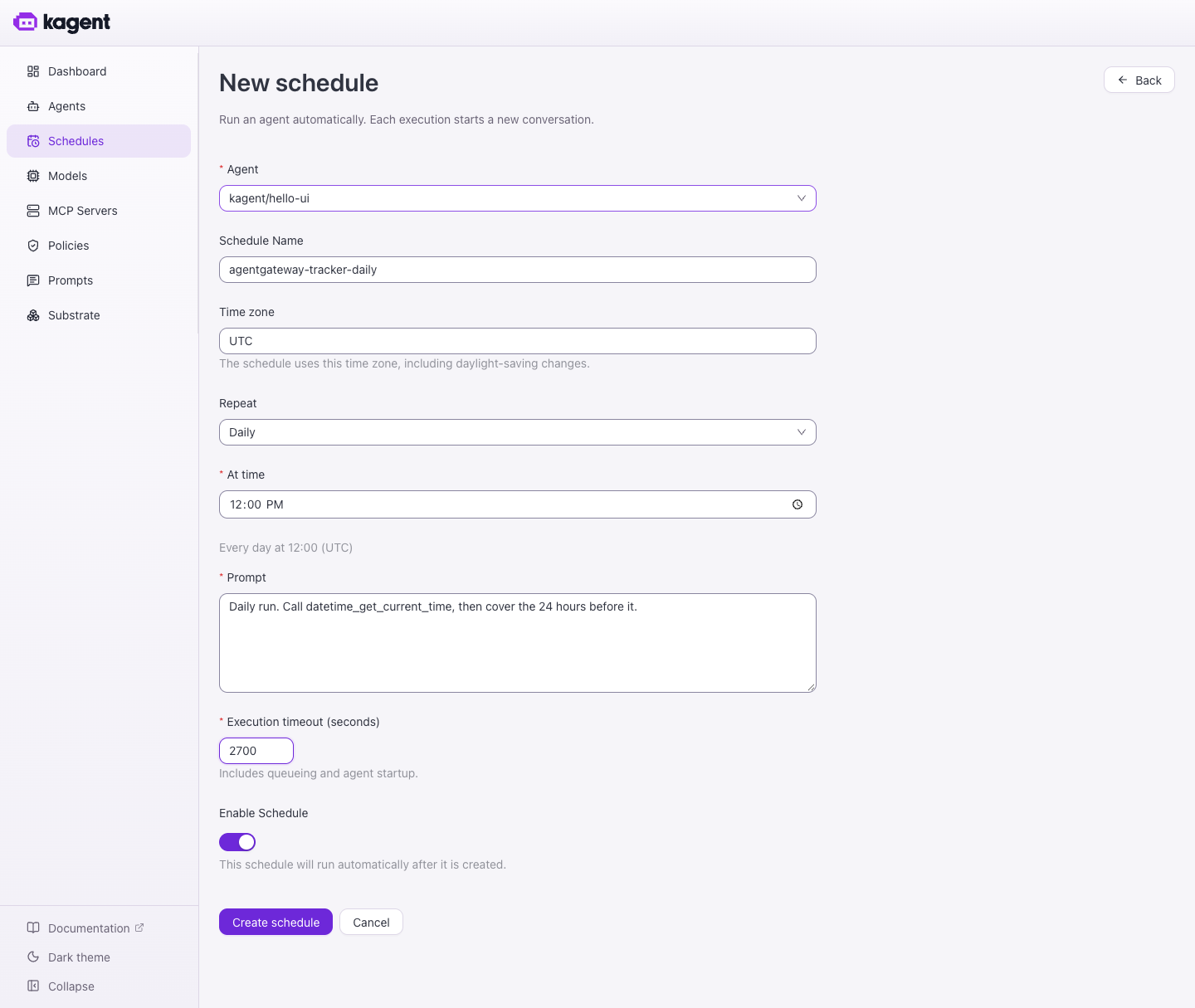
rc3 has a built-in scheduler under Schedules → New Schedule. Each run starts a new chat with a fixed prompt. The prompt can’t include the date, which is why the agent has datetime_get_current_time and reads the clock itself.
| Field | Value |
|---|---|
| Agent | kagent/agentgateway-tracker |
| Time zone / Repeat / At time | UTC / Daily / 12:00 |
| Prompt | Daily run. Call datetime_get_current_time, then cover the 24 hours before it. |
| Execution timeout | 2700 (45 min, includes queueing and startup) |
You can use a Kubernetes CronJob instead. It computes the window, downloads the kagent CLI, and invokes the agent through the controller’s A2A gateway:
K="kagent --api-url $KAGENT_URL --gateway-url $KAGENT_URL -n kagent"
FROM=$(date -u -d @$(( $(date +%s) - 86400 )) +%Y-%m-%dT%H:%M:%SZ)
TO=$(date -u +%Y-%m-%dT%H:%M:%SZ)
SID=$($K agent session create --agent agentgateway-tracker -o json | jq -r '.session.id // .id')
$K agent invoke --session "$SID" --timeout 45m --task "Window: $FROM to $TO. Date: $(date -u +%F)."
Choose one method, because running both writes two reports a day. I use the Schedule when I want to click through runs in the UI. I use the CronJob when I want the schedule in Git with the rest of the YAML, or when the job has to collect data before the agent runs. That second case leads to agent #2.
Agent #2: Fortinet CVEs against my actual firmware
CVE feeds are noisy. What I want to know is whether any CVE from this month affects the FortiOS build I’m running. The split works like this:
- The CronJob is a normal pod, not sandboxed. It reads the FortiGate’s firmware version over the FortiOS REST API, then pulls Fortinet CVEs from the last 30 days from the NVD API and the Fortinet entries from the CISA KEV catalog.
- The agent gets that data as its task. It decides which CVEs affect my exact FortiOS version and commits
reports/fortinet-cve/YYYY-MM-DD.md.
The CronJob gathers the data and the agent only reasons and publishes. The FortiGate API token never reaches the model, and the agent doesn’t need egress to a LAN IP, which Substrate wouldn’t allow anyway. The agent’s only tools are get_file_contents and create_or_update_file.
On the FortiGate, create a REST API admin with a read-only profile and set Trusted Hosts to your Mac’s LAN IP, because kind traffic leaves through Docker Desktop NAT. Store the host and token in a Secret:
kubectl -n kagent create secret generic fortigate-api \
  --from-literal=host=192.168.1.99 \
  --from-literal=token='<fortigate-api-token>'
The prompt classifies each CVE as AFFECTED, NOT AFFECTED (with the fixed version), or UNCLEAR. It ignores non-FortiOS products and flags anything in KEV as ⚠️ ACTIVELY EXPLOITED. The core of the CronJob:
FGT=$(curl -sfk -H "Authorization: Bearer $FGT_TOKEN" \
      "https://$FGT_HOST/api/v2/monitor/system/status" \
      | jq -c '{version, build, model: (.results.model_name+" "+.results.model_number), hostname: .results.hostname}')

NVD=$(curl -sf "https://services.nvd.nist.gov/rest/json/cves/2.0?keywordSearch=FortiOS&pubStartDate=$START&pubEndDate=$END" \
      | jq -c '[.vulnerabilities[].cve | {id, published, cvss: ..., description: ...}] | .[0:60]')

KEV=$(curl -sf https://www.cisa.gov/sites/default/files/feeds/known_exploited_vulnerabilities.json \
      | jq -c '[.vulnerabilities[] | select(.vendorProject=="Fortinet") | {cveID, product, dateAdded}]')

printf 'Date: %s\nFORTIGATE: %s\nNVD: %s\nKEV: %s\n' "$(date -u +%F)" "$FGT" "$NVD" "$KEV" \
  | $K agent invoke --session "$SID" --timeout 45m --file -
The full CronJob and agent YAML are in the repo.
The LLM’s version-range matching is a triage aid, not an authoritative scanner. Check every AFFECTED finding against the FortiGuard PSIRT advisory before you change anything.
Where I got stuck (so you don’t have to)
| Symptom | Cause / fix |
|---|---|
kagent install fails with exit status 1, all pods Running | Helm timed out waiting for the UI LoadBalancer. Start sudo cloud-provider-kind and re-run the install |
apply fails with apiGroup must be omitted | v1alpha3 tools[].mcp.server takes only kind: RemoteMCPServer and name |
| Agent replies but never calls tools | vLLM is missing --enable-auto-tool-choice --tool-call-parser … |
Agent never becomes Ready | kubectl describe agent, kubectl get pods -n ate-system, and helm list -n ate-system (expect substrate-atelet) |
| GitHub tool errors (401/403) | PAT scope or expiry. The secret value must be Bearer <token> |
| CronJob can’t reach the FortiGate | Trusted Hosts must include the Mac’s LAN IP (Docker Desktop NAT) |
Python-runtime agents crash with Illegal instruction | Use the kagent (Go ADK) harness. rc3’s built-in harness image is Go |
kind create fails on the node image | Upgrade kind to ≥ v0.31 |
Coming from rc2?
The kagent CRDs didn’t change from rc2 to rc3. rc3 moves Substrate to v1.0.0 and installs atelet as its own substrate-atelet release. On a throwaway kind cluster, run kagent uninstall and kind delete cluster --name kagent, then reinstall. Your reports are already in Git. For an in-place upgrade, follow the rc3 release notes. Re-running kagent install alone isn’t enough: Substrate has to be upgraded before kagent, and GoldenEgressPolicy has to be added to Substrate’s preview list first.
Wrap-up
What I like about this setup is where it puts each kind of trust:
- Model: local. Prompts and CVE data go only to the DGX Spark.
- Credentials: in Kubernetes Secrets. The egress gateway injects the GitHub token, and the FortiGate token stays in a plain CronJob pod.
- Agent capabilities: an explicit tool allow-list and DNS-only egress inside a gVisor sandbox.
- Output: Markdown files in Git. A
git pulleach morning shows what both agents found.
Full guide, YAML, and the Playwright UI tour: github.com/sebbycorp/kagent-getting-started.