My AWS and GCP budget agents read cloud bills. This one reads something with considerably more consequence in my house: the firewall my family’s internet goes through.
fw-maniak-hq is a FortiGate 80F at 172.16.10.1. Real traffic, real policies, and — importantly — policies I wrote months ago and no longer remember the details of. That last part is what makes a home firewall a better test subject than a pristine lab box. The interesting questions aren’t “is it up,” they’re archaeological:
What is fw-maniak-hq running, and which WAN is up?
What’s the YouTube policy?
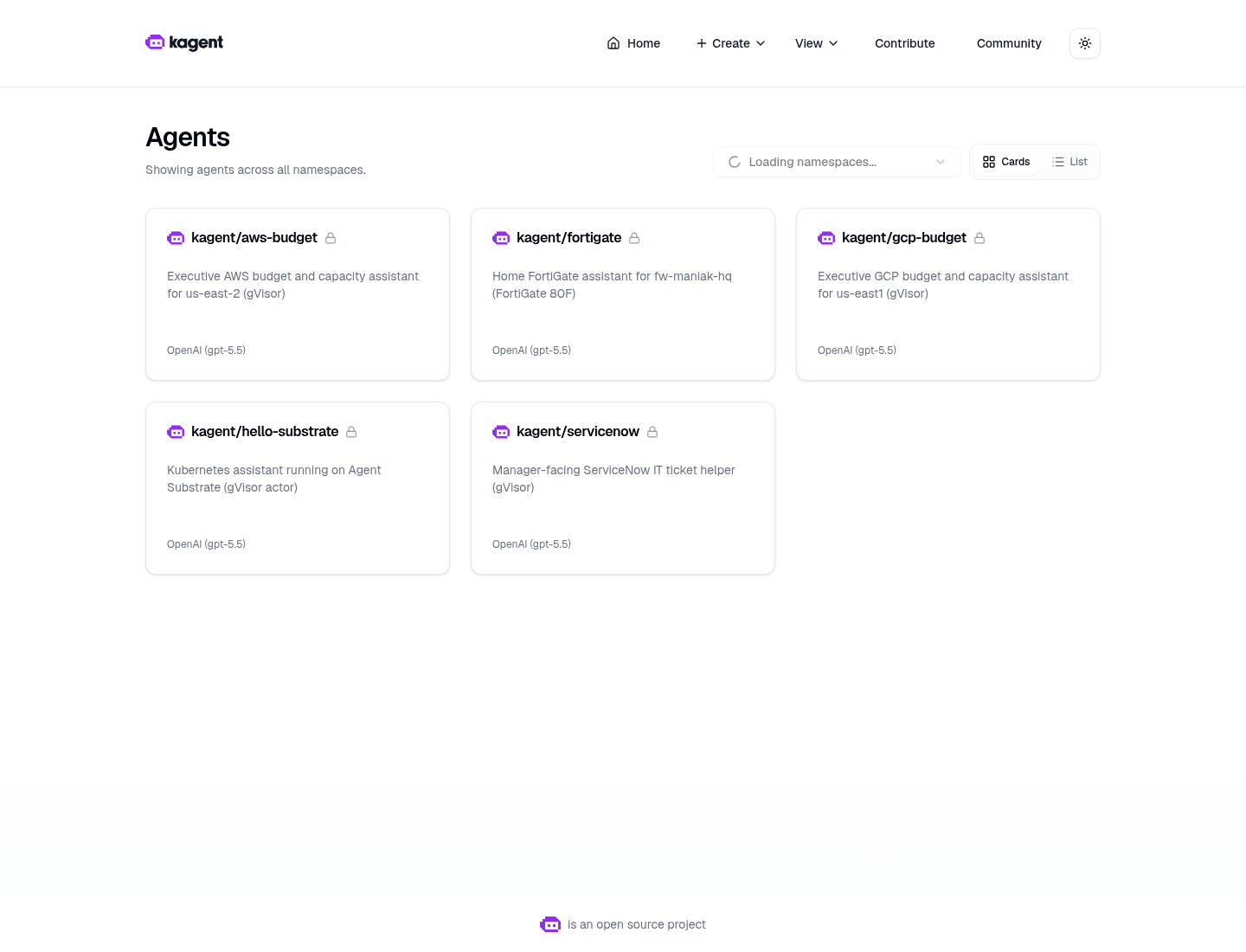
Live kagent UI, 2026-08-16. Isolated sandboxes, not plain Agents — kagent/fortigate on the grid.
Why a SandboxAgent and not a plain Agent
A normal kagent Agent is a Deployment: always on, container isolation, same as every other pod. Fine for a cluster helper.
This one holds a REST token for the device that gates my entire household’s network. The model gets a filesystem, memory, and a live network for the whole chat. Substrate puts that session in a gVisor actor on WorkerPool kagent-default:
- Isolated sandbox. gVisor’s user-space kernel is the wall between the model session and my Viper/k3s host. Tools call FortiOS through the MCP pod; the REST token stays in Vault, not in the actor.
- Idle chats snapshot (zstd) and free the worker. The next message restores the same session instead of booting a new container.
- No always-on pod per conversation.
- A golden snapshot you can resume.
Tradeoff on this lab: nested gVisor on dockerized k3s, and snapshots are in-cluster rustfs today (gs:// is a URI prefix only), not GCS.
Architecture
The REST token goes Vault → External Secrets Operator → the MCP pod. The actor calls tools over MCP and never holds the token. If a session gets confused by something it read, the credential is still on the far side of the sandbox wall.
Pins (do not bump)
| Piece | Value |
|---|---|
| kagent OSS Helm + CRDs | 0.10.0-rc2 |
| Agent Substrate Helm + CRDs | 0.0.9 |
| Worker image | ghcr.io/kagent-dev/substrate/ateom-gvisor:v0.0.9 |
| Pattern | Go declarative SandboxAgent + FastMCP + RemoteMCPServer + ExternalSecret |
| Model | default-model-config (gpt-5.5 via agentgateway) |
| Box | FortiGate 80F · fw-maniak-hq · 172.16.10.1 |
| FortiOS | v7.4.11 build 2878 · VDOM root |
rc2 always writes ActorTemplate with spec.pauseImage and env[].valueFrom.secretKeyRef. Substrate 0.0.9 accepts that shape; 0.0.12 does not. Do not “upgrade to fix” a Ready=False agent — a pin mismatch is a CRD problem.
Build it
GitOps for this one lives in sebbycorp/k8s-viper (platform/kagent-ai/fortigate-*.yaml, images/fortigate-mcp/, docs/fortigate-agent.md) — the demo folder in the substrate repo is the live-run record. The shape is the same as the others:
- FortiGate side. Create a REST API admin with a read-mostly profile, restricted to the trusted host that the MCP pod egresses from. Generate the token once.
- Vault. Path
secret/platform/fortigate. ESO syncs it into a Kubernetes Secret the MCP pod consumes. Git holds the mapping only. - Image. Build
fortigate-mcp:dev,ctr images importonto the k3s node. Dockerized k3s can’t see host Docker images;imagePullPolicy: IfNotPresentis deliberate. - Apply the SandboxAgent, RemoteMCPServer, ExternalSecret, and skills ConfigMap.
Verified live on 2026-08-16, and this is the whole proof surface:
NAME                                READY   ACCEPTED
sandboxagent.kagent.dev/fortigate   True    True

NAME                                       PROTOCOL          URL                                    ACCEPTED
remotemcpserver.kagent.dev/fortigate-mcp   STREAMABLE_HTTP   http://fortigate-mcp.kagent:8084/mcp   True

NAME                              READY   STATUS    RESTARTS   AGE
pod/fortigate-mcp-745d4c9ff5-bxjvc 1/1    Running   0          19h

NAME                                               CLASS
actortemplate.ate.dev/fortigate-b8bc65944f9bc4df   gvisor
location: gs://ate-snapshots/kagent/fortigate
goldenSnapshot: gs://ate-snapshots/kagent/fortigate/2bcc7a8b-.../2026-08-16T02:45:18Z-R7ZXMSV6CEC2D4NVN4XEX5UDO3
phase: Ready
Ready=True with a goldenSnapshot means Substrate booted a golden actor, checkpointed it, and new chats restore from that image rather than cold-starting.
The tool catalog
This agent is the widest of the five demos — 22 tools, because a firewall has a lot of surfaces worth reading:
Reads. fg_system_status, fg_resource_usage, fg_list_interfaces, fg_interface_stats, fg_list_policies, fg_get_policy, fg_policy_stats, fg_list_addresses, fg_list_addrgrp, fg_list_services, fg_list_routes, fg_list_static_routes, fg_vpn_status, fg_dhcp_leases, fg_list_vips, fg_log_state, fg_current_admins.
Writes. fg_create_address, fg_update_address, fg_create_policy, fg_set_policy_status, fg_update_policy_comment.
And, more importantly, what is absent: there is no generic “run any FortiOS CLI” tool, no tmsh-equivalent, no config backup, no firmware operation, and no delete of anything. The write tools that exist are additive or single-field — create an address object, flip a policy’s enable flag, edit a comment. The agent has to ask before using any of them.
That’s the same position I took with the ServiceNow agent’s two write tools: give it writes a human can undo in one click, and nothing else. On a firewall the stakes are higher, so the “nothing else” list is longer — a fg_delete_policy on a home gateway is a self-inflicted outage waiting for a bad prompt.
The live run
Two questions through /api/a2a-sandboxes/kagent/fortigate, 2026-08-16 evening.
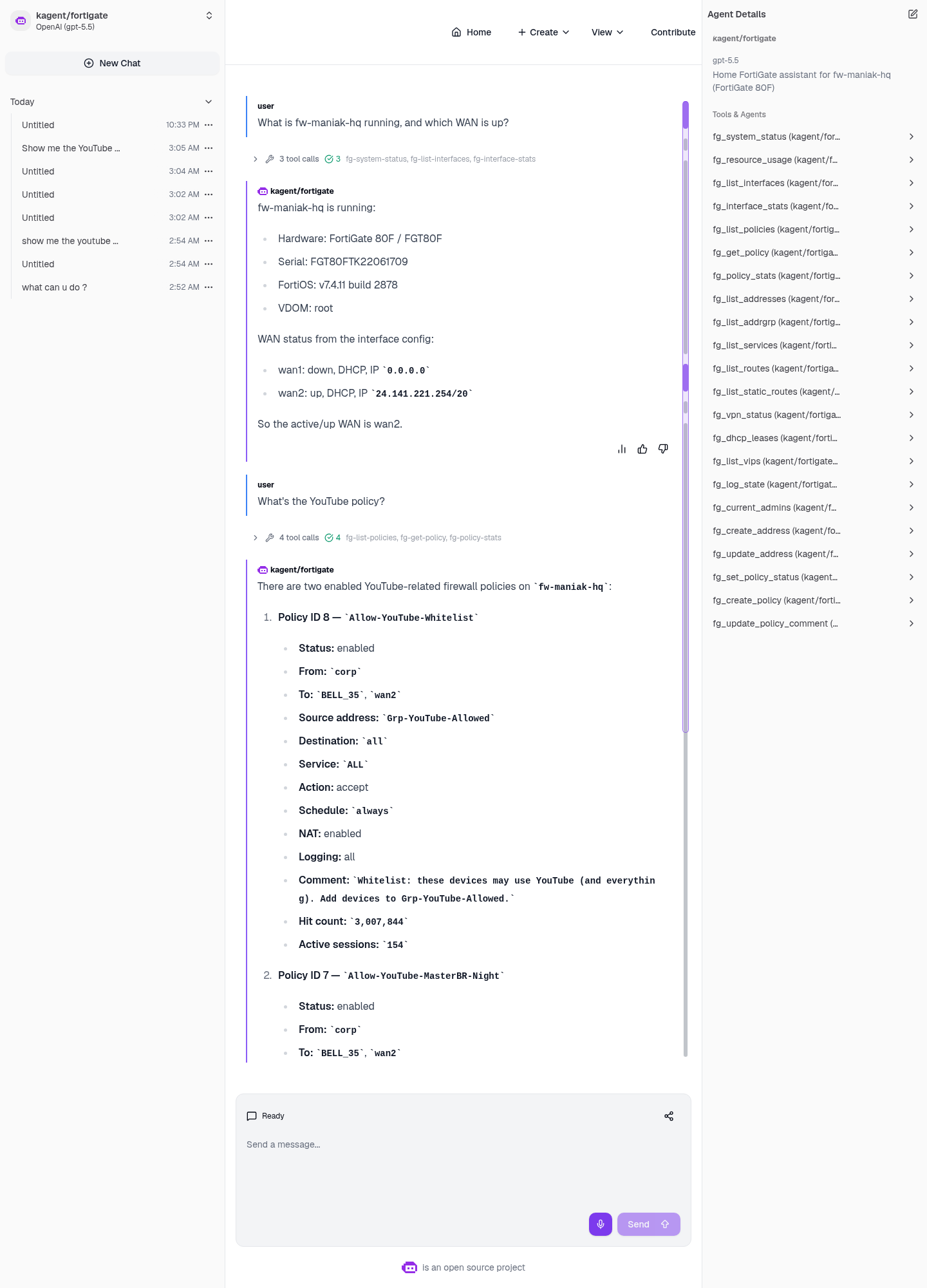
Live kagent UI, 2026-08-16. Three tool calls on Q1, four on Q2. The right-hand pane shows the full 22-tool catalog.
Q1 — “What is fw-maniak-hq running, and which WAN is up?” (~6.6s, tools: fg_system_status, fg_list_interfaces, fg_interface_stats)
- FortiGate 80F / FGT80F, serial
FGT80FTK22061709 - FortiOS v7.4.11 build 2878, VDOM
root - wan1: down, DHCP, IP
0.0.0.0 - wan2: up, DHCP, IP
24.141.221.254/20
Six and a half seconds for hardware, firmware, and WAN failover state. Worth noting it correctly read 0.0.0.0 as down rather than reporting an interface that exists as an interface that works.
Q2 — “What’s the YouTube policy?” (~12.0s, tools: fg_list_policies, fg_get_policy ×2, fg_policy_stats)
| ID | Name | Source | Schedule | Hits | Active sessions |
|---|---|---|---|---|---|
| 8 | Allow-YouTube-Whitelist | Grp-YouTube-Allowed | always | 3,007,844 | 154 |
| 7 | Allow-YouTube-MasterBR-Night | YT-AppleTV-Master-122 | Allow-YT-MasterBR-8pm-2am | 18,902 | 0 |
Both from corp → BELL_35 / wan2, action accept, NAT on, logging all. Policy 8 even carried its own documentation in the comment field: “Whitelist: these devices may use YouTube (and everything). Add devices to Grp-YouTube-Allowed.”
Then the answer I actually needed: there is no separate YouTube block policy in the returned list. The allow-list is doing the work by being narrow, not by pairing with an explicit deny — and the agent said that rather than assuming a deny must exist somewhere because the setup “looks like” a whitelist pattern.
What this demo is actually good at
Two things stand out after using it.
It reads intent, not just config. fg_policy_stats turning “policy 8” into 3,007,844 hits, 154 sessions right now is the difference between reading a rule and knowing whether the rule matters. Policy 7 has 18,902 lifetime hits and zero active sessions — its schedule window (8pm-2am) wasn’t open. Neither of those facts is in the policy definition.
It’s honest about what it can see. Twice in one session it declined to fill a gap: no YouTube deny policy in the compact list, and wan1 reported as down rather than glossed. Same principle as the GCP agent saying unavailable rather than inventing spend. On a firewall, a confidently hallucinated policy is worse than no answer — you’d go make a change based on a rule that doesn’t exist.
Honest limits
- Import the MCP image on the k3s node before the pod starts.
- The Vault path
secret/platform/fortigatemust exist or the ExternalSecret stays unsynced. - The kagent UI at
http://172.16.10.135:30500/is LAN-only. This isn’t published. - No generic FortiOS CLI tool. No delete, no config backup, no firmware operation.
- Writes exist (
fg_create_policy,fg_set_policy_status, …) and the agent must ask first — a prompt-level control backed by a tool-level one, not a replacement for it. - Snapshots are in-cluster rustfs.
gs://is a prefix only. - Never commit the FortiGate REST token or Vault secret values.
The rest of the series
Five demos, one runtime — same pins, same Vault/ESO shape, same gVisor wall. Different blast radius each time.
- AWS budget — Cost Explorer, least-privilege IAM, and the full build from pins to golden snapshot.
- GCP budget — us-east1 capacity, and why the billing half honestly reports unavailable.
- ServiceNow triage — 25 incidents into a manager briefing, and where write tools belong.
- F5 BIG-IP — 19 VIPs, 18 tool calls in one turn, and zero write tools.
- Why secure sandbox substrates are the future — the argument behind all five.
Live-run record: sebbycorp/kagent-agent-substrate-demos / fortigate-sandbox-agent. Manifests and the MCP image are in sebbycorp/k8s-viper — see docs/fortigate-agent.md.