I already wrote the why — why secure sandbox substrates are the future. This one is the how. Same agent, but from the build side: every object you apply, where the AWS key lives, and the one version pin that will waste your afternoon if you get it wrong.
The goal is a single question, answered honestly:
What’s our us-east-2 spend this month, and are we over capacity?
Not “roughly.” Not an estimate. Real ce:GetCostAndUsage numbers, or an explicit denied.
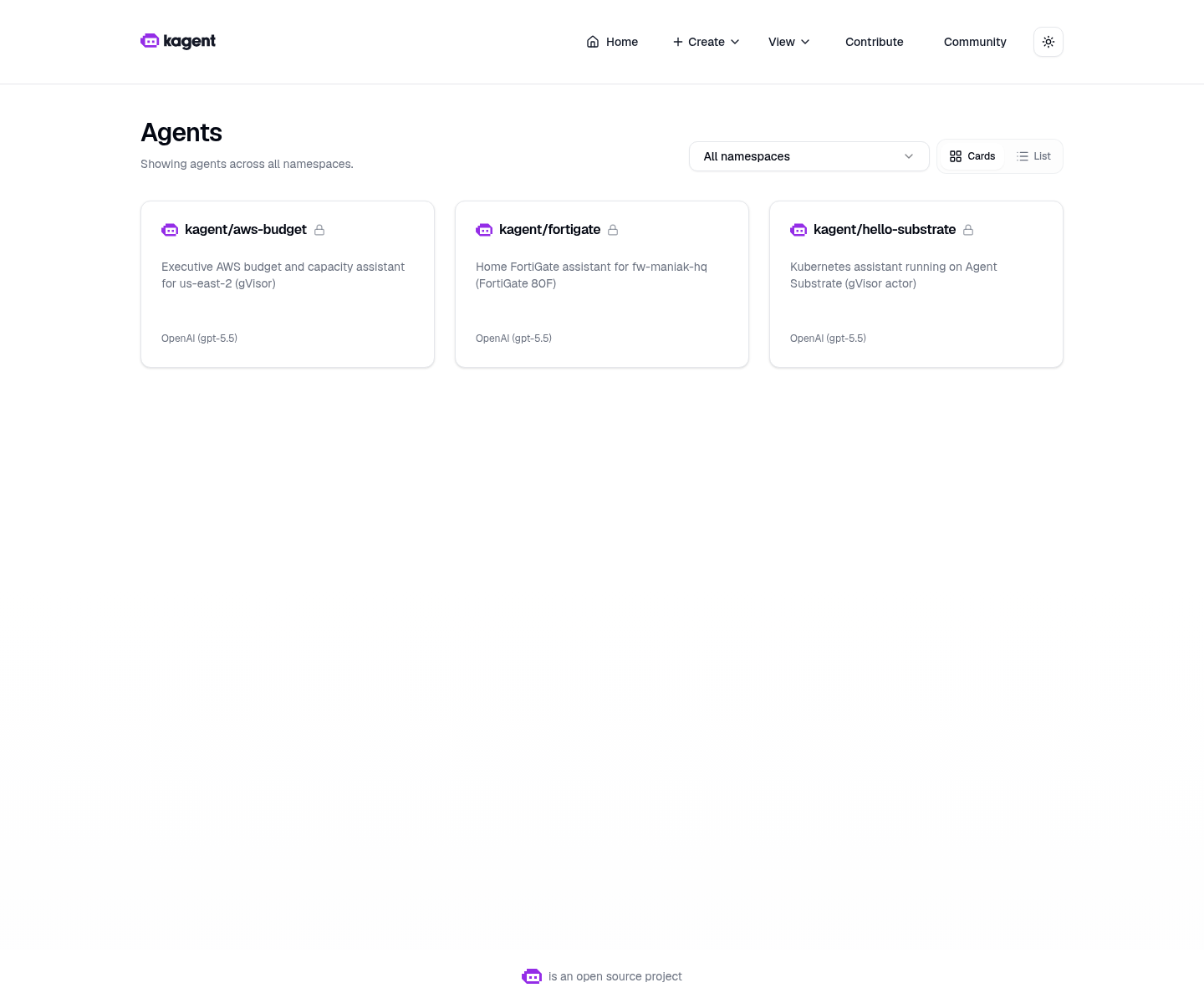
Live kagent UI, 2026-08-16. Three SandboxAgent cards, not plain Agents. aws-budget is described as “Executive AWS budget and capacity assistant for us-east-2 (gVisor).”
Why a SandboxAgent and not a plain Agent
A normal kagent Agent is a Kubernetes Deployment. Always on, container isolation, same as any other pod. That is completely fine for a cluster helper that reads pod logs.
This agent talks to your AWS bill. The model gets a filesystem, memory, and a live network for the whole conversation, and it chews on tool output it did not author. Substrate puts that session in a gVisor actor — a user-space kernel between the session and your k3s host.
Plain kagent Agent | SandboxAgent (Substrate) | |
|---|---|---|
| Kubernetes shape | Deployment, always-on pod | Actor on WorkerPool kagent-default, booted per session |
| Isolation | Container, shared host kernel | gVisor user-space kernel |
| Idle cost | A pod per conversation | Snapshot (zstd), worker freed |
| Resume | N/A | Restore the exact session |
Honest rule of thumb: if all you need is a Python container with boto3 and no snapshot lifecycle, use a Deployment. The moment the session reads your bill, take the wall.
Architecture
Read that bottom row carefully. Vault and ESO feed the MCP pod, not the actor. The gVisor session — the part running the model — never holds an AWS access key. It calls a tool; the tool makes the API call on the far side of the wall.
The pins that matter (do not bump)
This is the part I would tattoo on the runbook.
| Piece | Value |
|---|---|
| kagent OSS Helm + CRDs | 0.10.0-rc2 |
| Agent Substrate Helm + CRDs | 0.0.9 |
| Worker image | ghcr.io/kagent-dev/substrate/ateom-gvisor:v0.0.9 |
| Pattern | Go declarative SandboxAgent + FastMCP + RemoteMCPServer + ExternalSecret |
| Model | default-model-config (my lab: gpt-5.5 via agentgateway) |
| Region | us-east-2 only |
kagent rc2 always writes an ActorTemplate with spec.pauseImage and env[].valueFrom.secretKeyRef (for KAGENT_CONFIG_JSON, KAGENT_AGENT_CARD_JSON, KAGENT_SRT_SETTINGS_JSON, OPENAI_API_KEY).
Substrate 0.0.9 CRDs accept that shape. Substrate 0.0.12 removed valueFrom and moved the pause image into SandboxConfig. Point rc2 at 0.0.12 and the apiserver rejects the object — you get Ready=False, ActorTemplateNotFound, or spec.containers[0].env[…].value: Required value.
The trap: the first time your agent is not Ready, your instinct is to upgrade. Don’t. A pin mismatch is a CRD problem, not a staleness problem. And don’t “fix” it by flattening the env into literal values either.
Snapshots today: rustfs, and omit snapshotsConfig
Substrate checkpoints actor RAM and filesystem to object storage. On my Viper lab that storage is in-cluster rustfs, not Google Cloud:
| Live today | |
|---|---|
| atelet 0.0.9 | ATE_STORAGE_BACKEND=s3 → http://rustfs.ate-system.svc:9000 |
| Bucket | ate-snapshots (1Gi PVC) |
| SandboxAgent | omits snapshotsConfig |
| ActorTemplate location | gs://ate-snapshots/kagent/aws-budget |
The gs:// scheme there is a URI prefix only. The bytes are on rustfs. I have a real GCS bucket (gs://viper-kagent-ate-snapshots, project viper-kagent, org maniak.io) reserved for a later cluster-wide atelet cutover, and I deliberately did not point this agent at it — atelet would go looking for that bucket on rustfs, not find it, and the golden snapshot would fail. No ignoreDifferences. Stay on rustfs.
Step 1 — a dedicated IAM identity
AWS console, region us-east-2 → IAM → create user aws-budget-agent, no console password → attach a customer-managed policy → create an access key (“application running outside AWS”).
The policy is AwsBudgetAgentReadOnly: ce:Get*, budgets:View*, ec2:Describe* and siblings, conditioned to us-east-2 wherever IAM allows a region condition. No iam:Create*. No ec2:Terminate*. No budgets:Delete*. No s3:* on your data.
Why a dedicated identity: the agent is read-mostly and it must not borrow a human admin key. If someone talks the model into something clever, the ceiling is “read one region’s billing metadata.”
Two housekeeping notes:
- Enable Cost Explorer in the billing console if the account has never used it. Otherwise
aws_cost_*fails honestly — and an honest failure is success, not a reason to fake$0. - Compute Optimizer / CE rightsizing enrollment is optional. Skip it and
aws_rightsizing_hintsmust say “not available.”
Step 2 — keys into Vault, never git
docker exec -it k3s-viper kubectl -n vault exec -i vault-0 -- \
  vault kv put secret/platform/aws-budget \
    access_key_id='<paste>' \
    secret_access_key='<paste>' \
    region='us-east-2'
Then let ESO do the sync:
docker exec k3s-viper kubectl -n kagent get externalsecret aws-budget-mcp
You want STATUS: SecretSynced. Git only ever holds the ExternalSecret mapping — path names and key names. Never values. And please don’t kubectl get secret -o yaml and paste the result into Slack.
Step 3 — build and import the MCP image
Dockerized k3s cannot see host Docker images, and there is no registry pull for aws-budget-mcp:dev, so you import it into containerd:
./aws-sandbox-agent/scripts/02-build-import-mcp.sh
That builds the image and runs ctr images import. The Deployment uses imagePullPolicy: IfNotPresent on purpose. ImagePullBackOff means the import didn’t land or your tag doesn’t match.
Step 4 — apply the agent
Note the shape of this command. Kustomize runs on the host, and the output is piped into k3s — not apply -k against a host path the container can’t see:
kubectl kustomize aws-sandbox-agent/k8s | docker exec -i k3s-viper kubectl apply -f -
externalsecret.external-secrets.io/aws-budget-mcp created
deployment.apps/aws-budget-mcp created
service/aws-budget-mcp created
configmap/aws-budget-skills created
remotemcpserver.kagent.dev/aws-budget-mcp created
sandboxagent.kagent.dev/aws-budget created
One wrinkle worth knowing: kagent 0.10.0-rc2 rejects spec.skills on a SandboxAgent, and there is no skill-mount into the gVisor session. So the skill text lives in ConfigMap aws-budget-skills and gets inlined into systemMessage via declarative.promptTemplate. Keep skills/ and k8s/skills-configmap.yaml in sync.
Step 5 — what “Ready” actually means
kagent does not start a Deployment of the LLM runtime. It creates an ActorTemplate owned by the SandboxAgent. Substrate boots a golden actor once, checkpoints it, and stores that checkpoint as status.goldenSnapshot. New chats restore from that image.
| You see | Meaning |
|---|---|
No ActorTemplate | Wrong CRD pin (0.0.12) or the controller isn’t reconciling |
Template, no goldenSnapshot | First checkpoint running (60–90s is normal), or gVisor/atelet can’t write storage |
Ready=True + goldenSnapshot: gs://… | You can talk to it |
docker exec k3s-viper kubectl -n kagent get sandboxagents,remotemcpservers
docker exec k3s-viper kubectl -n kagent get actortemplates
The tool catalog — no generic shell
Eleven tools, all Describe/Get/View/List. This is the single most important design decision in the demo, and it’s a design decision, not a config flag:
| Tool | AWS API (typical) |
|---|---|
aws_whoami | sts:GetCallerIdentity |
aws_cost_month | ce:GetCostAndUsage |
aws_cost_by_service | ce:GetCostAndUsage grouped by service |
aws_budgets | budgets:ViewBudget |
aws_ec2_capacity | ec2:DescribeInstances |
aws_asg | autoscaling:Describe* |
aws_rds | rds:Describe* |
aws_ebs_summary | ec2:DescribeVolumes |
aws_service_quotas | servicequotas:GetServiceQuota |
aws_rightsizing_hints | CE rightsizing / Compute Optimizer |
aws_executive_brief | composes the above |
There is no “run any aws cli” tool. The agent has no verb for destruction. That boundary is enforced three independent times — in the tool code, in the IAM policy, and in the sandbox — so getting past one layer still lands you on the next.
Small API detail that trips people up: Cost Explorer and Budgets live in us-east-1. The tools still filter results to us-east-2.
The live run
2026-08-16 on Viper, through /api/a2a-sandboxes/kagent/aws-budget:
| Month-to-date spend | $0.67 |
| Budget | $4.13 / $100 (4.13% used) |
| EC2 / ASG / RDS / EBS | 0 / 0 / 0 / 0 |
| Identity | aws-budget-agent, account 616973157416 |
| Tool calls | 10 / 10 |
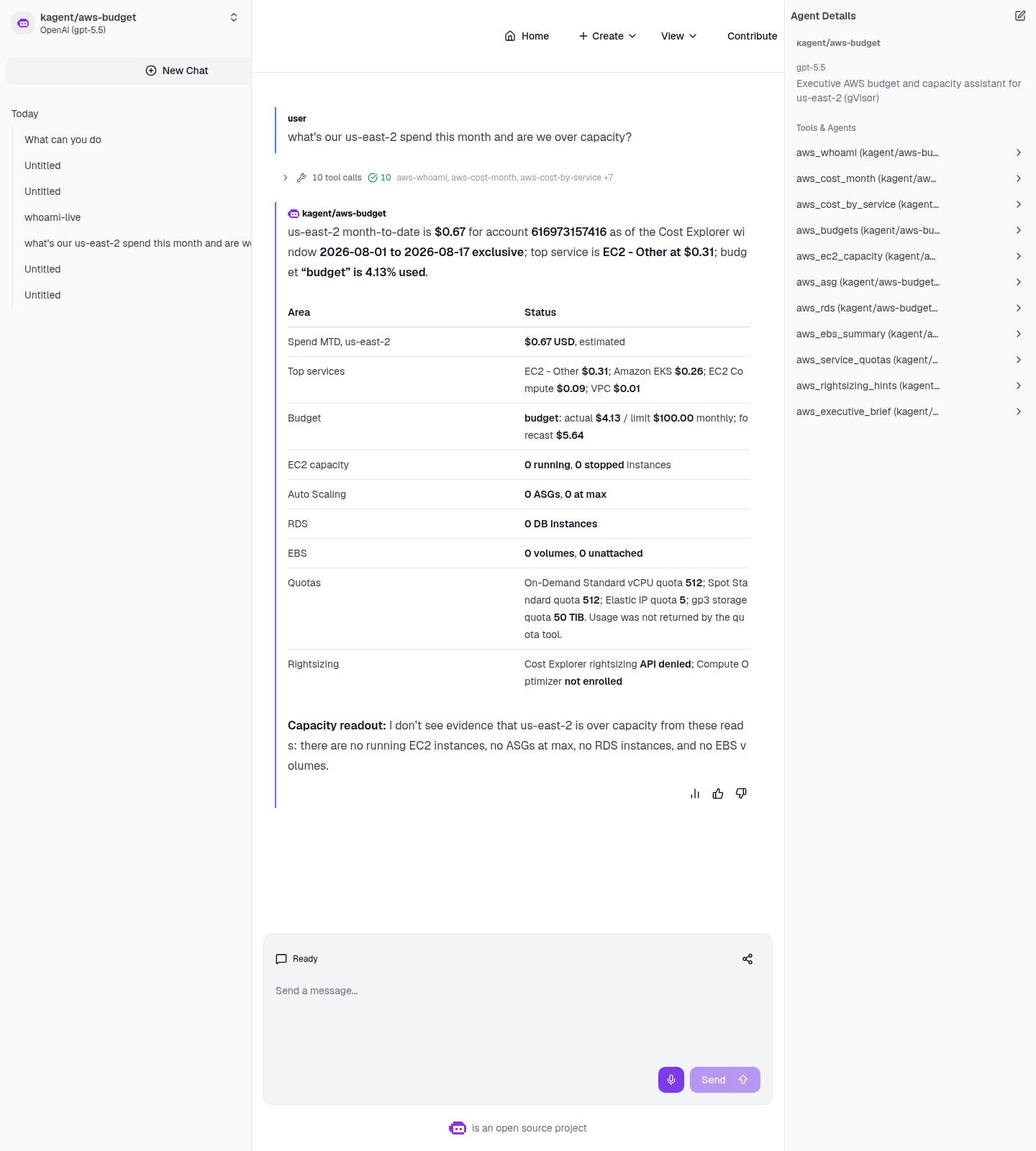
Live kagent UI, 2026-08-16. Ten of ten tool calls, every number sourced from a real AWS API.
The line I care about most is not the dollar figure. It’s this: the agent reported “Cost Explorer rightsizing API denied; Compute Optimizer not enrolled” instead of inventing a recommendation. An agent that fabricates a helpful-sounding number to fill a gap is an agent you cannot put in front of a budget.
If yours does invent spend, the tools didn’t run. Tell it “call the tools; do not estimate,” then check the MCP logs:
docker exec k3s-viper kubectl -n kagent logs deploy/aws-budget-mcp
That process must never print the secret key.
Proof, with nothing sensitive on screen
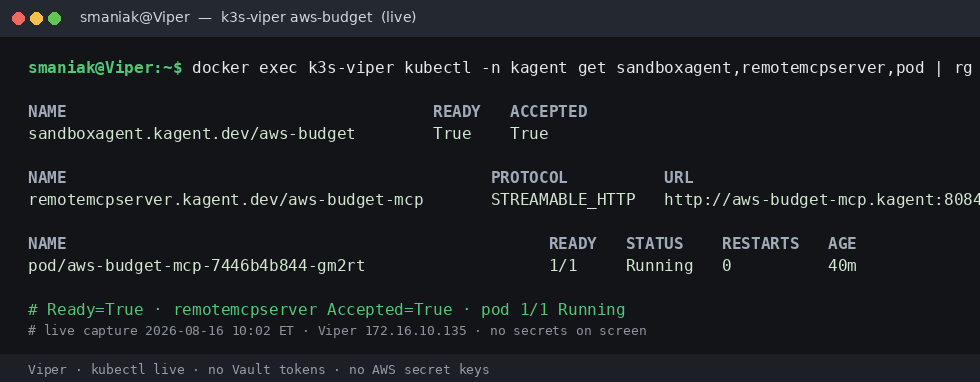
Live capture, 2026-08-16. Ready=True, MCP Accepted with 11 tools, pod 1/1 Running — and deliberately no Vault tokens or AWS keys in frame.
And the whole turn as a short reel:
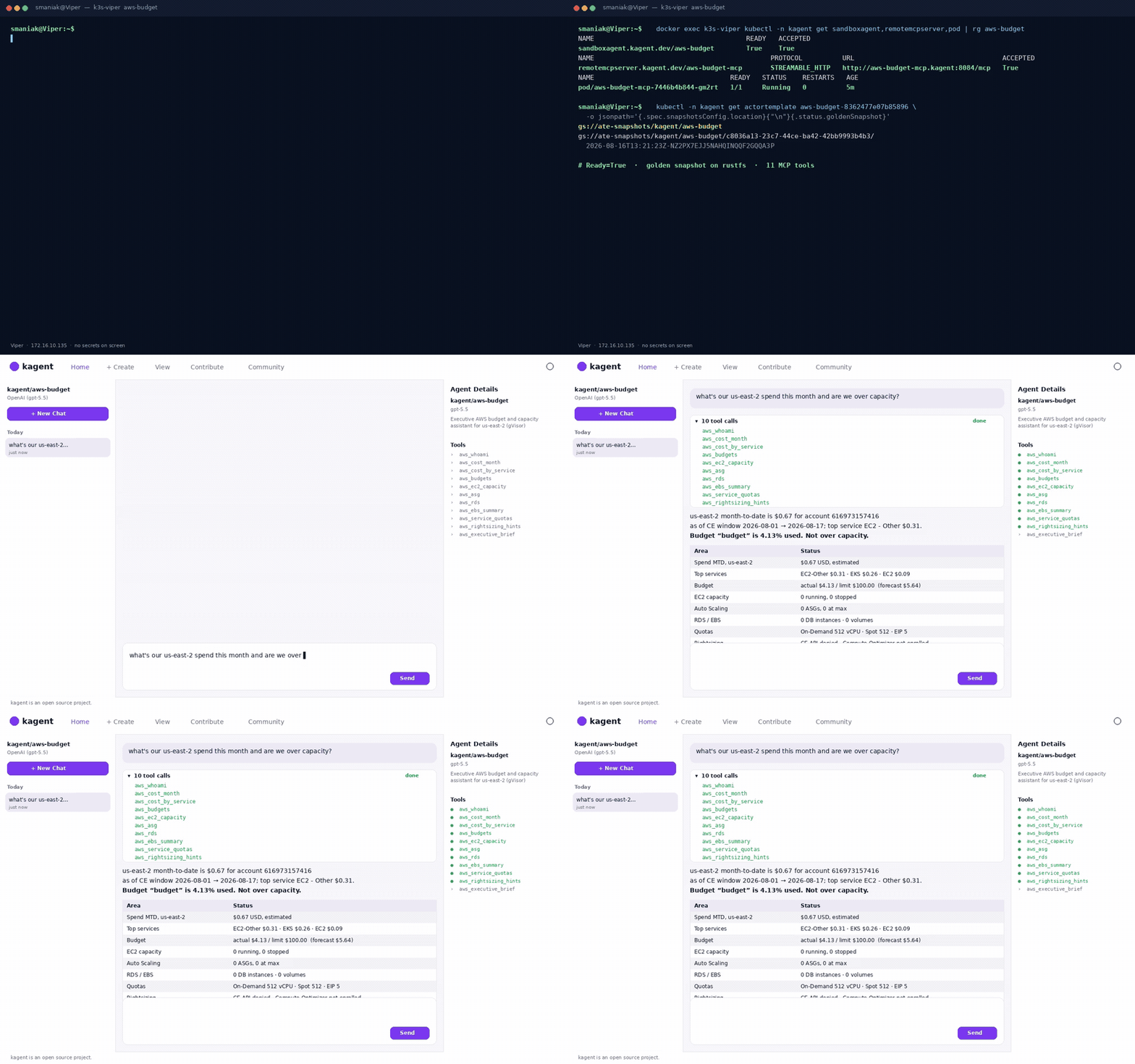
One tell that these are genuinely sandboxed sessions: the classic /api/a2a/kagent/aws-budget endpoint 404s, because there is no Agent CR at all. The UI talks to /api/a2a-sandboxes/kagent/aws-budget, and the card wears a Sandbox: Agent Substrate badge.
Honest limits
- The image must be imported on the k3s node (
ctr images import) before the MCP pod starts. - The Vault path must exist first, or the ExternalSecret sits unsynced forever.
- Nested gVisor on dockerized k3s can still hit
runsc/ seccomp //dev/kvmproblems. That’s a worker-environment issue — not a reason to downgrade the agent to an unsandboxed Deployment. - Snapshots are local rustfs. Cluster-wide object storage is future work.
- Never commit AWS or GCP secret values. Manifests carry paths and key names only.
The rest of the series
Five demos, one runtime — same pins, same Vault/ESO shape, same gVisor wall. Different blast radius each time.
- GCP budget — us-east1 capacity, and why the billing half honestly reports unavailable.
- ServiceNow triage — 25 incidents into a manager briefing, and where write tools belong.
- FortiGate 80F — my actual home firewall, 22 tools, and 3,007,844 hits on one policy.
- F5 BIG-IP — 19 VIPs, 18 tool calls in one turn, and zero write tools.
- Why secure sandbox substrates are the future — the argument behind all five.
Full demo — manifests, the FastMCP server, IAM policy, runbooks, and the live report this draws on: sebbycorp/kagent-agent-substrate-demos / aws-sandbox-agent.