I sat down on Saturday with OpenMausBot because I wanted a chat app that felt like texting a teammate, not another terminal. I named the bot Indigo, picked GPT-5.6 Sol, and asked it to say hi in five words.
It did: Hi, I’m Indigo, your bot.
The part I loved — and the part that made me reach for agentgateway — is that OpenMausBot never called OpenAI. It spawned codex on my laptop. That’s charming until you want a real key, a guardrail, a rate limit, or a cost number that isn’t “trust me, I watched the terminal.”
So I did what I always do. Same pattern as Claude Code / Codex and Claude Desktop: the chat app stays on loopback, the secret and the policy live in the gateway.
This is that Saturday, written down so you can replay it.
👉 milind-soni/OpenMausBot · Official recipe: Codex → agentgateway · If you haven’t run the binary yet: standalone locally
Architecture
Think of it as three people in a room. OpenMausBot is the friendly one you talk to. Codex does the work. agentgateway is the grown-up who holds the wallet.
| Hop | What happens |
|---|---|
| 1 · Chat | I talk to Indigo at http://127.0.0.1:5199. The UI never sees a provider key — and that’s how I want it. |
| 2 · Spawn | The harness starts codex. The Codex driver deletes OPENAI_API_KEY from the child env on purpose, so a leaked key can’t quietly flip billing to pay-as-you-go. |
| 3 · Codex | Codex 0.147.0 uses model_provider = "agentgateway" and base_url = "http://127.0.0.1:4000/v1". |
| 4 · Gateway | Virtual key, regex guard, token budget, cost catalog — then the real OpenAI key goes upstream. |
Codex calls {base}/v1/responses on the standalone LLM listener. Official docs were tested against codex-cli 0.144.4. I was on 0.147.0. OpenMausBot’s default Codex model in this build is GPT-5.6 Sol.
I tried Claude first. It face-planted (exit 127). Codex is the path that said hello.
Why OpenMausBot never holds the key
This is the bit that made me smile when I read the source. Before it even starts the CLI, OpenMausBot strips the provider secrets:
- Codex deletes
OPENAI_API_KEY - Claude deletes
ANTHROPIC_API_KEY(and the Claude Code identity vars)
You can paste a key into the OpenMausBot process and the bot still won’t send it. The CLI either uses its own login, or it talks to whatever base_url you gave it.
That’s my invitation. Standalone agentgateway is that base_url. One binary on my desk held the real OPENAI_API_KEY, a virtual key tagged user: openmausbot / tier: live, the regex guards, the rate limit, and the cost catalog. Indigo didn’t need to know any of that.
What was actually on my desk
| Thing | Saturday’s value |
|---|---|
| OpenMausBot UI | http://127.0.0.1:5199 |
| Harness | 127.0.0.1:8799 |
| Bot | Indigo |
| Model picker | GPT-5.6 Sol |
| Codex | 0.147.0 · wire_api = "responses" |
| agentgateway LLM | http://127.0.0.1:4000/v1 |
| Admin UI | http://127.0.0.1:15000/ui/ |
| Virtual key metadata | user: openmausbot · tier: live |
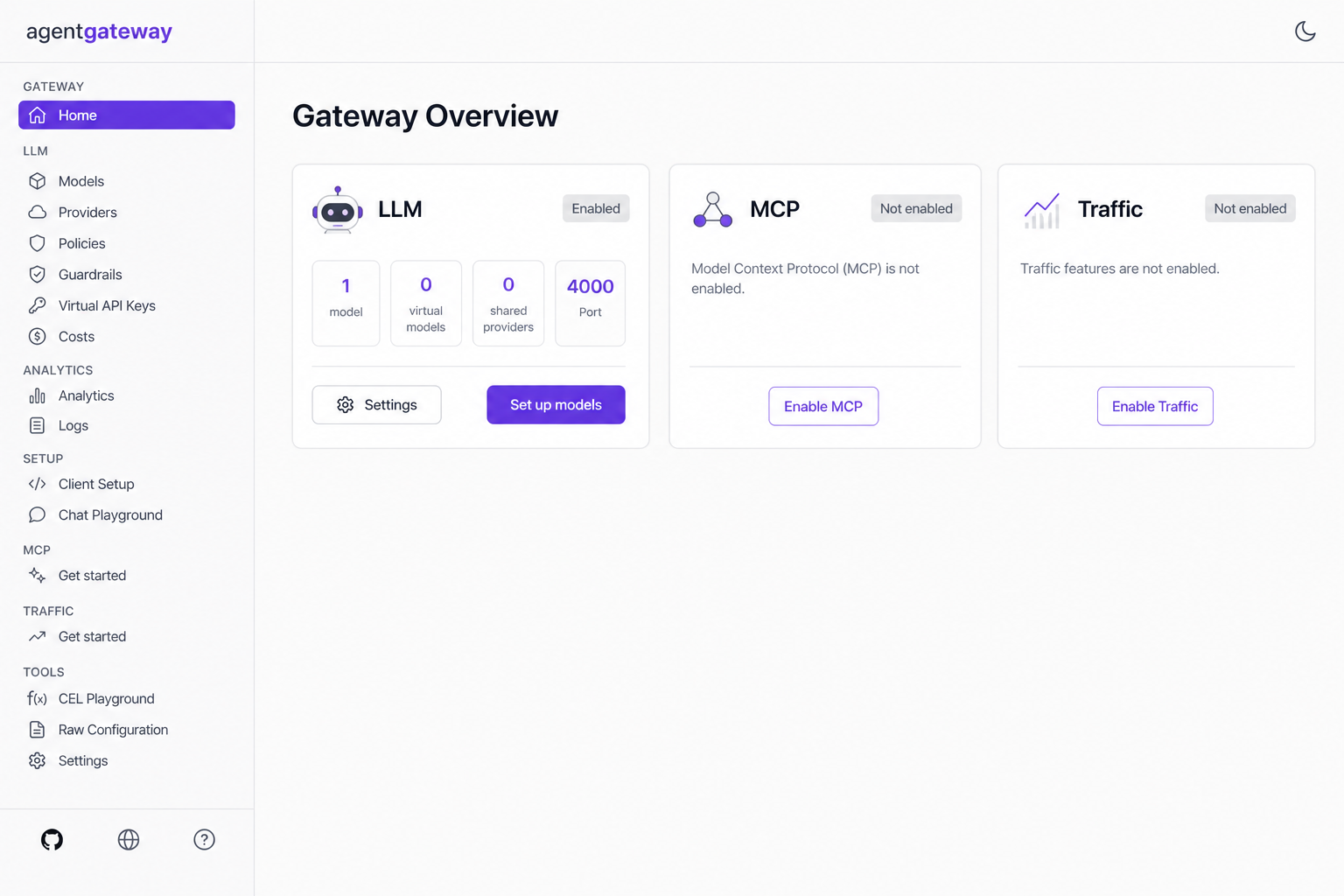
| Gateway Overview | LLM Enabled · 1 model · Port 4000 |
| The prompt I used | say hi in five words. |
| What came back | Hi, I'm Indigo, your bot. |
Sanity check whenever something feels off:
agentgateway --version
codex --version
Once apiKey.mode is strict, a call with no key should 401. A call with the virtual key should reach OpenAI. That’s the whole handshake.
Standalone agentgateway
I installed the binary and wrote a config that does the four jobs I actually wanted that afternoon: talk to OpenAI, know who called, refuse sloppy secrets in the prompt, and put a number on the turn.
curl -sL https://agentgateway.dev/install | bash
mkdir -p ~/agw-openmausbot/costs
cd ~/agw-openmausbot
agctl costs import --source models.dev --providers openai --out ./costs/catalog.json
cat > config.yaml << 'EOF'
# yaml-language-server: $schema=https://agentgateway.dev/schema/config
config:
  modelCatalog:
  - file: ./costs/catalog.json

llm:
  policies:
    apiKey:
      mode: strict
      keys:
      - key: "$OPENMAUSBOT_VIRTUAL_KEY"
        metadata:
          user: openmausbot
          tier: live
    localRateLimit:
    - maxTokens: 200000
      tokensPerFill: 200000
      fillInterval: 3600s
      type: tokens
  models:
  - name: "*"
    provider: openAI
    params:
      apiKey: "$OPENAI_API_KEY"
      tokenize: true
    guardrails:
      request:
      - regex:
          action: reject
          rules:
          - pattern: "api[_-]?key[=:]\\s*\\S+"
          - pattern: "sk-[A-Za-z0-9_-]{10,}"
          - builtin: email
        rejection:
          status: 400
          headers:
            set:
              content-type: "application/json"
          body: |
            {
              "error": {
                "message": "Request rejected: sensitive content",
                "type": "invalid_request_error",
                "code": "content_policy_violation"
              }
            }
EOF
export OPENAI_API_KEY='sk-...'                 # gateway process only
export OPENMAUSBOT_VIRTUAL_KEY='sk-omb-...'    # what Codex presents; not an OpenAI key
agentgateway -f config.yaml
| Port | What I used it for |
|---|---|
| 4000 | The front door Codex hits (/v1/responses, /v1/chat/completions, /v1/models) |
| 15000 | The Admin UI I left open in a tab — http://127.0.0.1:15000/ui/ |
| 15020 | Stats, if you like watching tokens (agentgateway_gen_ai_client_token_usage) |
Leave it running. My Gateway Overview said LLM Enabled, 1 model, Port 4000. I didn’t turn on MCP or Traffic. I didn’t need them to say hello.
Keep the model name as *. Codex sends gpt-5.6-sol itself. If you pin the gateway to one model, you’ll spend an hour wondering why Indigo looks confused.
Virtual API key
I didn’t want Codex holding the real OpenAI key. I wanted a house key — something that says “this is OpenMausBot” when I look at cost later.
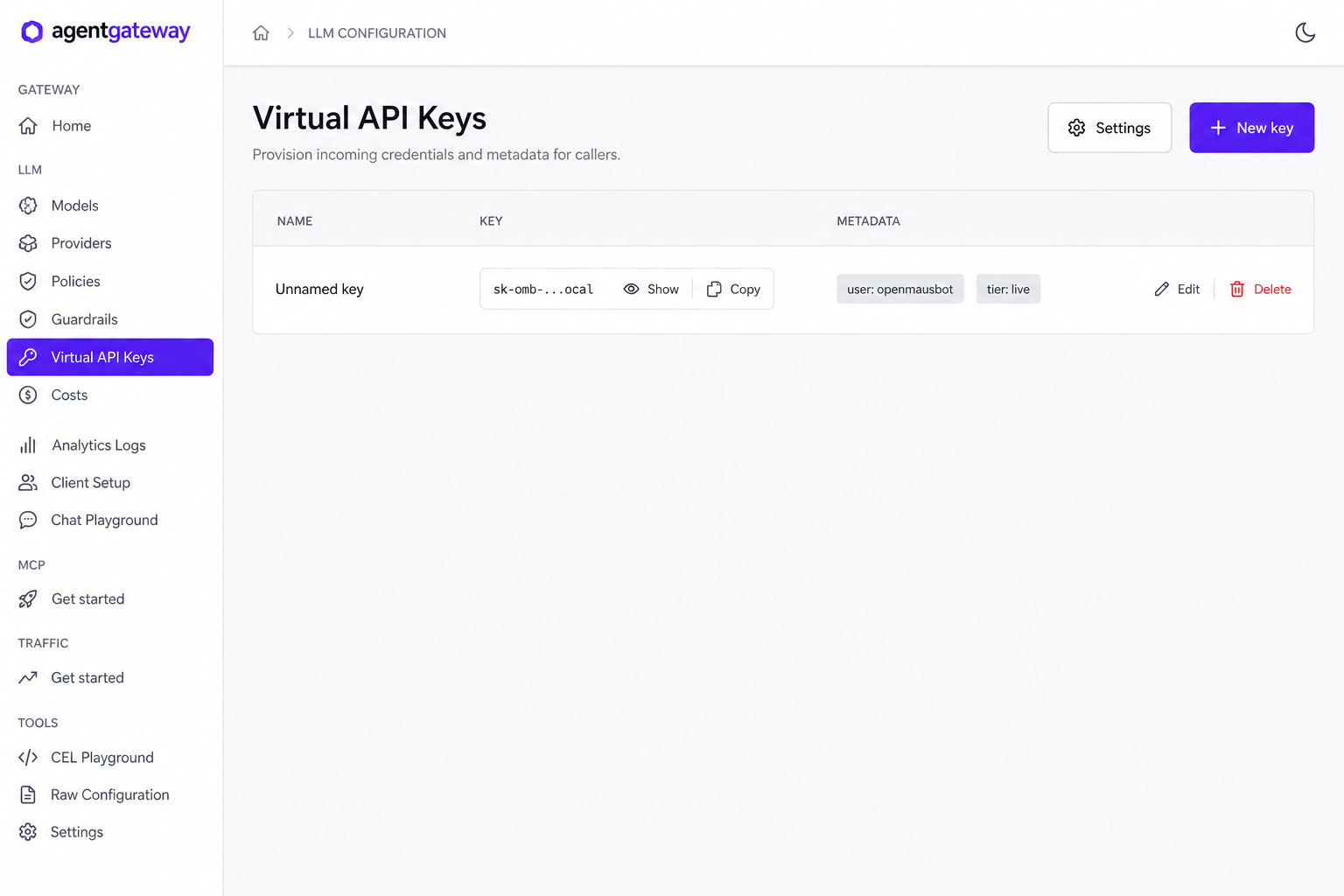
LLM → Virtual API Keys → + New key. I tagged mine like this:
| Field | What I used |
|---|---|
| Name | I left it Unnamed key. You can be nicer. |
user | openmausbot |
tier | live |
Copy it once. The UI masks it (sk-omb-…). That value opens your gateway. It does nothing at OpenAI.
A few things I wish someone had said out loud:
Go strict once you care who paid.optional is fine for the first curl. The moment you want user: openmausbot on the cost page, optional is just a hole.
Don’t name the virtual key OPENAI_API_KEY.
OpenMausBot deletes that name before Codex starts. I put it in OPENMAUSBOT_VIRTUAL_KEY and told Codex via env_key. The harness can inherit it. Codex still sees it after spawn.
Client Setup is a printer, not a wizard.
Admin UI → Client Setup will copy the Codex snippet from config you already wrote. It will not invent a route, a model, or a key. I still like it — less typing, fewer typos.
More in the virtual key docs.
Guardrails, rate limits, cost
This is why I didn’t just export a key and call it a day. The YAML above is what I actually ran:
| Control | Why I put it there |
|---|---|
Regex reject | I don’t want a prompt that looks like api_key=…, sk-…, or an email to leave the laptop (regex filters) |
localRateLimit type: tokens | 200k tokens an hour — enough for a Saturday, not enough for a runaway loop |
tokenize: true | Count the prompt before OpenAI sees it, so a fat turn can 429 without spending |
modelCatalog | So each Indigo turn has a dollar number (agw.ai.usage.cost.total) |
On standalone, that rate limit is for the whole gateway. If you later want per-key daily budgets, you’ll want a remote rate-limit server — budget limits and my hard spend limits post. Cost catalog walkthrough: standalone dashboard. If you want a heavier scanner in front of the same door: F5 guardrails.
None of that YAML lives in OpenMausBot. Indigo just chats. I like that.
Codex → :4000/v1
This is the official Codex recipe. I wrote a profile, then made it the default so the CLI OpenMausBot spawns would pick it up without me thinking about it.
mkdir -p ~/.codex
cat > ~/.codex/agentgateway.config.toml <<'EOF'
model_provider = "agentgateway"

[model_providers.agentgateway]
name = "OpenAI via agentgateway"
base_url = "http://127.0.0.1:4000/v1"
wire_api = "responses"
env_key = "OPENMAUSBOT_VIRTUAL_KEY"
EOF

cp ~/.codex/config.toml ~/.codex/config.toml.bak 2>/dev/null || true
cp ~/.codex/agentgateway.config.toml ~/.codex/config.toml
If you’d rather not touch the default file:
codex -c 'model_provider="agentgateway"' \
  -c 'model_providers.agentgateway.name="OpenAI via agentgateway"' \
  -c 'model_providers.agentgateway.base_url="http://127.0.0.1:4000/v1"' \
  -c 'model_providers.agentgateway.wire_api="responses"' \
  -c 'model_providers.agentgateway.env_key="OPENMAUSBOT_VIRTUAL_KEY"'
The three gotchas that ate my morning:
wire_api = "responses".
Codex speaks /v1/responses, not only chat completions. Miss this and you’ll stare at a quiet gateway log while the CLI looks busy.
env_key cannot be OPENAI_API_KEY.
That name is gone by the time Codex starts. OPENMAUSBOT_VIRTUAL_KEY survives.
Codex also knocks on /v1/models.
Until agentgateway#1462 grows a model list, you may get a metadata warning. Ignore it. /v1/responses still works.
I always smoke-test the CLI before I open the pretty chat UI. Saves a lot of “is it the bot or the gateway?”
export OPENMAUSBOT_VIRTUAL_KEY='sk-omb-...'
codex --profile agentgateway "Hello"
You want a 200 on /v1/responses in the agentgateway log (endpoint=api.openai.com:443, gen_ai.provider.name=openai). If Codex logs into ChatGPT instead, the profile didn’t load. Coffee, then check ~/.codex/config.toml.
Talking to Indigo
Desktop builds embed the harness. From source I run both:
git clone https://github.com/milind-soni/OpenMausBot && cd OpenMausBot
pnpm install
export OPENMAUSBOT_VIRTUAL_KEY='sk-omb-...'   # virtual key only
pnpm dev:server    # 127.0.0.1:8799
pnpm dev           # http://127.0.0.1:5199
Then, in the browser:
- Open
http://127.0.0.1:5199 - Click Indigo
- Model picker → GPT-5.6 Sol
- Type
say hi in five words.
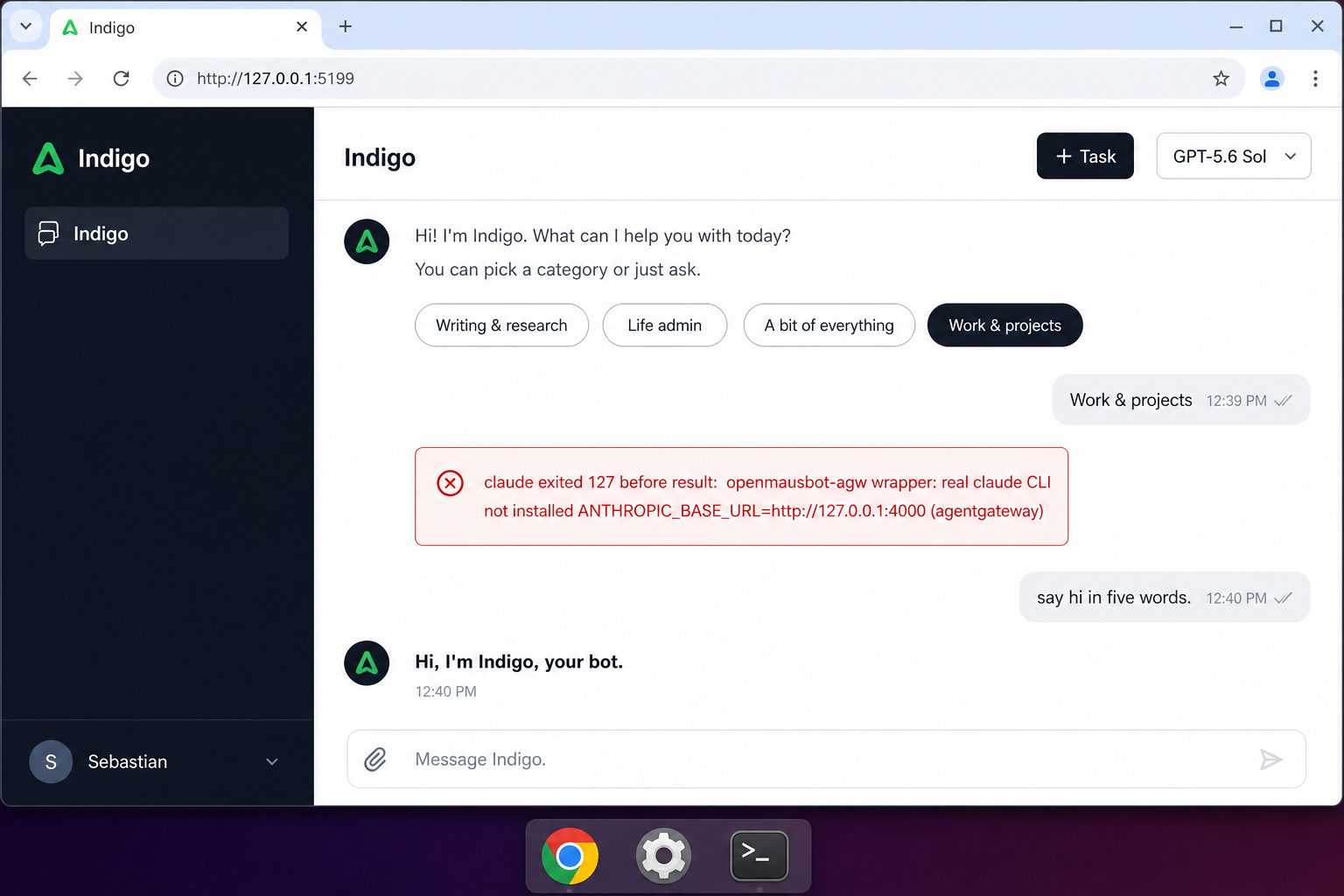
I picked the categories it offered (Work & projects — I was not in a “life admin” mood). Claude failed first, which I’ll get to. Then Codex came back through the gateway and I grinned at five words.
Hi, I’m Indigo, your bot.
The Claude face-plant
The first bubble in that thread was a red box. I left it in the screenshot on purpose. Saturday labs should be honest.
claude exited 127 before result: openmausbot-agw wrapper: real claude CLI not installed
ANTHROPIC_BASE_URL=http://127.0.0.1:4000 (agentgateway)
127 means “I can’t find that command.” A wrapper was already pointing Claude at agentgateway — the redirect was right — but I hadn’t actually installed claude. OpenMausBot will not invent an Anthropic client because you wished for one.
If you want that path later, install the CLI and keep ANTHROPIC_API_KEY on the gateway. The Claude driver deletes it from the child the same way Codex deletes OPENAI_API_KEY.
# after `claude` is actually installed
export ANTHROPIC_BASE_URL='http://127.0.0.1:4000'
I stayed on Codex. Five words were enough for the day.
Why bother
| Without the gateway | How Saturday felt with it |
|---|---|
| OpenAI key on the laptop, or worse, in the bot | The key stayed in the agentgateway process. I slept better. |
| Codex talking to OpenAI with no shared rules | Virtual key, regex guards, a rate limit I can change without touching Indigo |
| “What did this cost?” shrugged off | Cost catalog + user: openmausbot on the turn |
| Every new chat app grows another secret | One :4000 door. Next weekend’s toy can use it too. |
If you already send Claude Code or Codex through agentgateway, this is the same idea with a nicer living room: localhost, /v1, a bot named Indigo instead of a blinking cursor.
Further reading
- Official: Codex → agentgateway
- Official: Virtual keys
- Official: Regex guardrails
- OpenMausBot: milind-soni/OpenMausBot
- Related: How To: Run agentgateway standalone locally
- Related: How To: Connect Claude Code & Codex through agentgateway
- Related: How To: Point Claude Desktop at agentgateway with Entra SSO
- Related: Route MCP / Claude traffic through agentgateway
- Related: agentgateway standalone cost & tokenomics dashboard
- Related: Hard spend limits for LLM traffic
- Related: First steps: agentgateway and F5 AI Guardrails
- Related: What is agentgateway.dev?
- Related: Why your AI agents need a gateway