First, what is DeepSeek Harness?
Two days ago — August 13, 2026 — DeepSeek open-sourced DeepSeek Harness, and the README’s pitch is one line: everything is a plugin.
Not marketing-everything. Actually everything. Models, tools, skills, sessions, sandboxes, storage, the agent loop, scheduling, even the UI are all swappable from configuration. It’s MIT licensed, it’s an honest developer preview — the package reads 0.1.0-rc.5 and the README promises breaking changes — and you can be running it in one command:
npx @deepseek-ai/dsh web
What comes up is a local agent workspace: chat on one side, the agent’s trajectory on the other, sessions in a sidebar, a model picker at the bottom. It runs on your laptop, with filesystem and shell access, and it’s good.
The plugin that matters for this post is the one deciding where the tokens come from. Harness will talk to DeepSeek’s own models, or to any OpenAI-compatible endpoint you point it at. It asks for exactly one thing in return, on the Settings → Models screen: an API key.
That’s the moment worth pausing on. A two-day-old agent framework, running with shell access, asking for a provider key it will write to a file in my home directory — and once it has it, every call it makes is between those two parties. No one else sees the traffic. Nothing counts it. Nothing constrains it.
And what is agentgateway?
agentgateway is an open source connectivity data plane built specifically for agent traffic — LLM calls, MCP tool calls, and agent-to-agent. I’ve written about why that needs to be its own thing rather than a reverse proxy with extra steps.
For this post the relevant part is simple: it’s a single binary that speaks the OpenAI API dialect. Anything that can call OpenAI can call it instead — including Harness.
What we’re actually here to do
Put the gateway between Harness and the provider, and that one hop becomes the place where five things live that the harness has no opinion about:
- Govern — one place that decides what this client is allowed to ask for. Virtual keys, prompt guards, rate limits, spend caps.
- Secure — the real
OPENAI_API_KEYstays inside the gateway process. Harness gets a token I invented, and it works just as well. - Route — Harness asks for a model by name; the gateway decides which provider and which exact model version actually serves it.
- Log — every call, its status, and the model it resolved to, on one page. Without a proxy, this traffic is invisible.
- Cost — tokens turned into dollars with a cost catalog, attributed per model and per user.
I’ll build it in that order, and the order matters: the first four are what make the thing work, and governance is what makes it safe to leave running. Secure, route, log, and cost come first, because you want to see traffic before you start refusing it. Then we turn govern on at the end and watch the front door get pickier.
By the end of it I asked Harness two deliberately boring questions, and the gateway handed me a receipt: 39 tokens, 2 calls, $0.0000072. A meaningless amount of money, and exactly the point — that number simply does not exist when an agent talks to a provider directly.
Here’s the whole build, including the two places I broke it.
👉 Everything below is in the repo: sebbycorp/deepseek-agw · Never run the gateway binary before? Start with agentgateway standalone locally
The shape of it
Three processes on one laptop, and the only interesting part is which one holds the secret.
Harness thinks it’s talking to OpenAI. It isn’t — it’s talking to a gateway on 127.0.0.1:4002 that speaks the same OpenAI-compatible dialect, accepts my made-up token, and quietly swaps in the real key on the way out. Because every request passes through that one process, it’s also the natural place to count tokens, add up dollars, and emit traces.
The rule I care about: the key is not in GitHub, not in Harness’s config directory, and not in the Harness process. It lives in one file on disk with mode 600, and it gets loaded into exactly one process.
Standing up the gateway
Node first, and this one is worth stating plainly because it cost me a confusing minute: current dsh does not run on Node 20. Use 24.
nvm install 24
nvm use 24
node -v
Then the gateway itself, pinned to 1.4.1 — I’m on the 1.4 OSS line:
curl -sL https://agentgateway.dev/install | bash -s -- --version v1.4.1
agentgateway --version
Next, the piece people skip. The gateway can count tokens on its own, but tokens aren’t money. Import the cost catalog once and it can turn those counts into dollars:
mkdir -p costs
agctl costs import --source models.dev --providers openai --out ./costs/catalog.json
If you want traces too, Jaeger all-in-one is one command. Skip it if you don’t care — nothing else depends on it:
docker run -d --name jaeger \
  -e COLLECTOR_OTLP_ENABLED=true \
  -p 16686:16686 -p 4317:4317 -p 4318:4318 \
  jaegertracing/all-in-one:latest
Now the config. The thing to notice is what isn’t in it — there’s no secret here, just a placeholder, which is why this file is safe to commit:
config:
  adminAddr: localhost:14010
  statsAddr: "[::]:14030"
  modelCatalog:
    - file: ./costs/catalog.json
  tracing:
    otlpEndpoint: http://localhost:4317
    randomSampling: true

gateways:
  default:
    port: 4002

llm:
  models:
    - name: "*"
      provider: openAI
      params:
        apiKey: "$OPENAI_API_KEY"
The real key goes in its own file, locked down, and git never sees it:
mkdir -p .secrets
umask 077
printf 'export OPENAI_API_KEY=sk-...\n' > .secrets/openai.env
chmod 600 .secrets/openai.env
And a small start script does the only clever thing in this whole setup — it sources that file into this process and nothing else, then refuses to start if the key didn’t make it:
#!/usr/bin/env bash
set -euo pipefail
SECRET="${AGW_SECRET_FILE:-$ROOT/.secrets/openai.env}"
[[ -f "$SECRET" ]] || { echo "missing $SECRET" >&2; exit 1; }
set -a; . "$SECRET"; set +a
[[ -n "${OPENAI_API_KEY:-}" ]] || { echo "OPENAI_API_KEY is empty" >&2; exit 1; }
exec agentgateway -f "$ROOT/agentgateway.yaml"
./start-agw.sh
Open http://127.0.0.1:14010/ui and make sure the admin UI is actually there before moving on. If the gateway isn’t running, everything in the next section fails in ways that look like Harness problems but aren’t.
Handing Harness a fake key
export GATEWAY_API_KEY=local-harness-not-openai
npx @deepseek-ai/dsh web
Read that token again: local-harness-not-openai. It isn’t a credential, it’s a label. The gateway is sitting on loopback and will accept it happily, then attach the real key on the way upstream.
Harness comes up on http://127.0.0.1:3080. Don’t send a message yet — mine failed, and I’ll get to why in a minute. Wire the provider first.
Go to Settings → Models. DeepSeek shows up red here because there’s no DeepSeek key on this laptop and I don’t want one. The custom agentgateway row is the green one:
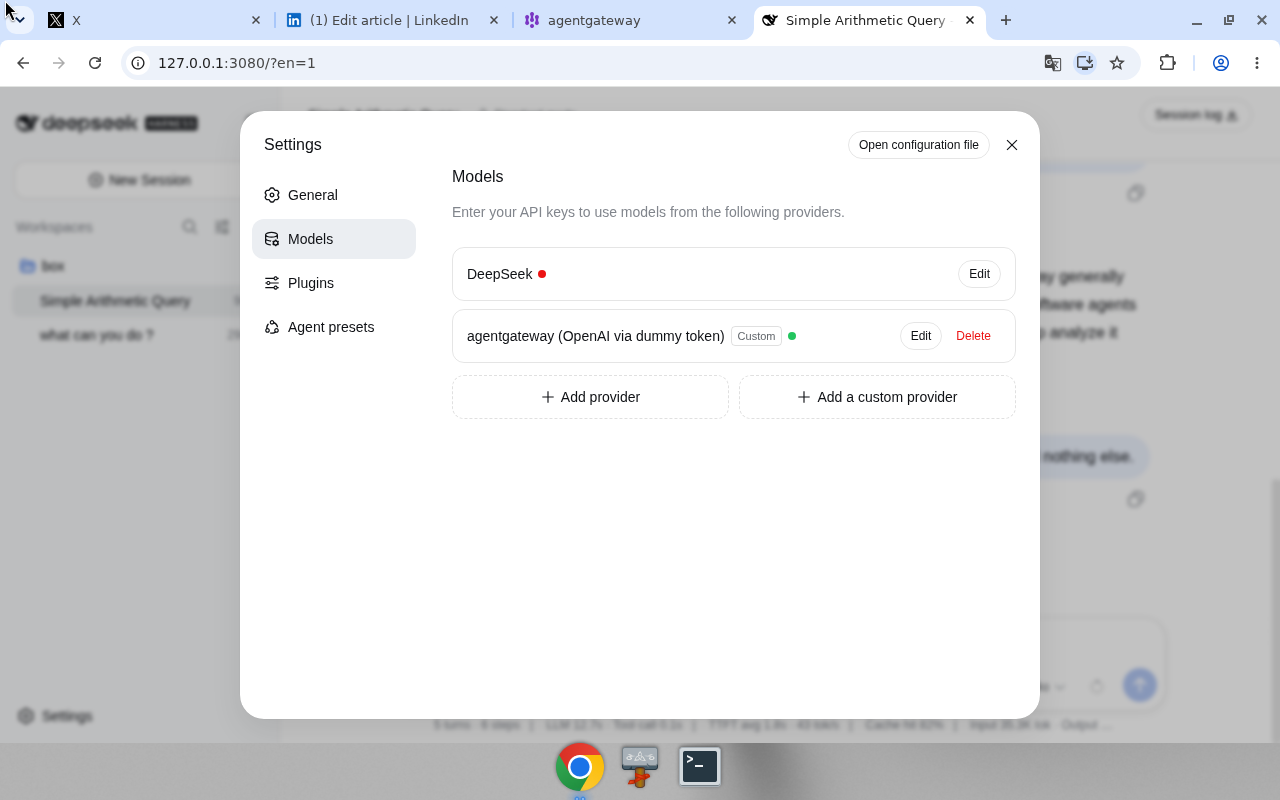
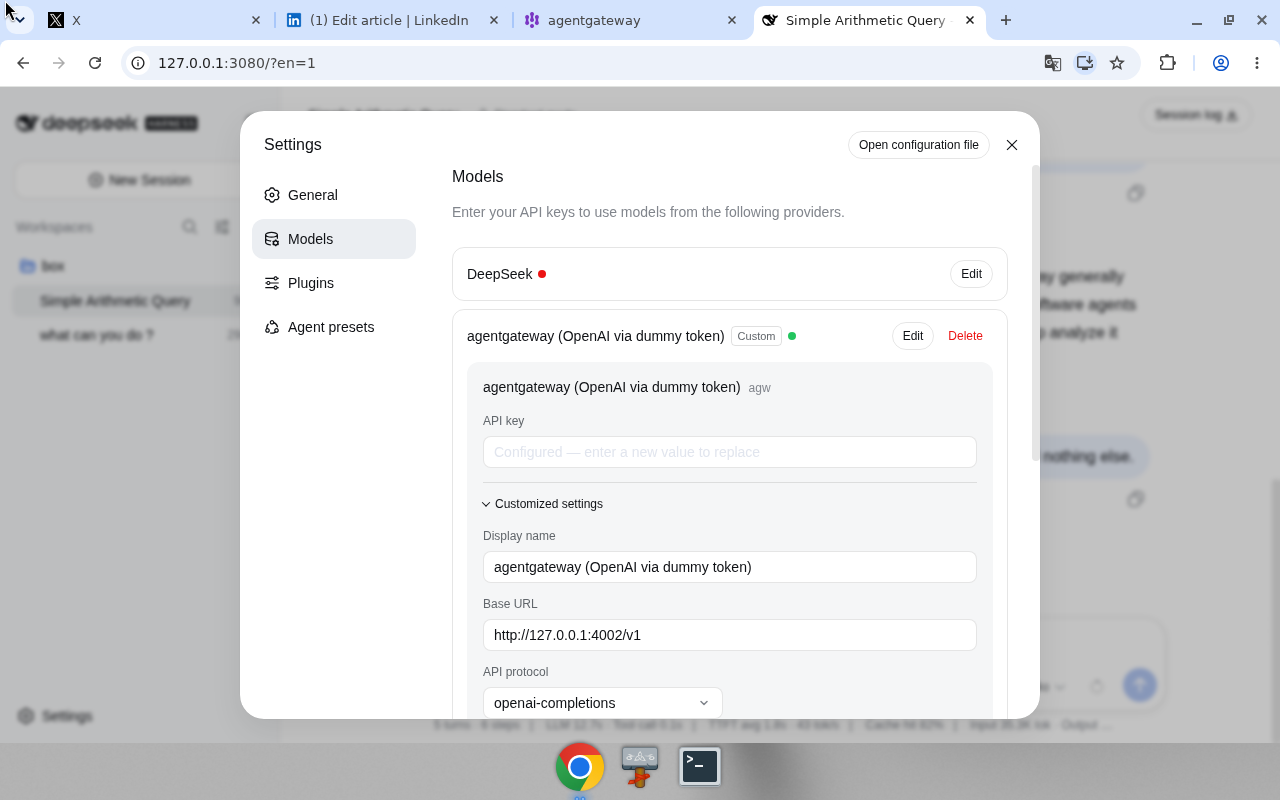
Add a custom provider and fill in the form. This is the entire integration — a base URL and a fake token:
| Field | Value |
|---|---|
| Provider ID | agw |
| Display name | agentgateway (OpenAI via dummy token) |
| API protocol | openai-completions |
| Base URL | http://127.0.0.1:4002/v1 |
apiKeyEnv | GATEWAY_API_KEY |
| Key value | local-harness-not-openai — not the real OpenAI key |
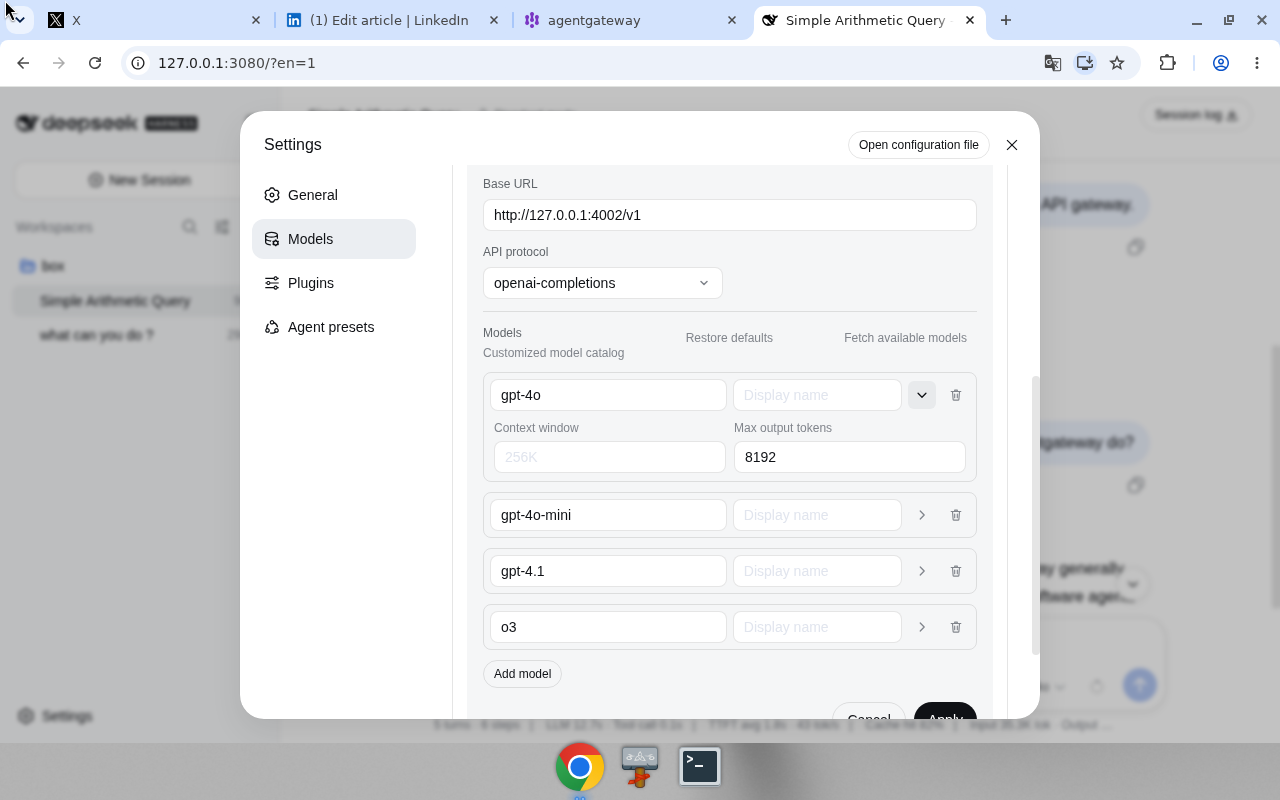
Then add the models — gpt-4o and gpt-4o-mini are enough to start — and change max output tokens to 8192 while you’re in there. That number matters more than it looks, which is the first of my two mistakes:
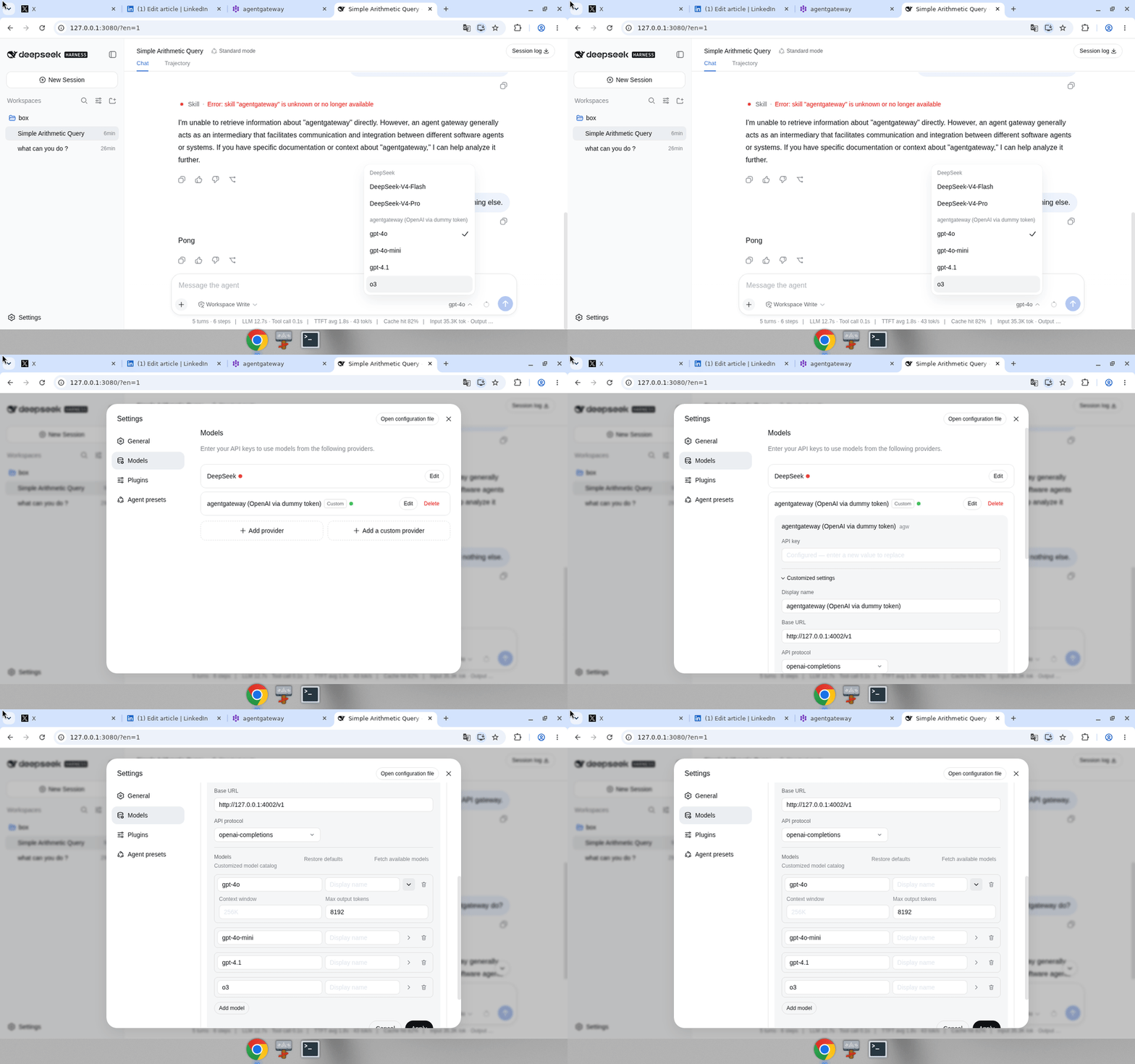
Finally, New Session, and pick agentgateway / gpt-4o. The picker keeps the DeepSeek models in their own group above the custom provider, so once you know to look it’s hard to get wrong:
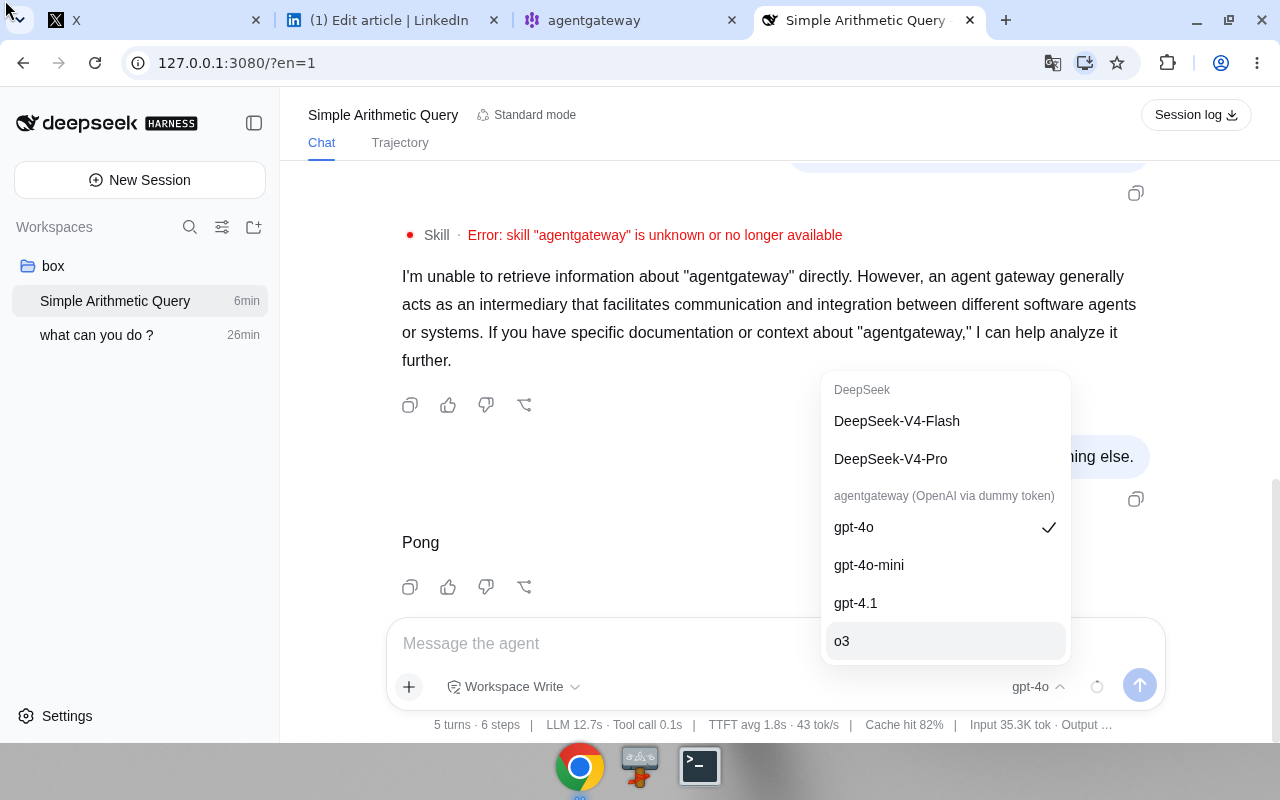
None of this has to happen in the browser, by the way. The UI is just writing $DSH_HOME/settings.yaml — usually ~/.dsh — so you can skip the clicking entirely:
llm-pi-ai:
  providers:
    agw:
      apiKeyEnv: GATEWAY_API_KEY
      api: openai-completions
      baseURL: http://127.0.0.1:4002/v1
      models:
        - id: gpt-4o
          maxTokens: 8192
        - id: gpt-4o-mini
          maxTokens: 8192
The token lands in a second file, $DSH_HOME/.credentials.yaml. Worth opening once just to reassure yourself: it holds GATEWAY_API_KEY, the fake one. OPENAI_API_KEY never appears anywhere in that directory.
Where I tripped
Two failures, ten minutes, neither one the gateway’s fault. I’m writing both down because I’d have saved the evening if someone else had.
The first turn failed on a missing key. I’d wired everything up, typed a message, and got an error about a DeepSeek credential — which made no sense, because I’d just spent twenty minutes making sure this thing pointed at OpenAI. The catch: my session had been created before I added the provider, so it was still sitting on deepseek-official, and there’s no DEEPSEEK_API_KEY on this box. My careful config was real; the session just wasn’t using it. New Session, pick agw, move on.
Then gpt-4o started returning 400. This one is sneakier. Harness defaults max output tokens to 32768, and gpt-4o caps completion tokens at 16384. Every request was asking for more headroom than the model allows, and OpenAI was rejecting it before a single token got generated. Set it to 16384 or 8192 and it clears up immediately.
That’s the entire troubleshooting section. Fix the provider, fix the ceiling, and it just works.
Two boring questions
I kept the test deliberately dull, because I wasn’t testing the model — I was testing the plumbing:
- “What is 2+2? Reply with just the number.” → 4
- “Name the capital of France in one word.” → Paris
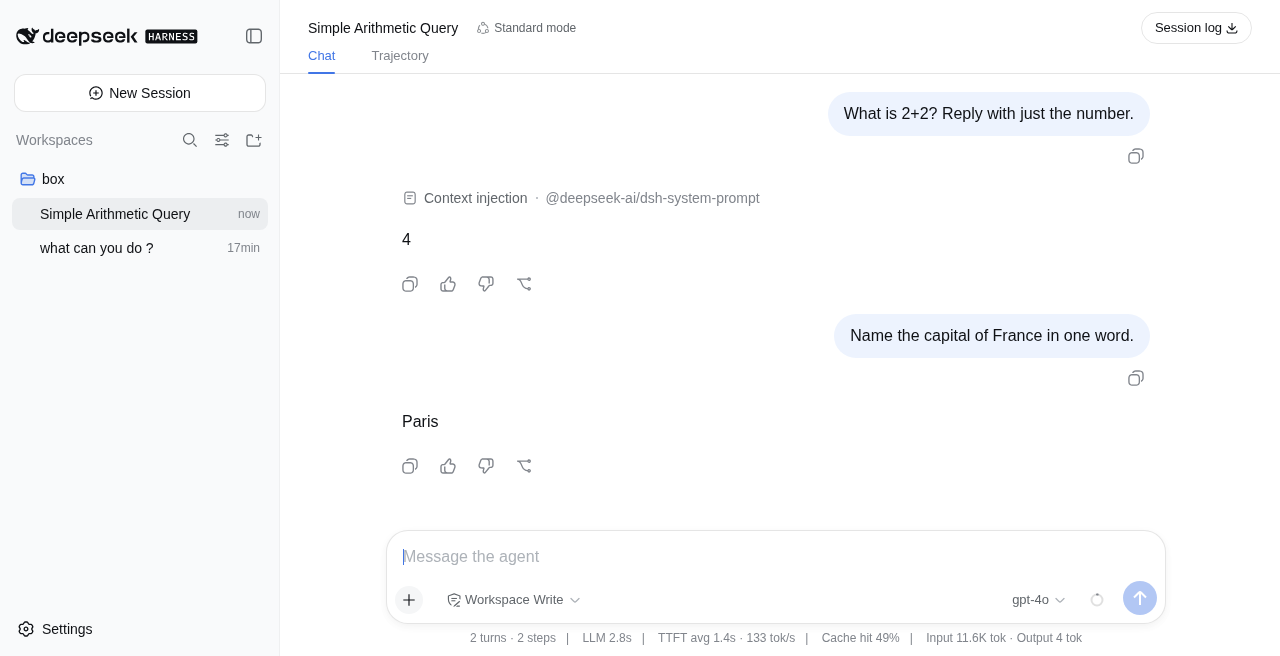
Four and Paris. Not exactly a demo you’d put on a conference slide. But those two answers travelled from a UI holding a fake token, through a gateway holding the real one, out to OpenAI and back — which is the only thing I wanted to prove.
Now the part I actually built this for. Over in the admin UI, that conversation has a receipt: 39 tokens, 2 calls, $0.0000072, broken out by model, user, and provider.
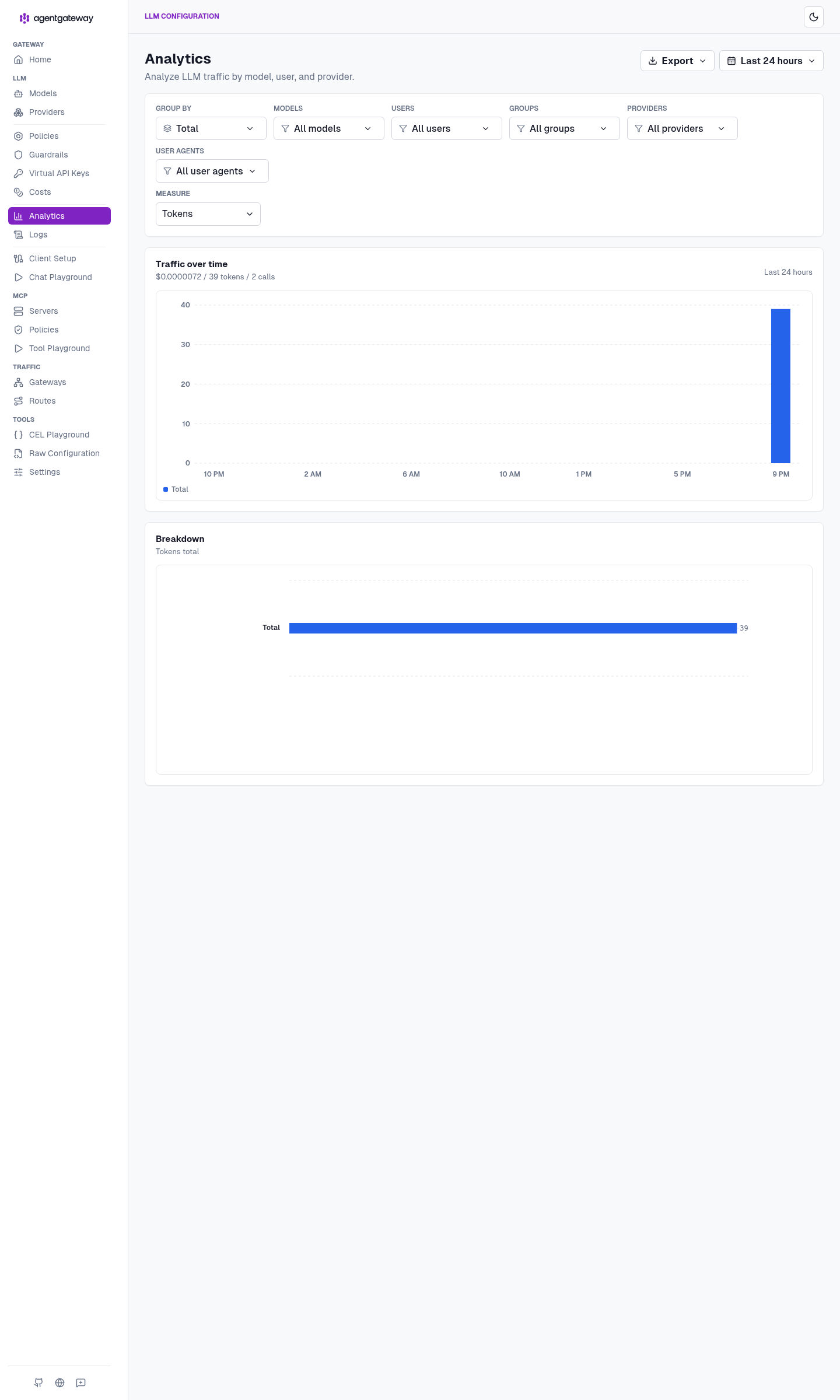
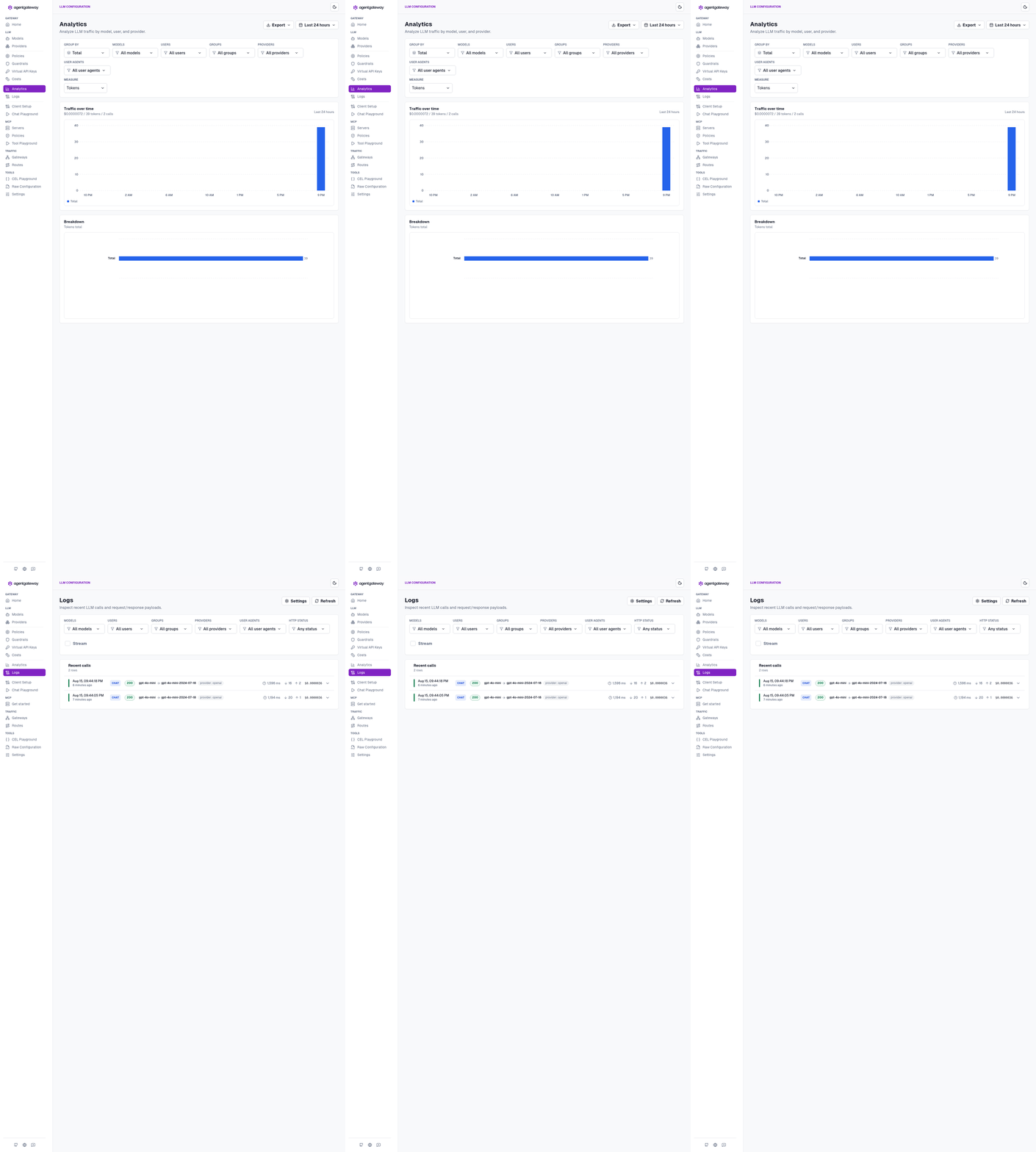
The Logs page is the proof that the dummy token really did reach OpenAI and come back: two CHAT rows, both 200, model routing resolving gpt-4o-mini to gpt-4o-mini-2024-07-18 on provider openai. And no key anywhere on the page, which is the whole idea.
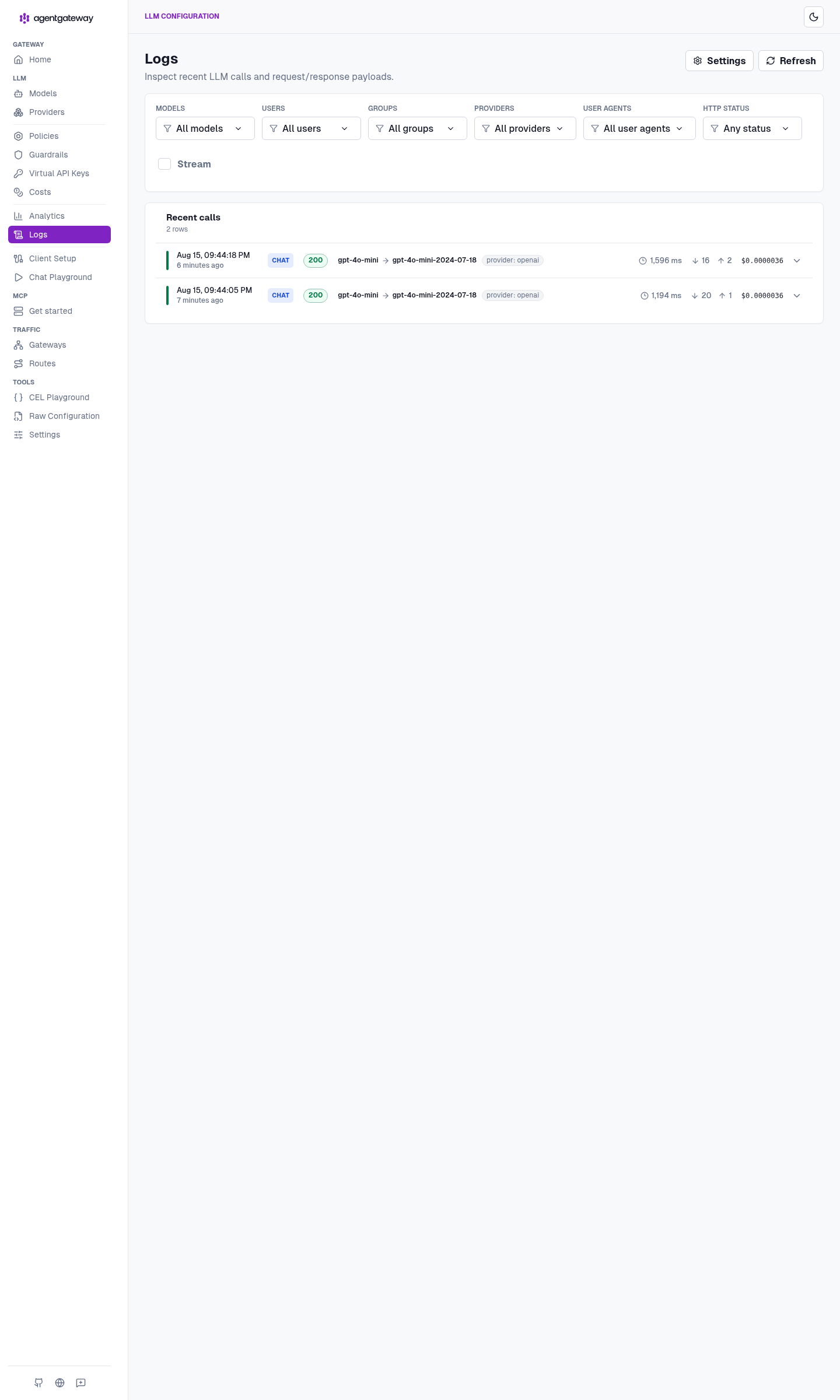
Scale that thought up. It’s a rounding error for two arithmetic questions, but it’s the same counter when an agent runs unattended for an hour. If you want the richer version of this view, I went deeper on it in the cost and tokenomics dashboard post.
Now make the door pickier
Everything so far gets the key out of the app and puts a number on the traffic. That’s four of the five. What’s still missing is the one that matters the moment this stops being a toy: nothing yet decides who may call, how much they may spend, or what may be sent.
Right now my gateway accepts local-harness-not-openai because it accepts anything. That’s fine for proving a path works. It’s not fine for a framework running with shell access on a laptop that also has my SSH keys on it.
So the config grows three policies. This is agentgateway-governed.yaml in the repo:
llm:
  policies:
    # GOVERN — who is allowed through this door, and under what name
    apiKey:
      mode: strict
      keys:
        - key: "$DSH_VIRTUAL_KEY"
          metadata:
            user: dsh
            tier: local

    # GOVERN — a ceiling the harness cannot talk its way past
    localRateLimit:
      - maxTokens: 200000
        tokensPerFill: 200000
        fillInterval: 3600s
        type: tokens

  models:
    - name: "*"
      provider: openAI
      params:
        apiKey: "$OPENAI_API_KEY"
        tokenize: true          # count the prompt before OpenAI sees it

      # SECURE — an agent that can read files shouldn't be able to paste
      # a secret into a prompt
      guardrails:
        request:
          - regex:
              action: reject
              rules:
                - pattern: "api[_-]?key[=:]\\s*\\S+"
                - pattern: "sk-[A-Za-z0-9_-]{10,}"
                - builtin: email
Three things change, and each one is worth understanding rather than pasting.
mode: strict turns my invented token into a real one. Not real as in OpenAI — it still does nothing at api.openai.com. Real as in the gateway now recognizes it, and stamps user: dsh onto every call it authorizes. That’s the difference between a cost page that says “someone spent this” and one that says who. Once you care who paid, optional is just a hole.
The rate limit is the thing that lets me sleep. An agent loop that goes wrong doesn’t fail politely, it retries — and tokenize: true means the gateway counts the prompt before OpenAI does, so a runaway turn gets refused without spending anything. Worth knowing on standalone: that ceiling is gateway-wide, not per key. Per-key daily budgets need a remote rate-limit server, which is a different post.
The guardrails exist because of what Harness is. This is a framework with filesystem and shell access, driving a model that decides for itself what to include in a prompt. I don’t think it will paste my .env into a completion. I’d just rather it can’t.
Switching over is two edits. The virtual key goes in the same mode-600 file as the real one — pick any value, it’s yours:
printf 'export DSH_VIRTUAL_KEY=sk-dsh-local-harness\n' >> .secrets/openai.env
AGW_CONFIG=./agentgateway-governed.yaml ./start-agw.sh
And Harness sends that instead of the placeholder — one field in Settings → Models, or the environment before you start it:
export GATEWAY_API_KEY=sk-dsh-local-harness
npx @deepseek-ai/dsh web
That’s it. No plugin, no patch, nothing in ~/.dsh that knows any of this happened. The harness doesn’t learn about governance — it just keeps talking to /v1 and the door got pickier. That’s the whole argument for putting the control point outside the app.
One warning from experience: if you flip to strict and forget to update the token, every single call returns 401 and it looks exactly like the gateway is broken. And the email builtin in that guard is more eager than you’d expect — the first time a legitimate prompt gets a 400 content_policy_violation, that’s the rule that caught it, not a bug.
The same trick on a cluster
Nothing about the pattern changes when this moves off the laptop. Only the hiding place for the secret does — the mode-600 file becomes a Kubernetes Secret, and the local YAML becomes a handful of CRDs. The repo has them as applyable files under k8s/:
| On my laptop | On a cluster |
|---|---|
mode-600 .secrets/openai.env | openai-secret Secret, Authorization key |
llm.models in the YAML | AgentgatewayBackend + a /v1 HTTPRoute |
config.modelCatalog | ConfigMap + AgentgatewayParameters on the Gateway |
config.tracing | AgentgatewayPolicy → Jaeger |
http://127.0.0.1:4002/v1 | http://127.0.0.1:8080/v1 through a port-forward |
Harness doesn’t notice the difference. Same provider form, same fake token, one different URL:
kubectl port-forward -n agentgateway-system deploy/agentgateway-proxy 8080:80
export GATEWAY_API_KEY=local-harness-not-openai
npx @deepseek-ai/dsh web
One trap worth repeating, because it fails silently: the cost catalog has to be attached to the Gateway via AgentgatewayParameters. Hang it off the GatewayClass and it’s simply ignored — no error, just no dollar figures.
Being straight with you: the standalone path is the one I actually ran, and every screenshot above comes from it. The manifests mirror the 1.4.x CRDs, but I didn’t stand a cluster up for this one, so treat them as a starting point rather than something I’ve proven. For a cluster walkthrough I have run, see agentgateway quickstart on Kubernetes.
Why I keep doing this
The setup takes an evening. What I get back is the five things I opened with, and they’re all boring in the best way.
The real key lives in one file, loaded by one process, and ~/.dsh holds a virtual key that’s worthless anywhere else — secure. Rotating the real one means editing a file and restarting a single thing, instead of hunting through four config directories. Harness asks for gpt-4o and the gateway decides what actually answers — route. Every call is on a page with its status and resolved model — log. When someone asks what an agent cost to run, I have a number instead of a shrug — cost. And the door only opens for a key I issued, under a token ceiling, refusing prompts that look like secrets — govern.
That last one is the reason this is worth an evening rather than a curl. The first four make the setup pleasant. Governance is what makes it something you can leave running while you’re asleep, or hand to someone who isn’t you. And notice where all of it lives: five controls, none of them inside the agent framework. Harness never learned that any of this exists.
MCP isn’t wired into this one yet — same gateway, later. Given that Harness makes everything a plugin, including its tools, that’s the obvious next stop. But the shape keeps repeating. Whether it’s Claude Code and Codex, OpenMausBot, or DeepSeek Harness, the app stays on loopback with a fake token and the secret stays in the gateway. Every new toy just points at /v1.
Which means the next one takes ten minutes, not an evening. That’s really why I bother.
Further reading
- Repo: sebbycorp/deepseek-agw
- Official: agentgateway LLM clients
- Related: How To: Run agentgateway standalone locally
- Related: How To: Point OpenMausBot at standalone agentgateway
- Related: How To: Connect Claude Code & Codex through agentgateway
- Related: agentgateway standalone cost & tokenomics dashboard
- Related: agentgateway 1.4 OSS: what changed from 1.3
- Related: agentgateway quickstart on Kubernetes
- Related: Proxying all your LLM traffic through agentgateway
- Related: Why your AI agents need a gateway
- Related: What is agentgateway.dev?