Code Share: Deploy kagent with Agent Substrate
By Sebastian Maniak
Agent sessions are bursty. A user asks a question, the agent thinks for a few seconds, then the session sits idle for minutes — or hours — waiting on the next turn. Plain Kubernetes handles this badly: an idle pod still books its CPU and memory, and a cold pod takes seconds to come back. Multiply that across thousands of conversations and you’re paying for a lot of nothing.
Agent Substrate flips the model. It decouples the agent session from the pod: idle sessions are checkpointed — full RAM and filesystem, via gVisor — to object storage, the pod returns to a warm pool, and the session resumes sub-second on the next request, exactly where it left off. Think serverless scale-to-zero, but for stateful agents.
kagent is the Kubernetes-native agent control plane. Wire substrate in as its execution layer and a declarative SandboxAgent becomes a gVisor actor instead of a long-running Deployment.
This guide covers three things:
- What a substrate is (concepts from learn.agentsubstrate.dev)
- What you can actually accomplish with it (use cases)
- How to set it up with kagent OSS on a throwaway kind cluster — one-shot script or manual Helm
Runnable code for this path lives in
01-kagent-agent-substrate(or your local kagent-demos clone). Prefer a guided lab? Same flow in the Instruqt workshop.
What is Agent Substrate?
From the official atlas at learn.agentsubstrate.dev:
Agent Substrate is a Kubernetes-native runtime for highly-multiplexed actor workloads — AI agents, sandboxed environments, stateful services. It decouples actor lifecycle from Pods, so a small pool of pre-warmed gVisor workers can host 30× more actors than there are pods, by suspending idle actors to object storage and restoring them on demand.
Kubernetes is excellent at long-running services. It is not excellent at:
| Pain | Why K8s struggles | What substrate does |
|---|---|---|
| Idle agents | Pods still consume CPU/memory | Suspend to object storage; reclaim the worker |
| Millions of sessions | API server / etcd not built for that QPS | Actors live in Valkey/Redis, not as one CR per session |
| Sub-second wake | kube-scheduler + image pull is seconds | Pre-warmed workers; resume bypasses the scheduler |
| Stateful scale-to-zero | Volumes don’t attach/detach at agent speed | Full RAM + filesystem checkpoint via gVisor |
Architecture bet in one sentence: Kubernetes provisions infrastructure; substrate schedules actors.
Core concepts (glossary)
These terms show up everywhere in the UI, CRDs, and grpcurl surface. Definitions match learn.agentsubstrate.dev/concepts.
| Term | Meaning |
|---|---|
| Actor | One logical agent session. Has its own RAM, filesystem, and identity — but is not pinned to a pod. Can suspend on worker A and resume on worker B. |
| Worker | A pre-warmed pod that hosts at most one actor at a time (IDLE or assigned). Fungible hosting slot, not the agent itself. |
| WorkerPool | CRD for a Deployment of warm workers. You size concurrency by scaling the pool. |
| ActorTemplate | Immutable “class” for actors (image, entrypoint, pool, snapshot location). Creating one builds a golden snapshot (version 0). |
| Golden snapshot | Fresh, just-booted image of the template. Brand-new actors restore from this instead of cold-booting. |
| Snapshot | Checkpoint of RAM + sentry/filesystem state in S3/GCS (zstd). Resume uses demand paging so only touched pages load. |
| Suspend / Resume | Checkpoint to object storage and free the worker / restore sub-second into an idle worker. |
| ateapi | Control plane: actor lifecycle, worker assignment, suspend/resume workflows (gRPC). |
| atenet | L7 router + DNS. Per-request resolve of which worker hosts an actor; triggers resume if suspended. |
| atelet | Node DaemonSet: pulls images, downloads snapshots, talks to ateom-gvisor over a Unix socket. |
| ateom-gvisor | In-worker helper that shells out to runsc checkpoint / runsc restore. |
Actor lifecycle
CreateActor → SUSPENDED
     │
     ▼
ResumeActor → RESUMING → RUNNING
     │                      │
     │                      ▼
     │               SuspendActor → SUSPENDING → SUSPENDED
     │
     └── DeleteActor (from SUSPENDED)
Only RUNNING holds a worker. Between chat turns a declarative session is typically SUSPENDED.
Request path (why resume is fast)
On each HTTP hit to an actor:
- DNS resolves
actorId.actors.resources.substrate.ate.dev→ atenet router (not the worker IP). - ExtProc extracts the actor ID and calls ateapi
ResumeActor. - ateapi picks an idle worker from Redis (no kube-scheduler), asks atelet to restore the snapshot.
- ateom-gvisor runs
runsc restore -background— sentry comes up immediately; pages fault in on demand. - Router rewrites
:authorityto the worker pod and forwards the request.
Warm path (already RUNNING): skip restore, just route. Cold path (SUSPENDED): restore + route. No idle pod tax either way.
Deep dive: Resume actor end-to-end · System topology.
What can you accomplish? (use cases)
Substrate is framework-agnostic at the OCI/gVisor layer. With kagent OSS on top, these are the practical outcomes.
1. Dense multi-session chat agents (this guide)
Many concurrent declarative conversations without one Deployment per session.
- Each UI/chat session becomes a short-lived actor.
- After the turn, the actor snapshots back; the worker serves the next session.
- One small WorkerPool multiplexes far more sessions than it has pods (~30× oversubscription is the design point).
You get: serverless economics for stateful chat, with memory and filesystem preserved across turns.
2. Sandboxed cluster assistants (Kubernetes tools in a box)
Run a SandboxAgent with MCP tools (k8s_get_resources, logs, events) inside gVisor.
- Isolation: hostile or buggy tool use stays in the sandbox.
- Density: idle assistants don’t pin CPUs.
- Identity: actor is a first-class substrate identity, not “whatever ServiceAccount the pod had forever.”
This demo’s hello-substrate is exactly that pattern — a Kubernetes assistant actor on the default pool.
3. Coding harnesses and long-lived sandboxes (AgentHarness)
kagent can place OpenClaw / Hermes-style harnesses on substrate (runtime: substrate).
- Shared actor for a coding session or workspace.
- Pins a worker while active (scale the pool: roughly
1 + active harnessesfor headroom). - Strong isolation for shell, git, and untrusted code.
See the kagent AgentHarness docs after this walkthrough.
4. Agent swarms / many-actor demos
Substrate’s own demos (e.g. many stateful counter actors on few workers) show the multiplexing thesis: hundreds of stateful actors on a handful of pods.
You get: a path toward “millions of idle agents, thousands of wakeups/sec” without etcd holding every session.
5. Security-minded agent platforms
- gVisor (or micro-VM class) per actor.
- Egress can sit behind agentgateway so agents never hold provider keys (Solo’s enterprise pattern).
- Snapshot-to-storage means you can reclaim compute without losing session state.
North-star metrics from the architecture docs: ~100 ms activation p95, extreme scale of idle actors, high wakeup throughput. Treat those as direction, not a SLA for the kind lab.
Architecture on kind
What you will run:
┌──────────────────────────── kind cluster (kagent-substrate) ────────────────────────────┐
│                                                                                          │
│   namespace: kagent                          namespace: ate-system                       │
│   ┌────────────────────┐                     ┌──────────────────────────────────────┐   │
│   │ kagent-controller  │  controller.substrate.* │ ate-api-server  (scheduling)      │   │
│   │ kagent-ui          │ ───────────────────────▶│ atenet-router   (L7 routing)      │   │
│   │ SandboxAgent       │                     │   │ atelet          (node supervisor) │   │
│   │   hello-substrate  │                     │   │ valkey-cluster  (state)           │   │
│   │ WorkerPool         │                     │   │ rustfs          (snapshots/S3)    │   │
│   │   kagent-default   │                     │   └──────────────────────────────────────┘ │
│   └────────────────────┘                                                                  │
└──────────────────────────────────────────────────────────────────────────────────────────┘
| Layer | Role |
|---|---|
Agent Substrate (ate-system) | Multiplex actors onto warm workers; suspend/resume via gVisor + object storage. |
kagent (kagent) | Agent CRDs, UI, model provider (OpenAI); substrate as execution layer. |
SandboxAgent | Declarative agent → substrate actor (not a long-running Deployment). |
Pinned versions (this guide)
| Component | Version |
|---|---|
| Agent Substrate | 0.0.8 |
| kagent (OSS) | 0.10.0-beta6 |
| gVisor actor image | ghcr.io/kagent-dev/substrate/ateom-gvisor:v0.0.8 |
| kind | v0.31.0 |
| Node image | kindest/node:v1.35.0 (any 1.31+ works) |
Pairing matters. Substrate 0.0.8 matches kagent 0.10.0-beta6 ateapi/
CreateActorprotos so UI chat works. Substrate 0.0.9 broke that wire format — only bump together with a matching kagent.
Node image matters. Substrate CRDs use CELformat.dns1123Label/dns1123Subdomain(Kubernetes 1.31+). Old kind defaults reject the CRDs.
Prerequisites
- Linux host or VM (~8 vCPU / 16 GB RAM). Valkey (6) + control plane is heavy for a laptop-sized VM.
- Docker running
- OpenAI API key (real LLM calls)
- Optional:
grpcurl+jqfor the control-plane section
macOS / Windows: prefer a cloud Linux VM (
n1-standard-8,m5.2xlarge, …). Docker Desktop often fails the gVisor checkpoint path.
Quick start (one-shot script)
From the demo directory:
export OPENAI_API_KEY="sk-..."
# optional: cp .env.example .env  && edit .env

chmod +x setup.sh teardown.sh
./setup.sh
setup.sh installs tools if missing, creates kind, installs substrate + kagent (wired), and applies manifests/hello-substrate.yaml.
Open the UI:
kubectl -n kagent port-forward svc/kagent-ui 8080:8080
# → http://localhost:8080 → Agents → hello-substrate
Tear down:
./teardown.sh
Script knobs
| Env var | Default | Meaning |
|---|---|---|
OPENAI_API_KEY | (required) | Model provider key |
KIND_CLUSTER | kagent-substrate | kind cluster name |
SUBSTRATE_VERSION | 0.0.8 | Substrate chart |
KAGENT_VERSION | 0.10.0-beta6 | kagent chart |
WORKER_POOL_REPLICAS | 2 | Warm workers (2 helps golden-snapshot blue-green) |
SKIP_TOOLS=1 | off | Don’t auto-install kubectl/helm/kind/… |
SKIP_CLUSTER=1 | off | Reuse existing cluster |
SKIP_AGENT=1 | off | Skip applying the sample agent |
Manual walkthrough (same path as the script)
Env
export OPENAI_API_KEY="sk-..."
export KIND_CLUSTER=kagent-substrate
export SUBSTRATE_VERSION=0.0.8
export KAGENT_VERSION=0.10.0-beta6
⚠️ Do not write
OPENAI_API_KEY=... helm ... --set ...="${OPENAI_API_KEY}"on one line — the variable expands before the assignment and you silently install with an empty key.
Step 1 — kind cluster
kind create cluster --name "${KIND_CLUSTER}" --image kindest/node:v1.35.0 --wait 120s
kubectl get nodes
Step 2 — Agent Substrate
JWT auth (ServiceAccount tokens) is the chart default — no feature gates.
helm upgrade --install substrate-crds \
  oci://ghcr.io/kagent-dev/substrate/helm/substrate-crds \
  --version "${SUBSTRATE_VERSION}" \
  --namespace ate-system --create-namespace --wait

helm upgrade --install substrate \
  oci://ghcr.io/kagent-dev/substrate/helm/substrate \
  --version "${SUBSTRATE_VERSION}" \
  --namespace ate-system --wait --timeout 10m

kubectl get pods -n ate-system
Expect ate-api-server, ate-controller, atelet-*, atenet-router, valkey-cluster-0..-5, rustfs Running (plus Completed init Jobs).
| Pod | Role |
|---|---|
ate-api-server | Control plane: lifecycle, scheduling, suspend/resume |
ate-controller | Reconciles WorkerPool + ActorTemplate |
atelet | Node supervisor: images, sandbox, object storage |
atenet-router | L7 route to the active worker |
valkey-cluster-* | Actor/worker state + locks |
rustfs | In-cluster S3 for snapshots |
Step 3 — kagent wired to substrate
Order matters: install substrate first. The kagent controller crash-loops if ateapi is unreachable at startup.
helm upgrade --install kagent-crds \
  oci://ghcr.io/kagent-dev/kagent/helm/kagent-crds \
  --version "${KAGENT_VERSION}" \
  --namespace kagent --create-namespace --wait

helm upgrade --install kagent \
  oci://ghcr.io/kagent-dev/kagent/helm/kagent \
  --version "${KAGENT_VERSION}" --namespace kagent --timeout 10m --wait \
  --set providers.default=openAI \
  --set providers.openAI.apiKey="${OPENAI_API_KEY}" \
  --set controller.substrate.enabled=true \
  --set controller.substrate.ateApiEndpoint="dns:///api.ate-system.svc:443" \
  --set controller.substrate.ateApiInsecure=true \
  --set controller.substrate.atenetRouterURL="http://atenet-router.ate-system.svc:80" \
  --set controller.substrate.ateApiTokenFile="/var/run/secrets/tokens/ate-api/token" \
  --set controller.substrate.defaultWorkerPool.namespace=kagent \
  --set controller.substrate.defaultWorkerPool.name=kagent-default \
  --set substrateWorkerPool.create=true \
  --set substrateWorkerPool.name=kagent-default \
  --set substrateWorkerPool.replicas=2 \
  --set substrateWorkerPool.ateomImage=ghcr.io/kagent-dev/substrate/ateom-gvisor:v0.0.8 \
  --set grafana-mcp.enabled=false \
  --set observability-agent.enabled=false
| Flag | Purpose |
|---|---|
controller.substrate.enabled=true | Turn on integration |
controller.substrate.ateApiEndpoint | Substrate control plane |
controller.substrate.atenetRouterURL | Request router |
substrateWorkerPool.create=true + .replicas=2 | Two warm workers |
| grafana / observability agents off | Avoid broken MCP when Grafana isn’t installed |
If Helm times out on cold start:
kubectl wait deploy/kagent-controller -n kagent --for=condition=Available --timeout=10m
Verify:
kubectl get secret kagent-openai -n kagent
kubectl get workerpools.ate.dev -A   # expect kagent/kagent-default

kubectl -n kagent port-forward deploy/kagent-controller 8083:8083 >/tmp/pf-ctrl.log 2>&1 &
sleep 3
curl -s http://localhost:8083/api/substrate/status; echo
# expect "enabled": true
kill %1 2>/dev/null
Step 4 — Deploy a SandboxAgent
Manifest (also in the demo repo as manifests/hello-substrate.yaml):
apiVersion: kagent.dev/v1alpha2
kind: SandboxAgent
metadata:
  name: hello-substrate
  namespace: kagent
spec:
  type: Declarative
  description: A Kubernetes assistant running inside a substrate gVisor actor
  declarative:
    # Go runtime is required for gVisor checkpoint/restore on substrate.
    runtime: go
    modelConfig: default-model-config
    systemMessage: |
      You are a helpful Kubernetes assistant running inside an Agent Substrate
      gVisor actor. Use the Kubernetes tools to answer questions about the
      cluster. When asked who you are, say "I am a Kubernetes agent running
      inside a gVisor actor on Agent Substrate." Keep answers concise.
    tools:
    - type: McpServer
      mcpServer:
        name: kagent-tool-server
        kind: RemoteMCPServer
        apiGroup: kagent.dev
        toolNames:
        - k8s_get_resources
        - k8s_describe_resource
        - k8s_get_pod_logs
        - k8s_get_events
  substrate:
    workerPoolRef:
      name: kagent-default
kubectl apply -f manifests/hello-substrate.yaml
kubectl wait sandboxagent/hello-substrate -n kagent --for=condition=Ready --timeout=5m

kubectl get sandboxagent -n kagent
kubectl get actortemplates.ate.dev -n kagent
kubectl get pods -n kagent -l ate.dev/worker-pool=kagent-default -o wide
The first golden snapshot takes ~60–90s. kagent projects the SandboxAgent into an owned ActorTemplate (and secrets); you don’t hand-write the ate.dev CRDs for the happy path.
Step 5 — Chat and watch suspend / resume
kubectl -n kagent port-forward svc/kagent-ui 8080:8080
# http://localhost:8080 → Agents → hello-substrate
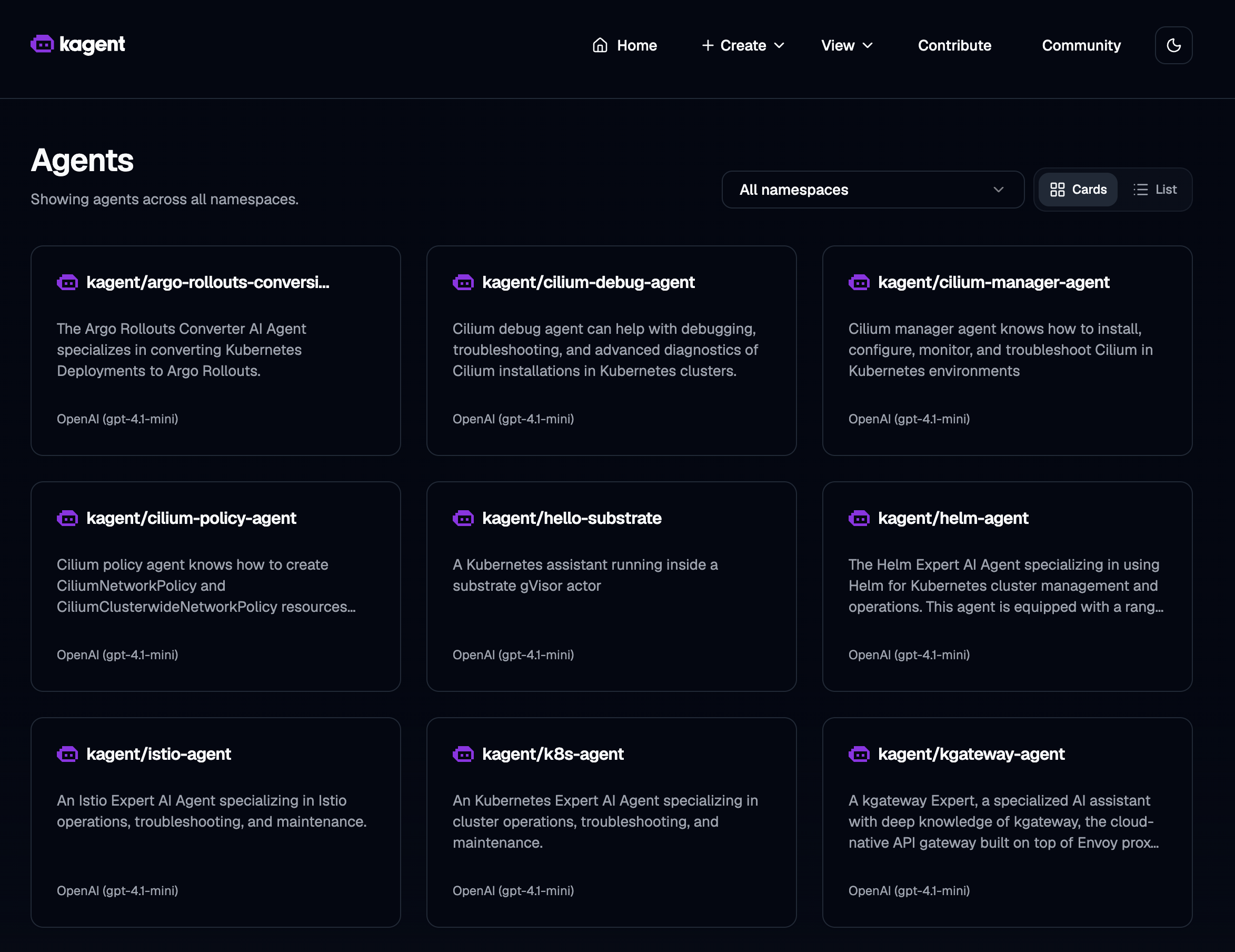
The Agents view lists every agent across namespaces — hello-substrate (our declarative Kubernetes assistant on the default pool) sits alongside the built-in kagent library (k8s, Helm, Istio, Cilium, kgateway, …). Open it to start a conversation.
Try:
What are you, and where are you running? Answer in one sentence.
List pods in ate-system.
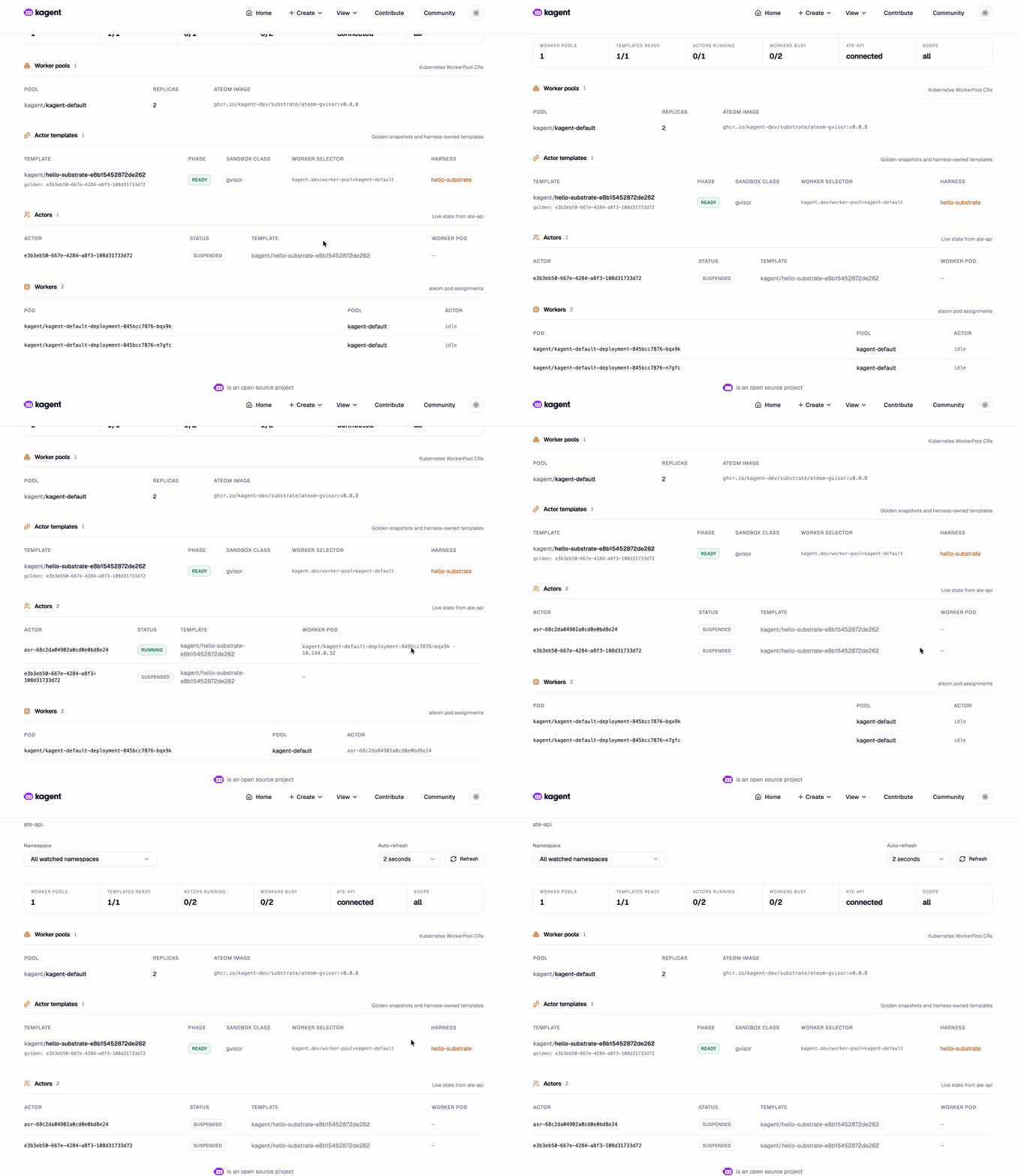
Between requests the session actor should sit Suspended (UI View → Substrate, or CLI below). Next message restores it sub-second.
The View → Substrate page is where the multiplexing thesis becomes visible: the kagent-default WorkerPool (2 replicas on ateom-gvisor:v0.0.8), the hello-substrate ActorTemplate (READY, sandbox class gvisor, backed by its golden snapshot), the live actor flipping to SUSPENDED between turns, and both workers sitting idle — no pod tax while the session waits.
Drive ate-api with grpcurl
kubectl port-forward -n ate-system svc/api 18443:443 >/tmp/pf-api.log 2>&1 &
sleep 3
TOKEN=$(kubectl create token kagent-controller -n kagent --audience=api.ate-system.svc --duration=15m)

grpcurl -insecure -H "authorization: Bearer $TOKEN" -d '{}' \
  localhost:18443 ateapi.Control/ListWorkers

grpcurl -insecure -H "authorization: Bearer $TOKEN" -d '{}' \
  localhost:18443 ateapi.Control/ListActors

ACTORS_JSON=$(grpcurl -insecure -H "authorization: Bearer $TOKEN" -d '{}' \
  localhost:18443 ateapi.Control/ListActors)
ACTOR_ID=$(echo "$ACTORS_JSON" | jq -r '.actors[0].actorId // empty')
ATESPACE=$(echo "$ACTORS_JSON" | jq -r '.actors[0].atespace // empty')

# ResumeActor expects actor_ref { atespace, name } — not a bare actor_id field.
if [ -n "${ACTOR_ID:-}" ] && [ -n "${ATESPACE:-}" ]; then
  grpcurl -insecure -H "authorization: Bearer $TOKEN" \
    -d "{\"actor_ref\":{\"atespace\":\"$ATESPACE\",\"name\":\"$ACTOR_ID\"}}" \
    localhost:18443 ateapi.Control/ResumeActor
fi
Scale the WorkerPool
One worker can serve many sequential declarative sessions (each releases the slot after snapshot). Scale when you need overlapping sessions or harnesses that pin a slot:
kubectl scale workerpool kagent-default -n kagent --replicas=3
How kagent and substrate fit together
 User / UI
    │
    ▼
 kagent (Agent / SandboxAgent CRDs, model config, tools)
    │  CreateActor / Resume on chat
    ▼
 Agent Substrate (ateapi + atenet + atelet + workers)
    │  gVisor sandbox per assigned actor
    ▼
 Your agent binary (Go ADK) + MCP tools
- Without substrate: kagent runs agents as ordinary Kubernetes Deployments (always-on pods).
- With substrate:
SandboxAgent+spec.substrate.workerPoolRef→ actor on the pool; suspend when idle.
Christian Posta’s write-up frames the product story: agents are long-lived but idle; you need isolation (gVisor/Firecracker) and real lifecycle (suspend, snapshot, resume). Substrate + kagent is that path open-sourced under the kagent umbrella. See also Solo’s blog and the official kagent Agent Substrate example.
Known issues & troubleshooting
| Issue | Detail |
|---|---|
| Default pairing | Pin substrate 0.0.8 + kagent 0.10.0-beta6 for working chat protos. |
| Empty OpenAI key | Install “succeeds” without kagent-openai → CreateContainerConfigError. Export key, re-run ./setup.sh or Helm. |
| Controller crash-loop | Substrate not ready when kagent starts — fix ate-system first. |
| CRDs rejected | Node image < 1.31 — recreate with kindest/node:v1.35.0. |
| TLS on idle kind | In-cluster certs can expire after ~24h — run in one sitting. |
| Pre-1.0 | APIs will change; not production-ready. |
| Symptom | Fix |
|---|---|
| Substrate CRDs rejected | Recreate cluster with k8s 1.31+ node image |
kagent-controller crash-loops | All ate-system pods Running before kagent |
| Chat fails / ConfigError | kubectl get secret kagent-openai -n kagent |
| Helm timeout on kagent | kubectl wait deploy/kagent-controller … --timeout=10m |
ListActors auth errors | Re-mint token (15m) |
| SandboxAgent not Ready | WORKER_POOL_REPLICAS>=2; check workers + ActorTemplate status |
Cleanup
./teardown.sh
# or: kind delete cluster --name kagent-substrate
What’s next
| Path | Why |
|---|---|
01-kagent-agent-substrate | Runnable code for this guide: setup.sh, teardown.sh, manifests |
| learn.agentsubstrate.dev | Visual topology, resume flow, ateapi internals |
| AgentHarness on kagent | Long-lived coding sandboxes on substrate |
| agentgateway | Govern LLM/MCP egress; keep keys off the actor |
| kagent docs | Agents, tools, MCP, observability |
Suspend-and-resume is the feature that finally makes per-session stateful agents affordable at scale on Kubernetes. Spin it up, chat with hello-substrate, and watch a small worker pool serve far more sessions than it has pods.