I have a group chat with my infrastructure.
Not a metaphor. I open Telegram, type /use forti what devices are on my wifi?, and a few seconds later my FortiGate firewall answers — in a chat bubble, on my phone, from the couch. Type /use k8s scale the drone-mcp deployment to 2 and my Kubernetes cluster does it, but first it stops and shows me an Approve / Reject button, because that one writes. Type /use drone take off, flip, photograph the room, land and an actual quadcopter in my office leaves the ground.
Six agents. One bot. One phone. It’s the most fun I’ve had with a cluster in a while — and underneath the fun there’s a design I actually care about: the bot holds no brains and no keys. Every agent lives in the cluster, every model call goes through my agentgateway, and anything dangerous waits for my thumb.
Live map: goose.maniak.ai/dispatch.html · Repo: sebbycorp/k8s-goose · Bot: @KagentCorpAIbot
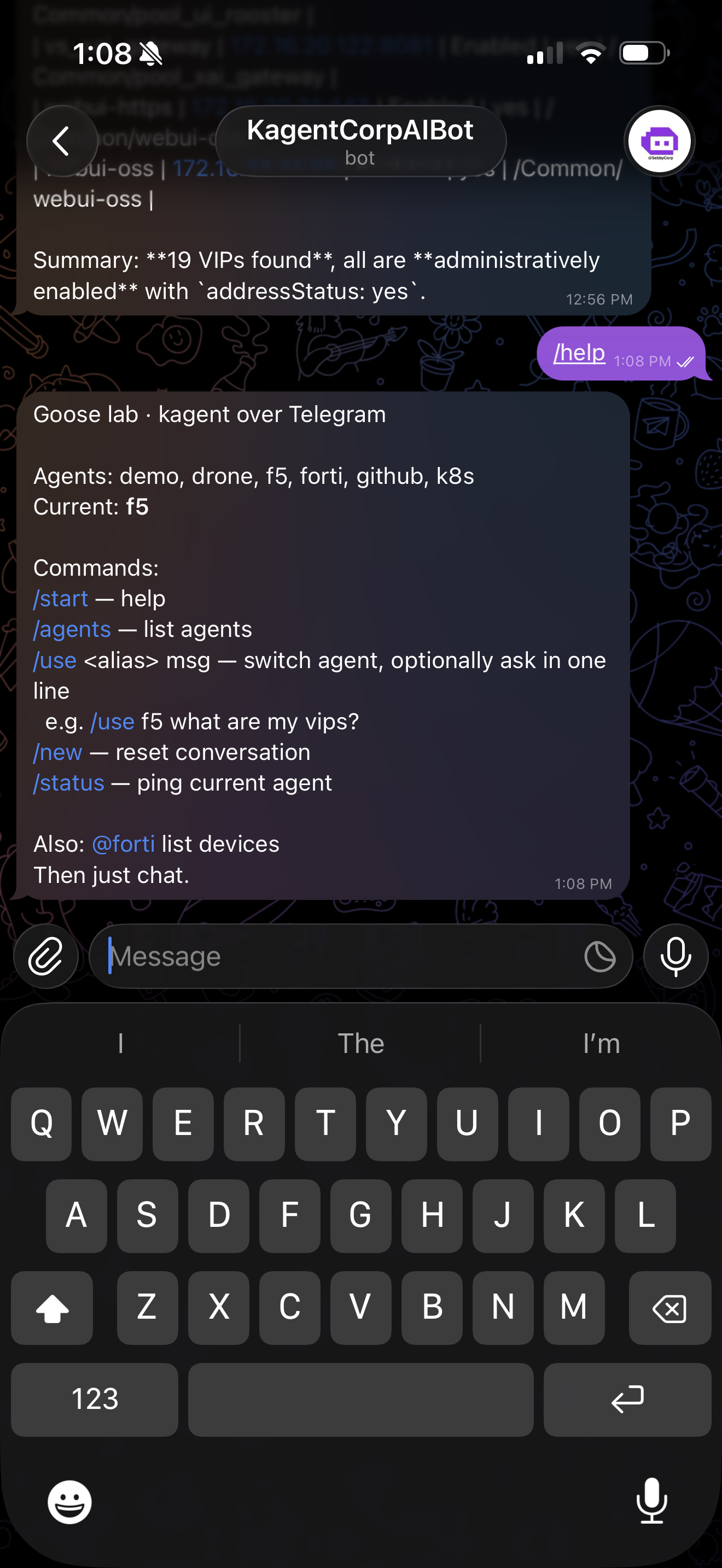
Here’s the whole thing on my phone — /help listing the six agents, and just above it the F5 agent answering “what are my vips?” with 19 VIPs found, all administratively enabled:
The cast
Meet @KagentCorpAIbot. It’s a single polling Deployment in the kagent namespace that speaks to six in-cluster agents. Each one is a real kagent Agent with its own tools, its own MCP servers, and its own blast radius:
| Alias | Agent | What it touches |
|---|---|---|
@k8s | k8s-agent (KubeAssist) | The cluster itself — get/describe/logs/events, plus scale/rollout/patch/apply/delete |
@forti | fortigate-agent | FortiGate 172.16.10.1 — policies, NAT/VIPs, DHCP leases, detected devices, FortiAP wireless |
@f5 | f5-bigip-agent | F5 BIG-IP 172.16.10.10 — pools, virtual servers, nodes, monitors, iRules, HA failover |
@github | github-agent | The remote GitHub MCP (47 tools) — issues, PRs, repo ops |
@drone | drone-agent | A real Ryze RoboMaster TT — 28 flight tools over an MCP server |
@demo | demo-agent | The sandbox MCP servers, for when I’m just poking |
That’s the whole point of the group chat: the same chat window is a firewall console, a kubectl prompt, a GitHub client, and a drone remote — I just switch who I’m talking to.
Here’s @forti doing exactly that — I asked “give me a list of wifi devices” and the FortiGate agent came back with 40 devices on SSID ManiakHQ, formatted as a table right in the chat (hostname, IP, MAC, AP, band, signal, OS, vendor):
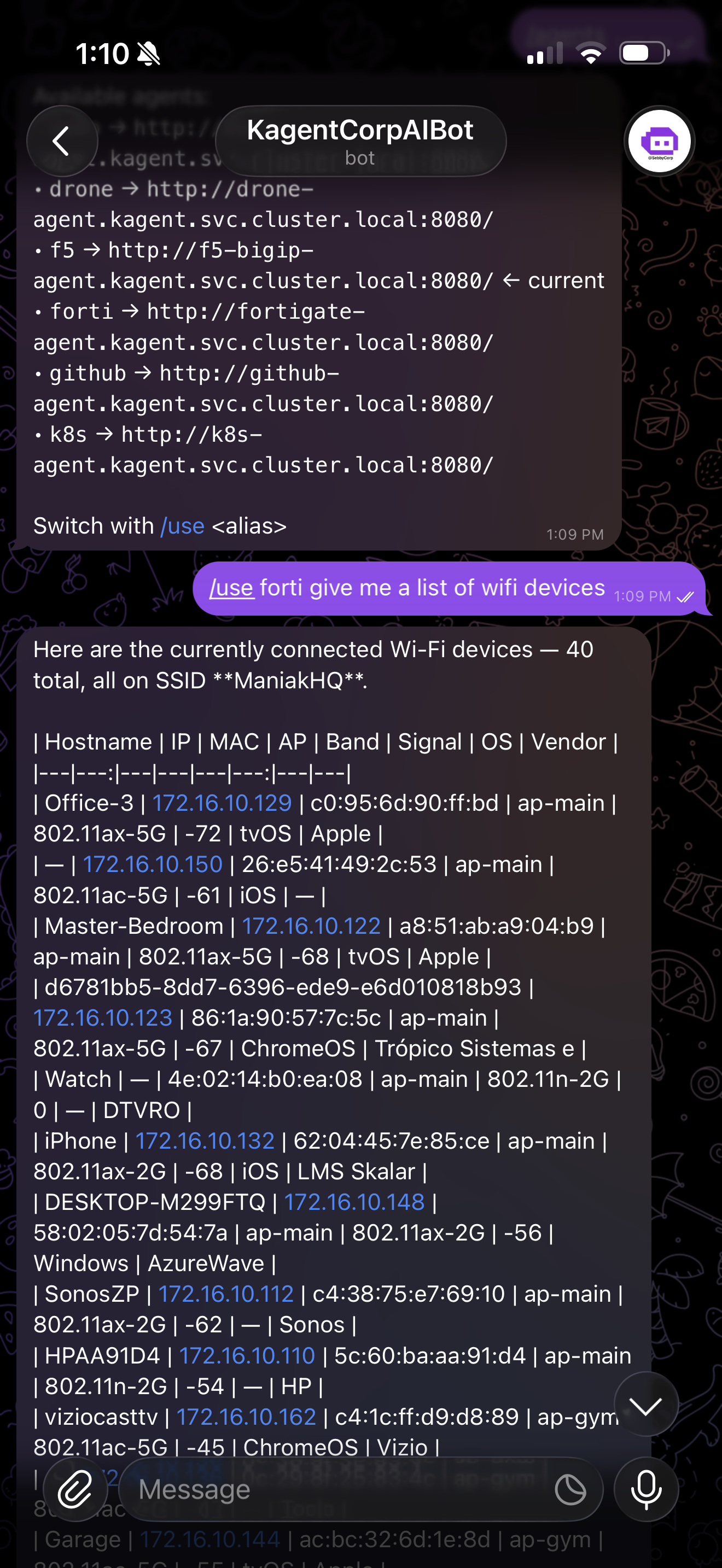
That’s a real FortiGate at 172.16.10.1 answering a plain-English question from my phone. No console, no SSH — just a chat bubble.
Act 1 — How a text message flies a drone
Here’s the loop, start to finish, when I send one message:
  📱 Telegram              ns kagent                     ns agentgateway-system
 ┌──────────┐   long-poll  ┌──────────────┐   A2A       ┌──────────────────┐   OpenAI-compat
 │  you →   │ ───────────▶ │ telegram-bot │ ─────────▶  │  drone-agent     │ ──────────────▶ AgentGateway
 │  @drone  │              │  (1 replica) │  message/   │  (kagent runtime)│                 /openai · /grok
 │  "flip"  │ ◀─────────── │              │  send       │  ModelConfig ────┼──▶ gateway ──▶ real provider
 └──────────┘   chat reply └──────────────┘             └────────┬─────────┘   keys from Vault
                                                                 │ MCP tools
                                                                 ▼
                                                          drone-mcp-server → 🚁
- You message. The bot long-polls Telegram (
getUpdates) — its BotFather token comes from Vault via an ExternalSecret, never from Git. Single replica, on purpose: two pollers means a409 Conflictfight over the same update stream. - A2A send. The bot is a thin router. It looks up which agent you’ve selected, and fires a JSON-RPC
message/sendat that agent’s in-cluster Service —http://drone-agent.kagent.svc.cluster.local:8080/— carrying a per-chatcontextIdso the conversation has memory. - The agent thinks.
drone-agentruns in the kagent runtime. To reason, it calls a model — but its kagentModelConfigdoesn’t point at OpenAI. It points at an in-cluster OpenAI-compatible base URL that is the gateway. - The gateway governs. agentgateway injects the real provider key (from a Vault-synced Secret), meters the tokens, emits a trace, and then forwards upstream. The agent never sees a credential.
- The reply comes home. The answer streams back over A2A, the bot posts it as a chat bubble, and — if the agent wanted to run a tool that writes — you get a button instead of a fait accompli. (More on that in Act 2.)
The bot’s routing table is literally one environment variable on the Deployment:
- name: AGENTS_JSON
  value: |
    {
      "k8s":    "http://k8s-agent.kagent.svc.cluster.local:8080/",
      "forti":  "http://fortigate-agent.kagent.svc.cluster.local:8080/",
      "f5":     "http://f5-bigip-agent.kagent.svc.cluster.local:8080/",
      "github": "http://github-agent.kagent.svc.cluster.local:8080/",
      "drone":  "http://drone-agent.kagent.svc.cluster.local:8080/",
      "demo":   "http://demo-agent.kagent.svc.cluster.local:8080/"
    }
Want a new agent in the chat? Add a line, redeploy the bot. No new brains to train, no keys to hand out — the agent already exists in the fleet, and the gateway already knows how to route its model.
/status pings whichever agent I’ve got selected, and /agents prints that routing table live — the same in-cluster A2A URLs, straight from the bot:
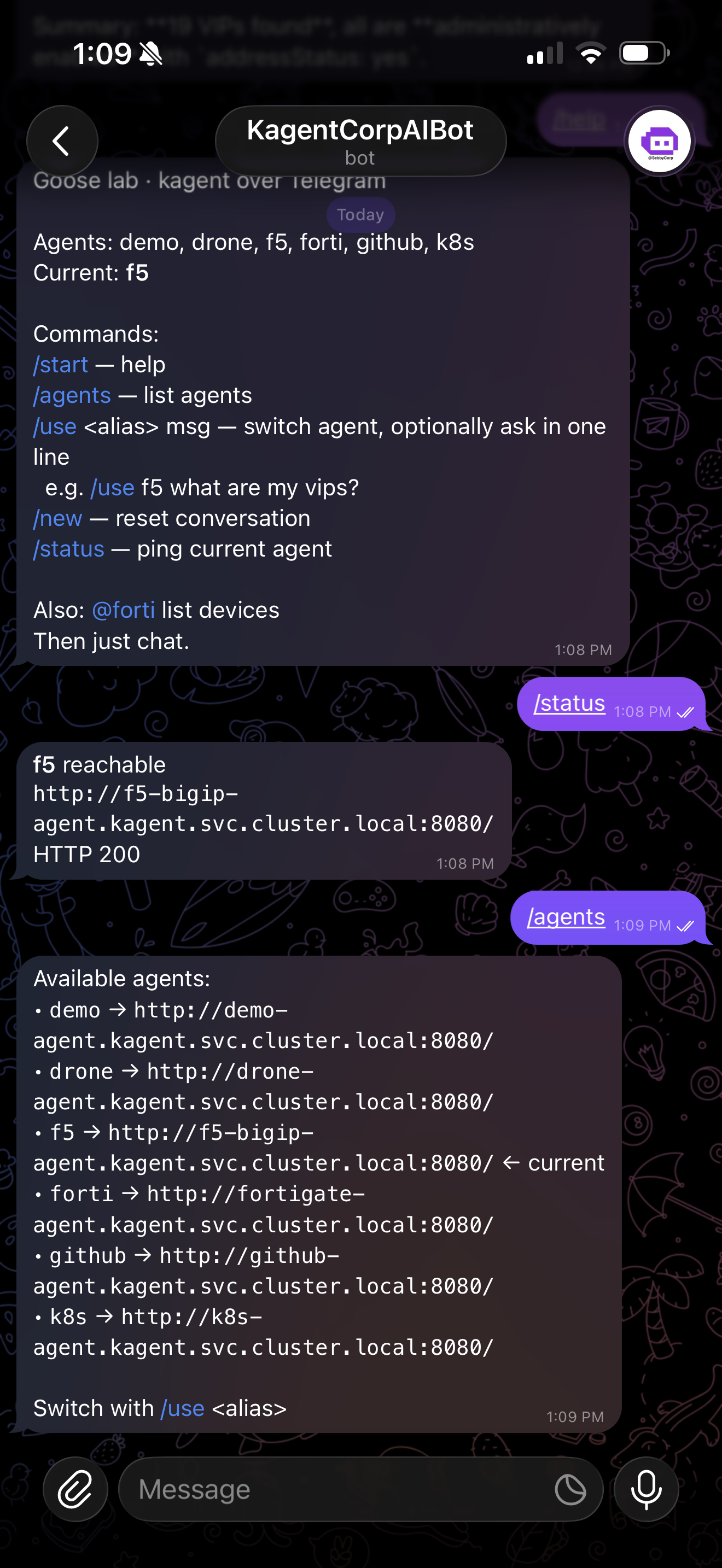
The commands are deliberately boring so I can drive them one-handed:
| Command | Action |
|---|---|
/start | Help |
/agents | List aliases + their A2A URLs |
/use <alias> [msg] | Switch agent — and optionally ask in the same line |
/new | Reset the session (fresh contextId) |
/status | Ping the current agent |
@forti … | Switch and message in one shot |
/use f5 what are my vips? is a complete interaction: pick the F5 agent and ask it, in one thumb-stroke.
Act 2 — The thumb between me and a delete
Here’s the part I refuse to skip. @k8s can delete deployments. @forti can rewrite firewall policy. @f5 can drain a pool member. A chatbot with that reach is a great way to nuke prod from a bus stop.
So the destructive tools are wrapped in kagent’s human-in-the-loop approval (requireApproval), and the bot surfaces it natively. When an agent decides it wants to run a write, it doesn’t run it — it returns an adk_request_confirmation back over A2A. The bot parses that, shows me exactly what’s about to happen, and hangs two inline buttons under it:
The agent wants to run: apply_manifest
  namespace: kagent
apiVersion: apps/v1 kind: Deployment …
[ ✅ Approve ] [ ❌ Reject ]
Tap Approve and the bot sends the decision back — the agent resumes and completes the tool call. Tap Reject and nothing happens. The read paths (get, describe, logs, “what devices are on my wifi”) flow straight through; only the writes stop. It’s the difference between “the bot did a thing” and “I did a thing, from my phone, with a receipt.”
And the receipt is real: because every model hop went through agentgateway, each of these interactions is a priced, traced span in Langfuse and a row in the Solo cost UI — split by project, by model, by agent. I can see what my group chat cost me this week.
Act 3 — The keys never leave home
The whole thing rests on one rule: no agent, and no channel, ever holds a provider API key.
The fleet the bot talks to is just the kagent Agents list in the Solo Enterprise UI — every agent Healthy, each with its Model column showing what it routes to (OpenAI gpt-5.5, local Qwen) and its required MCP tool servers (drone-mcp, f5-bigip-…):
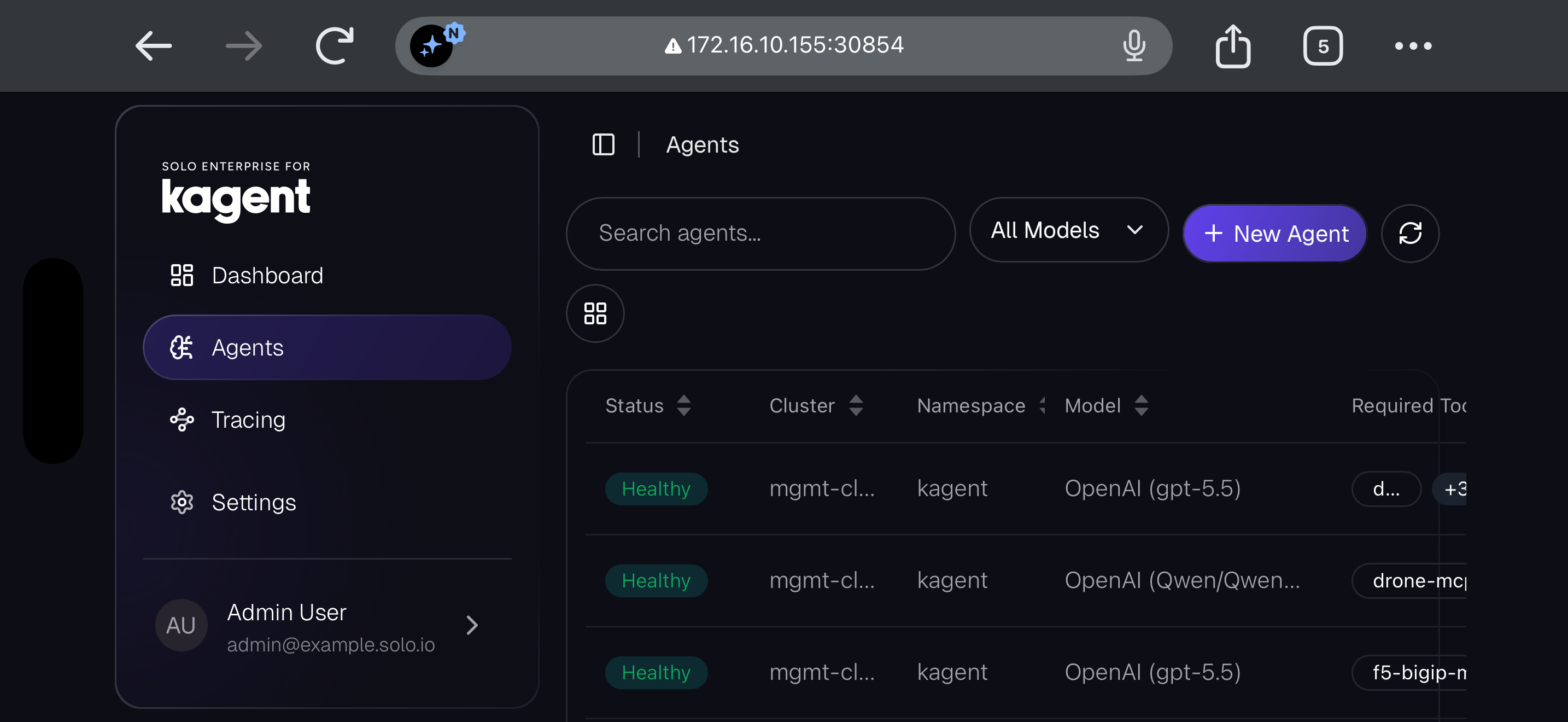
That Model column is the sleight of hand: it says “OpenAI (gpt-5.5)” and “OpenAI (Qwen),” but both are OpenAI-compatible endpoints that resolve to my gateway — not to OpenAI.
kagent ModelConfigs point at in-cluster gateways, not at providers:
| ModelConfig | Model | Gateway base URL (in-cluster) |
|---|---|---|
default-model-config | lab default | …/openai/v1 · agentgateway-proxy |
xai-grok | grok-4.5 | …/grok/v1 · xai-grok-gateway |
dgx-spark | Qwen (local, self-hosted) | …/spark/v1 · dgx-spark-gateway |
gpt-5-6 | gpt-5.6 | …/gpt56/v1 · dedicated gateway |
The real OpenAI, xAI, and Anthropic keys sit in Vault. External Secrets Operator syncs them into gateway-side Secrets. agentgateway injects them upstream at call time. Which means:
- One control plane for spend, traces, and budgets — not one per app.
- Agents are credential-free. Compromise a pod, you get no keys.
- I can swap
gpt-5.5for Qwen-on-my-DGX-Spark without touching the bot, the scheduler, or a single agent. It’s a one-lineModelConfigchange. - Cost and Langfuse stay accurate across channels — chat and cron land in the same ledger.
That last point matters more than it sounds, because the chat bot isn’t the only way in.
Act 4 — The cron twin
@KagentCorpAIbot is for “help me right now.” But some things should just happen every morning — a cluster health sweep, a firewall device audit, a “what PRs are stale” report. For that there’s a second front-end on the exact same fleet: the Agent Scheduler, and it is pure GitOps.
Here’s the twist I like: the scheduler’s web UI never creates a CronJob through the Kubernetes API. It can’t set desired state directly. All it does is open a pull request against sebbycorp/k8s-goose. ArgoCD notices, merges, and applies. Git stays the one source of truth; the cluster only ever executes what Git says.
  Web UI (:30955)          GitHub                 ArgoCD                  ns kagent
 ┌─────────────┐  PR +   ┌──────────────┐  sync  ┌────────────┐  apply  ┌──────────────┐
 │ save a      │ ──────▶ │ config/agent-│ ─────▶ │ agentgw-   │ ──────▶ │ CronJob      │
 │ schedule    │  merge  │ schedules/*  │        │ config app │         │ ags-<name>   │
 └─────────────┘         └──────────────┘        └────────────┘         └──────┬───────┘
                                                                                │ fires
                                                                                ▼
                                                          Job → A2A message/send → agent
                                                          result → ConfigMap ags-result-*
                                                          (± Telegram summary, same bot token)
When a scheduled Job fires, it POSTs the same A2A message/send to the same agent Service the chat bot uses, and writes the reply into ConfigMaps (ags-result-<name> for the latest, ags-hist-… for history). Check the box marked “send result to Telegram” and the Job posts a summary to my chat using the same Vault bot token — so my morning cluster report shows up in the same window where I do my ad-hoc asks.
One caveat worth stating plainly: that beautiful HITL approval gate is a problem for unattended cron. A Job can’t tap Approve. So scheduled prompts start read-only — audits, reports, “tell me what changed” — and the writes stay in the interactive channel where a human thumb is present.
The shape of it
Strip away the fun and here’s what’s actually true:
- Two front-ends, one fleet. A Telegram bot for conversation, a GitOps scheduler for routines — both are thin edge adapters that speak A2A to the same in-cluster kagent agents.
- kagent runs the brains. Six agents, each with its own MCP tool servers and its own RBAC/blast-radius, reachable at
:8080over A2A. - agentgateway is the governor. Every model call is priced, traced, key-injected, and policy-checked before it reaches a provider. Keys live in Vault; nothing sensitive is in Git.
- My thumb is the last mile. Destructive tools stop for an inline Approve/Reject.
It started as a joke — “what if I could text my firewall?” — and turned into the cleanest way I’ve found to operate a homelab: fun on the surface, governed all the way down.
If you want to build your own, the whole thing is GitOps’d in sebbycorp/k8s-goose — bot source in telegram-bot/, scheduler in agent-scheduler/, and the operator runbook (seed the Vault bot token, verify the ExternalSecret, smoke-test the chat path) on the live Dispatch page.
Now if you’ll excuse me, I have a drone to fly from the kitchen.