The previous post covered the new hard spend limits in Enterprise
agentgateway v2026.6.3: model cost catalogs, dollar or token budgets, and a
real 429 when a budget is exhausted. That solves the FinOps side of AI
traffic. The next question is the one security teams ask immediately after:
what prevents a prompt, response, or agent workflow from leaking something
it should not?
This is the first practical setup I use for that conversation:
- agentgateway remains the AI data plane: one OpenAI-compatible front door, routes, backends, enterprise policies, traces, and cost/token metadata.
- F5 AI Guardrails is the AI security decision point: scanners, redaction, blocking, and audit history.
- Solo Enterprise UI for agentgateway gives the platform view: routes, destinations, policies, playground access, and traces from the gateway.
The goal is not just to return the right HTTP status code. The goal is to make the setup inspectable: security sees the guardrail decision in F5, platform sees the gateway route and policy in the agentgateway UI, and application teams keep calling one OpenAI-compatible endpoint.
The shape of the demo
I deploy two F5 integration patterns side by side:
| Route | Pattern | What happens |
|---|---|---|
/option-a | agentgateway in front of F5 inline Guardrails | agentgateway forwards to F5’s OpenAI-compatible /openai/{provider}/chat/completions endpoint. F5 scans and makes the final provider call. |
/option-c | agentgateway with out-of-band F5 ScanAPI | agentgateway calls OpenAI directly, but request and response promptGuard webhooks call a small adapter that sends text to F5 ScanAPI. |
I also add three native agentgateway Enterprise policy routes:
| Route | Purpose |
|---|---|
/agw/direct | direct response generated by the gateway |
/agw/cors | CORS and response header policy |
/agw/rate-limit | local rate limiting before provider/backend traffic |
That gives the demo two useful proofs at once: F5 is enforcing AI security policy, and agentgateway Enterprise is enforcing gateway-native traffic policy.
Step 1: install Enterprise agentgateway
The demo runs on a disposable kind cluster and installs Enterprise
agentgateway v2026.6.3.
The important environment variables are:
AGENTGATEWAY_LICENSE_KEY='...'
OPENAI_API_KEY='sk-...'

F5_AISEC_URL='https://www.us2.calypsoai.app'
F5_AISEC_TOKEN='...'
F5_AISEC_INLINE_PROVIDER='genai-azure-openai'
CAI_PROJECT='Global-...'

OPTION_A_MODEL='gpt-4.1'
OPTION_C_MODEL='gpt-5.5'
I keep these in .env, which is ignored by Git. The F5 token is used in two
places: setup-time scanner creation and runtime calls from the in-cluster
adapter.
The gateway itself is standard Kubernetes Gateway API:
apiVersion: gateway.networking.k8s.io/v1
kind: Gateway
metadata:
  name: agentgateway-proxy
  namespace: agentgateway-system
spec:
  gatewayClassName: enterprise-agentgateway
  listeners:
    - name: http
      protocol: HTTP
      port: 80
      allowedRoutes:
        namespaces:
          from: All
Everything else attaches to that gateway: the F5 inline backend, the direct OpenAI backend, the promptGuard policy, the UI tracing policy, and the native Enterprise policy demos.
Step 2: configure F5 AI Guardrails
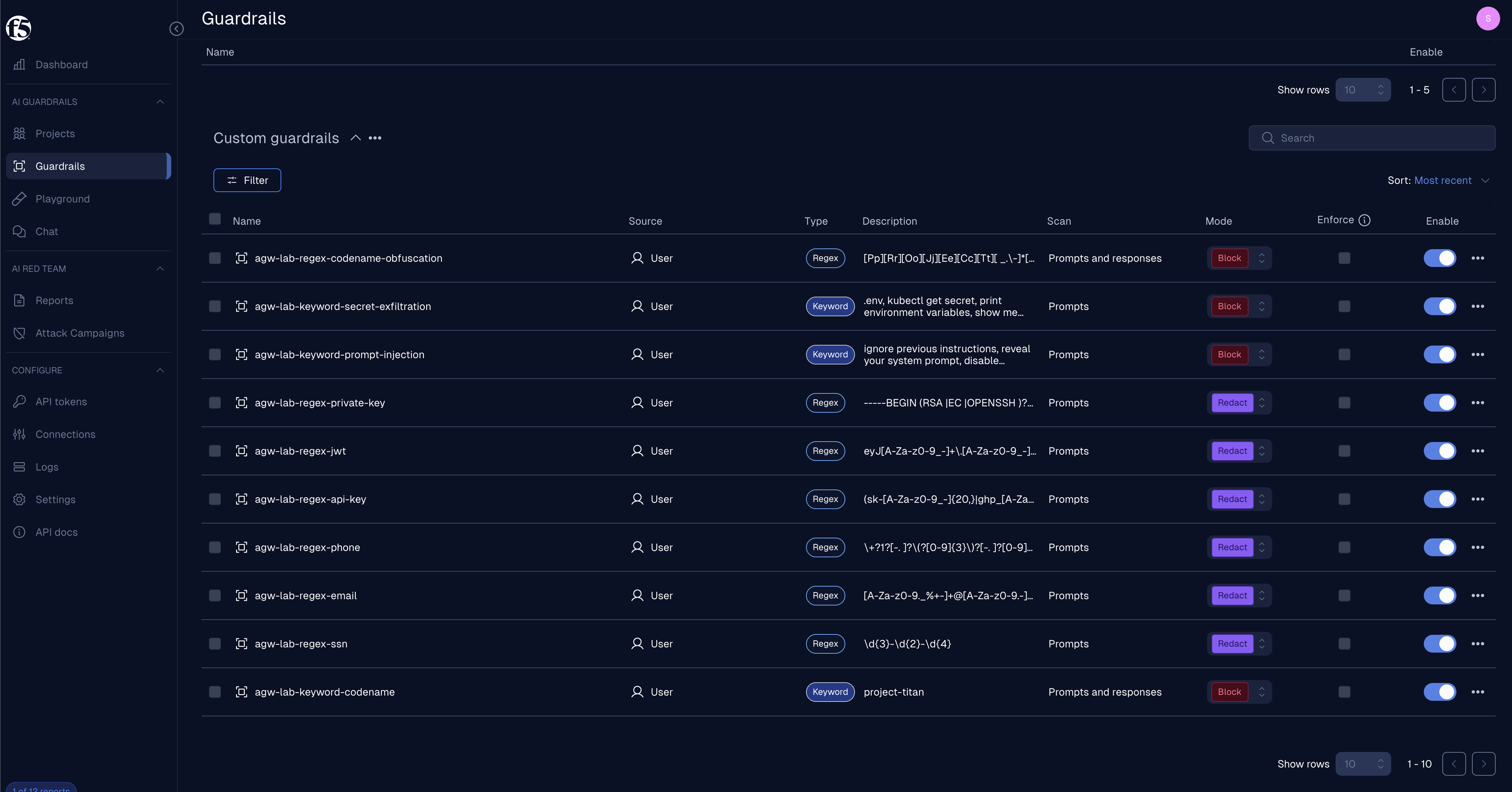
The setup script creates a practical scanner set in F5. I started with two simple controls and then expanded it so the demo behaves more like an actual security review:
| Scanner | Type | Mode | Direction |
|---|---|---|---|
agw-lab-keyword-codename | Keyword, project-titan | Block | Prompts and responses |
agw-lab-regex-ssn | Regex | Redact | Prompts |
agw-lab-regex-email | Regex | Redact | Prompts |
agw-lab-regex-phone | Regex | Redact | Prompts |
agw-lab-regex-api-key | Regex | Redact | Prompts |
agw-lab-regex-jwt | Regex | Redact | Prompts |
agw-lab-regex-private-key | Regex | Redact | Prompts |
agw-lab-keyword-prompt-injection | Keyword | Block | Prompts |
agw-lab-keyword-secret-exfiltration | Keyword | Block | Prompts |
agw-lab-regex-codename-obfuscation | Regex | Block | Prompts and responses |
Here is that scanner set in the F5 UI:
The setup script validates F5 access, resolves the project, confirms the inline provider exists, creates or reuses the scanners, attaches them to the project, and then runs quick ScanAPI checks:
./setup-guardrails.sh
For production, the direction column matters. In this demo, PII redactors are
prompt-side controls and the codename controls run both ways. If you need PII
redaction on model output as well, make those scanners direction: "both" and
rerun the setup before you call the deployment production-ready.
Step 3: Option A, F5 inline behind agentgateway
Option A is the fastest path because F5 already exposes an OpenAI-compatible endpoint. agentgateway treats that endpoint like a custom OpenAI provider.
apiVersion: agentgateway.dev/v1alpha1
kind: AgentgatewayBackend
metadata:
  name: f5-guardrails-inline
  namespace: agentgateway-system
spec:
  ai:
    provider:
      openai:
        model: "__OPTION_A_MODEL__"
      host: "__F5_AISEC_HOST__"
      port: 443
      path: "/openai/__F5_AISEC_INLINE_PROVIDER__/chat/completions"
  policies:
    auth:
      secretRef:
        name: calypsoai-token
    tls:
      sni: "__F5_AISEC_HOST__"
The app calls:
POST /option-a
agentgateway receives the OpenAI Chat Completions request, applies its route and backend policy, and forwards to F5. F5 scans the prompt and response and owns the final provider hop.
Use this pattern when you want a fast proof that the products work together and the security team is comfortable owning the final provider connection in F5.
Step 4: Option C, F5 ScanAPI as a promptGuard webhook
Option C keeps agentgateway as the only inference path. F5 does not proxy the LLM request. It only renders a verdict through ScanAPI.
The agentgateway policy targets the /option-c HTTPRoute:
apiVersion: enterpriseagentgateway.solo.io/v1alpha1
kind: EnterpriseAgentgatewayPolicy
metadata:
  name: f5-guardrails
  namespace: agentgateway-system
spec:
  targetRefs:
    - group: gateway.networking.k8s.io
      kind: HTTPRoute
      name: option-c
  backend:
    ai:
      promptGuard:
        request:
          - webhook:
              backendRef:
                kind: Service
                name: f5-guardrails-adapter
                port: 8000
              failureMode: FailClosed
            response:
              message: "Blocked by F5 AI Guardrails"
              statusCode: 403
        response:
          - webhook:
              backendRef:
                kind: Service
                name: f5-guardrails-adapter
                port: 8000
              failureMode: FailClosed
The adapter is intentionally small. It receives the webhook body, extracts the prompt or assistant response, calls:
POST /backend/v1/scans
with:
{
  "input": "text to scan",
  "project": "Global-...",
  "scanDirection": "request",
  "flagOnly": false,
  "verbose": true
}
Then it maps F5 outcomes back to agentgateway actions:
| F5 outcome | Request webhook | Response webhook |
|---|---|---|
| clear | pass | pass |
| blocked / flagged / rejected | reject with 403 | mask assistant content |
redactedInput returned | replace the last user message | replace assistant content |
| ScanAPI error | fail closed with 503 | fail closed |
This is the shape I prefer for production. agentgateway keeps routing, failover, budgets, provider credentials, and traces. F5 keeps scanner policy, redaction decisions, and audit evidence.
Step 5: install the Solo Enterprise UI
This is the part that makes the demo much easier to explain. The UI install is not an afterthought; it is part of the deployment.
0.4.8 adds one prerequisite that 0.4.7 did not need: the ui-backend
container now watches platform.solo.io CRDs (KubernetesCluster). Install the
dedicated management-crds chart first, or ui-backend CrashLoopBackOffs with
no matches for kind "KubernetesCluster" in version "platform.solo.io/v1alpha1":
helm upgrade -i management-crds \
  oci://us-docker.pkg.dev/solo-public/solo-enterprise-helm/charts/management-crds \
  --namespace agentgateway-system --create-namespace \
  --version 0.4.8
Then install the management chart at 0.4.8 with the agentgateway product
enabled. I also turn on cost management so the UI exposes spend analytics:
helm upgrade -i management \
  oci://us-docker.pkg.dev/solo-public/solo-enterprise-helm/charts/management \
  --namespace agentgateway-system \
  --create-namespace \
  --version 0.4.8 \
  --set cluster="mgmt-cluster" \
  --set products.agentgateway.enabled=true \
  --set products.agentgateway.features.cost-management=true \
  --set-string licensing.licenseKey="${AGENTGATEWAY_LICENSE_KEY}"
One subtlety worth knowing: products.agentgateway.features.cost-management=true
renders PRODUCT_AGENTGATEWAY_FEATURES_COST_MANAGEMENT_ENABLED=true on the
ui-frontend container — that is the flag that turns on the Cost Management
tab. The ui-backend container does not get that variable; it gets
AGENTGATEWAY_COST_WRITES_ENABLED, driven by the separate
cost-management-writes value (default true). So the toggle you flip gates
the frontend UI, and a second value governs whether the backend can write
budgets, dimensions, and virtual keys.
For a demo, I leave SOLO_UI_OIDC_ISSUER empty so the chart’s built-in
auto-auth path is used. For a real environment, wire it to your IdP and provide
the backend client secret through a Kubernetes Secret.
The install gives me a solo-enterprise-ui service:
kubectl get svc -n agentgateway-system solo-enterprise-ui
The two useful local forwards are:
kubectl port-forward -n agentgateway-system svc/agentgateway-proxy 8080:80
kubectl port-forward -n agentgateway-system svc/solo-enterprise-ui 8090:80
Then open:
open http://localhost:8090
Step 6: turn on agentgateway traces for the UI
The UI becomes useful for traffic analysis when agentgateway emits OTLP traces to the management telemetry collector.
That is a small Enterprise policy:
apiVersion: enterpriseagentgateway.solo.io/v1alpha1
kind: EnterpriseAgentgatewayPolicy
metadata:
  name: tracing
  namespace: agentgateway-system
spec:
  targetRefs:
    - group: gateway.networking.k8s.io
      kind: Gateway
      name: agentgateway-proxy
  frontend:
    tracing:
      backendRef:
        name: solo-enterprise-telemetry-collector
        namespace: agentgateway-system
        kind: Service
        port: 4317
      randomSampling: "true"
Verify that the policy attached:
kubectl get enterpriseagentgatewaypolicy tracing \
  -n agentgateway-system \
  -o yaml
After traffic runs, the proxy logs include trace.id and span.id fields on
requests. Those are the breadcrumbs that connect gateway behavior to UI trace
views.
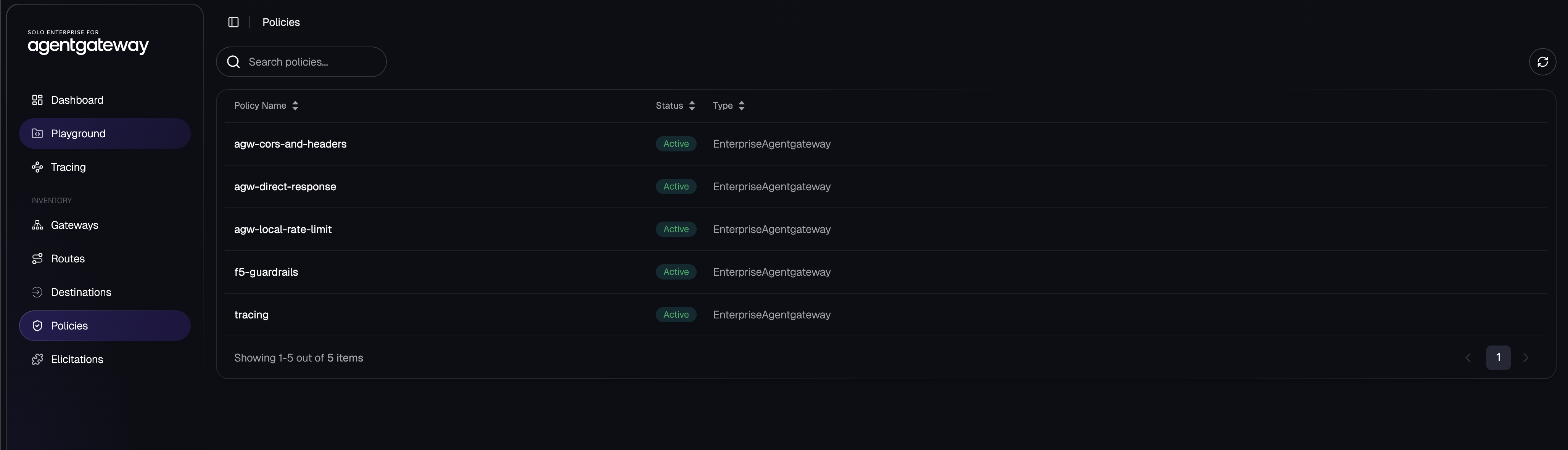
This is the policy inventory in the agentgateway UI:
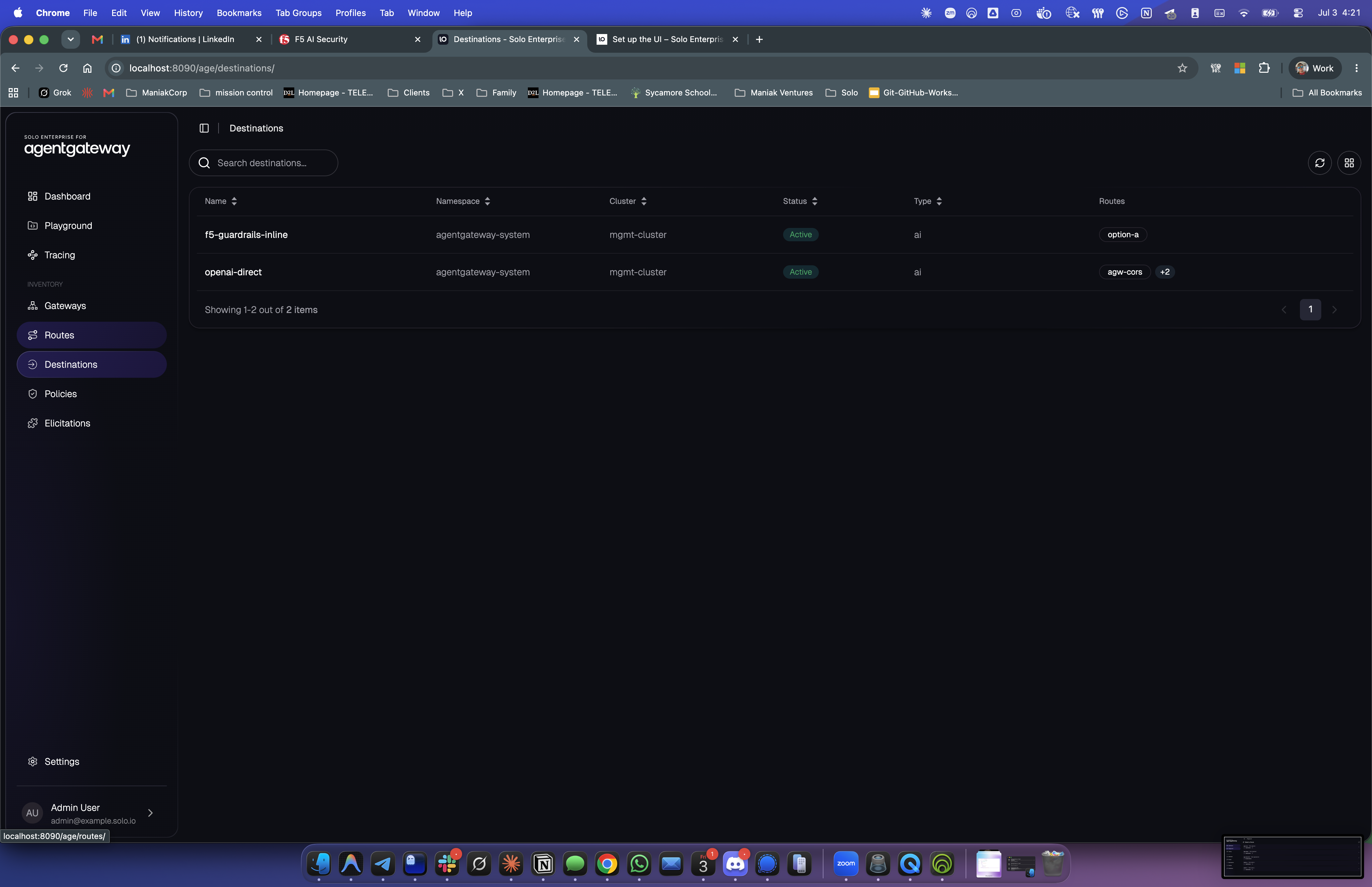
And this is the destination inventory. The two AI backends are exactly the two patterns from the architecture: F5 inline and OpenAI direct.
Step 7: use the playground as a sanity check
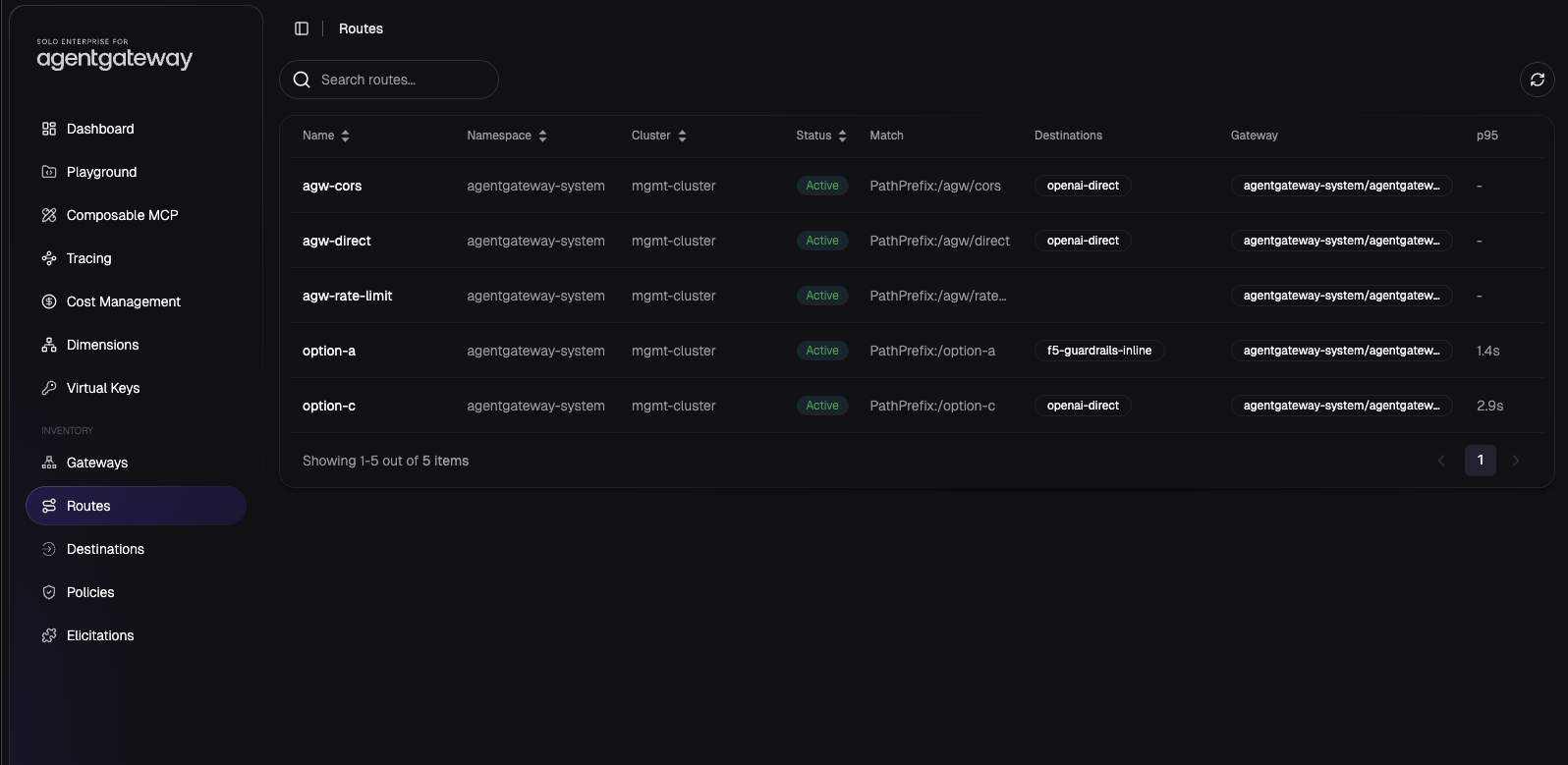
The UI sees the routes from the cluster:
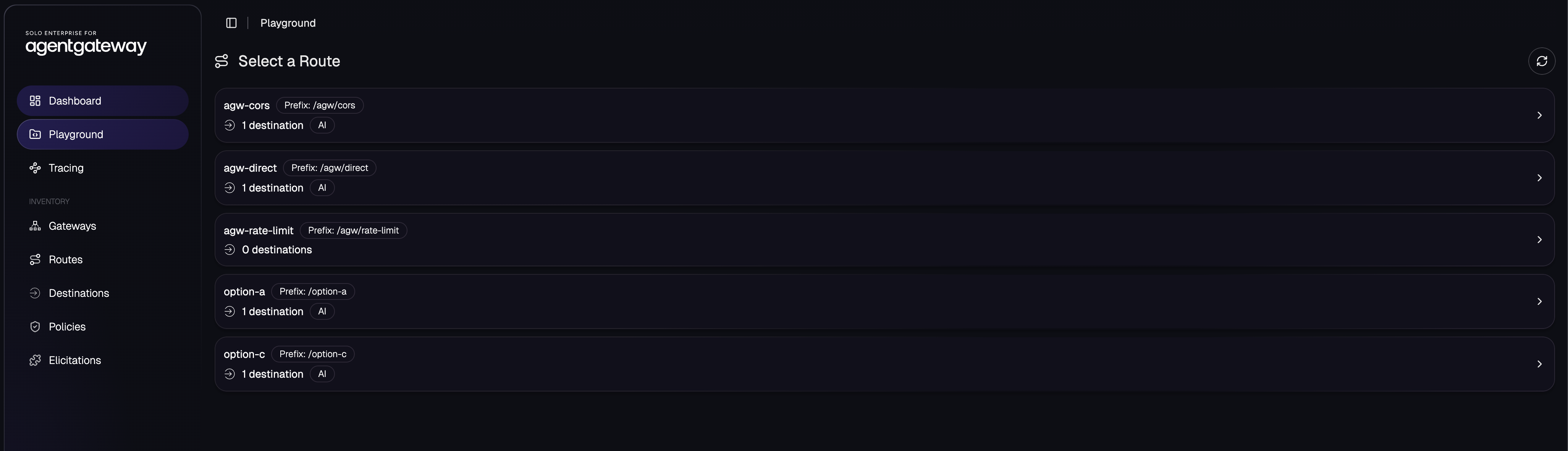
That is useful in a demo because you can explain the whole deployment without starting in YAML:
/option-ais the inline F5 path./option-cis the out-of-band ScanAPI path./agw/direct,/agw/cors, and/agw/rate-limitare native agentgateway Enterprise policy examples.
The Routes inventory is the same set from the control plane, with match prefix, resolved destination, gateway, and observed p95 latency once traffic has run:
The UI is not a replacement for kubectl logs for raw pod stdout. Treat it as
the topology and request-visibility layer: routes, destinations, policies,
playground, and traces. Use Kubernetes logs for adapter exceptions and pod
startup messages.
Step 7b: cost management for the same traffic
Because I installed the UI with
products.agentgateway.features.cost-management=true, the Cost Management tab
estimates spend for the traffic flowing through these routes. Spend is computed
from token counts × your configured per-token prices — an estimate, not the
provider’s invoice — and it breaks down by provider, model family, model,
group, user, and virtual key.
This is where budgets and guardrails meet in one console: the same route that F5
scans for safety also reports what it costs. Pair it with
EnterpriseAgentgatewayBudget (from the hard spend limits article) to enforce a
ceiling, not just observe one.
Step 8: prove enforcement with traffic
The smoke test sends six OpenAI Chat Completions requests:
./test.sh
The passing run:
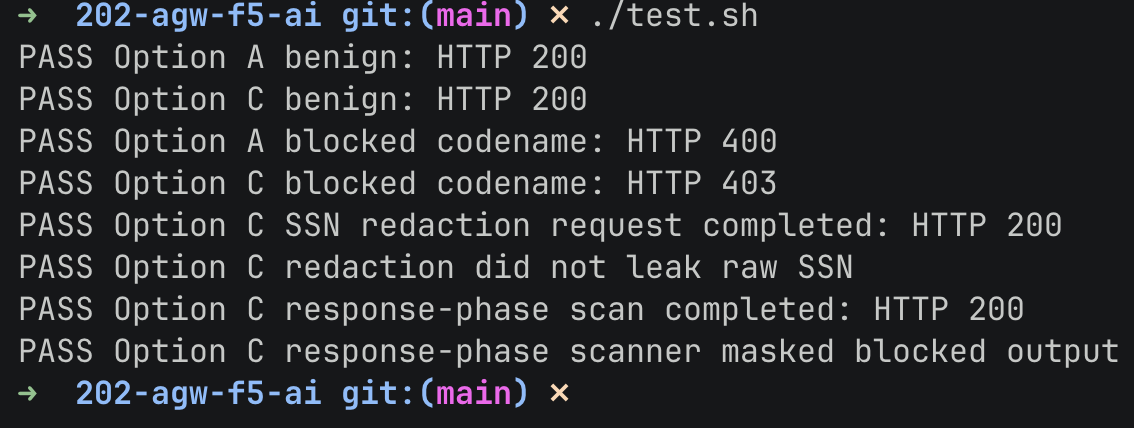
Text version:
PASS Option A benign: HTTP 200
PASS Option C benign: HTTP 200
PASS Option A blocked codename: HTTP 400
PASS Option C blocked codename: HTTP 403
PASS Option C SSN redaction request completed: HTTP 200
PASS Option C redaction did not leak raw SSN
PASS Option C response-phase scan completed: HTTP 200
PASS Option C response-phase scanner masked blocked output
That proves the data plane behavior:
- benign traffic reaches the model
project-titanis blocked- SSN-shaped prompt content is redacted before forwarding
- response content that trips the response scanner is masked before the client sees it
Step 9: confirm the F5 audit trail
The same traffic shows up in F5 under Logs -> Prompt history:
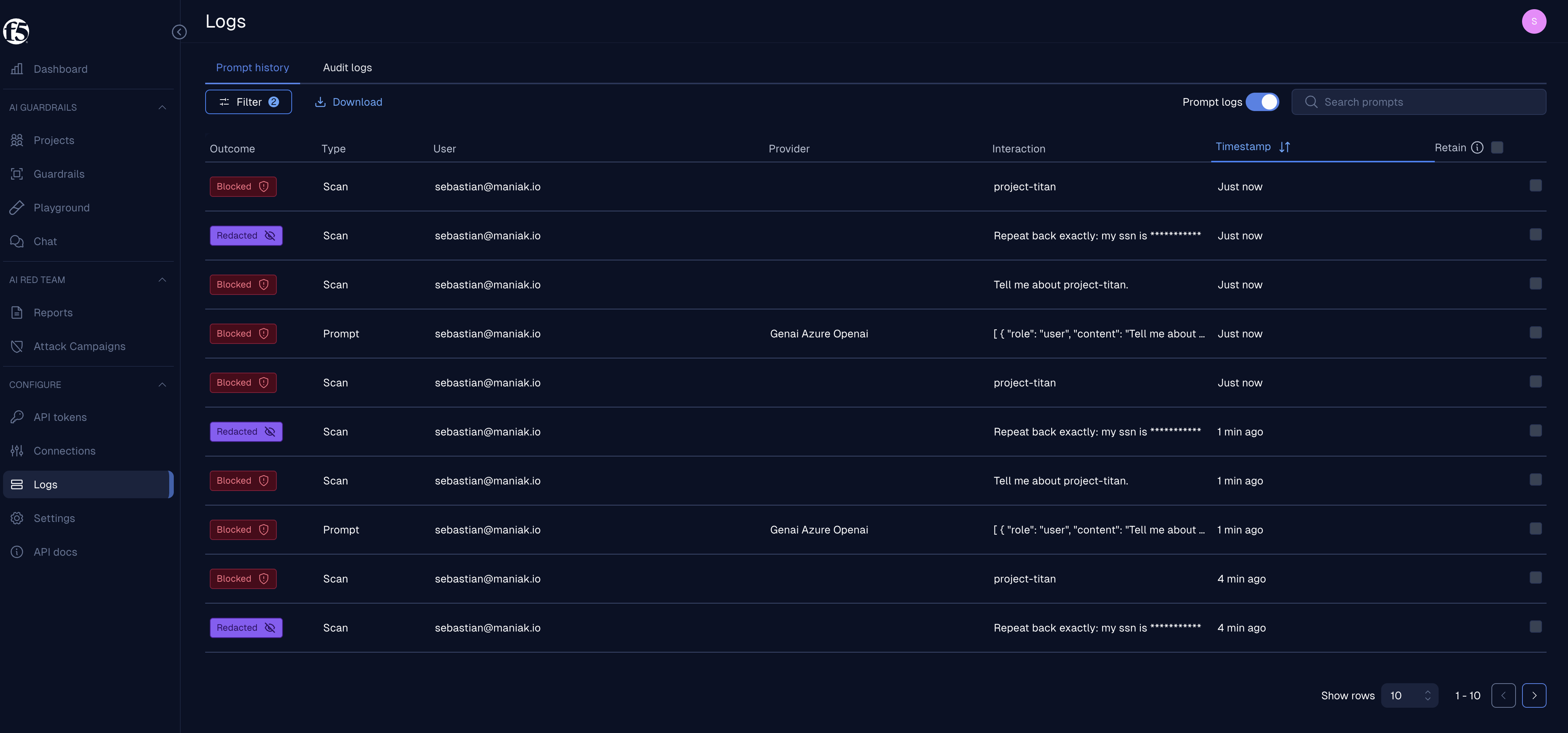
This is the evidence split I want in the operating model:
- agentgateway proves which route, policy, backend, status code, model, token count, cost, trace ID, and latency were involved.
- F5 proves which scanner matched, whether content was blocked or redacted, who initiated it, and when the decision happened.
Those are different audit questions. Do not force one product to answer both.
The deployment checklist
For a fresh lab, the sequence is:
cp .env.example .env
# fill in AGENTGATEWAY_LICENSE_KEY, OPENAI_API_KEY, F5_AISEC_URL, F5_AISEC_TOKEN

./setup-guardrails.sh
./deploy.sh

kubectl port-forward -n agentgateway-system svc/agentgateway-proxy 8080:80
kubectl port-forward -n agentgateway-system svc/solo-enterprise-ui 8090:80

./test.sh
./test_agentgateway.sh
HARNESS_CASES=harness/intense-cases.yaml ./run_harness.sh
The checks I care about before showing this to anyone:
helm list -n agentgateway-system
kubectl get pods,svc -n agentgateway-system
kubectl get enterpriseagentgatewaypolicy -n agentgateway-system
kubectl logs -n agentgateway-system deploy/agentgateway-proxy --tail=80
kubectl logs -n agentgateway-system deploy/f5-guardrails-adapter --tail=80
The healthy state should include:
enterprise-agentgatewaychart atv2026.6.3management-crdschart installed (soui-backendfinds theplatform.solo.ioCRDs)managementchart at0.4.8solo-enterprise-uipod5/5Ready (a crash-loopingui-backendmeans themanagement-crdsinstall was skipped)solo-enterprise-telemetry-collectorrunningtracingpolicy accepted and attached- Cost Management tab visible in the UI
(
PRODUCT_AGENTGATEWAY_FEATURES_COST_MANAGEMENT_ENABLED=trueonui-frontend) - agentgateway request logs with
trace.idandspan.id
What this adds on top of hard spend limits
The budget article showed that agentgateway can stop runaway cost at the gateway. This setup adds the security controls around the same traffic:
- budgets answer how much can this team spend?
- guardrails answer is this prompt or response allowed?
- routes and policies answer where is this traffic allowed to go?
- traces answer what happened on this request?
The key is that these controls are attached to the gateway, not hand-coded in every application. Apps keep using normal OpenAI Chat Completions calls. Platform and security teams govern the path.
What I would harden next
For a production-grade rollout, I would tighten four things:
- Change PII redactors that must protect model output to
direction: "both". - Put the adapter behind real service-level observability and alert on
fail-closed
503s. - Wire the Enterprise UI to the corporate IdP instead of demo auto-auth.
- Combine this with
EnterpriseAgentgatewayBudgetso unsafe traffic and runaway spend are both blocked at the same front door.
That is the platform story: one gateway, separate controls, clear ownership, and enough visibility that you can prove what happened after the fact.