agentgateway emits rich OpenTelemetry traces for every LLM request, tool call, and policy decision. This guide shows the production-grade way to forward those traces to Langfuse using an OpenTelemetry Collector — including proper cost tracking even when using local models.
Why Go Through an OTel Collector?
Directly sending from agentgateway to Langfuse causes problems:
- agentgateway parses OTLP headers as CEL expressions
- A raw
Authorization: Basic xxxheader makes the proxy crash-loop - You lose easy fan-out to multiple observability backends
Best practice: agentgateway → OTel Collector (no auth) → Langfuse (with Basic auth)
This is the exact pattern running in production on the k8s-iceman cluster.
Architecture
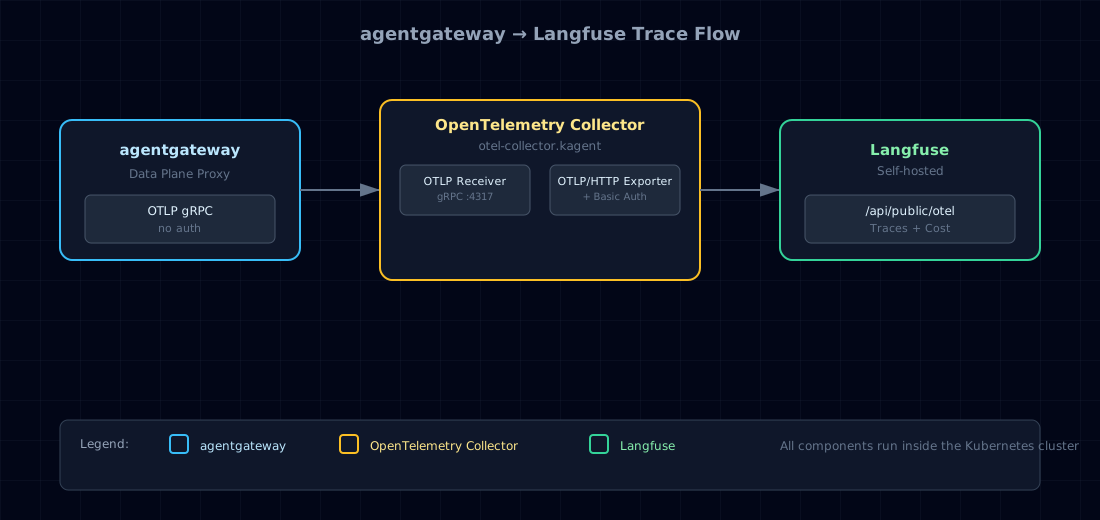
This design keeps agentgateway clean while the collector handles authentication and enrichment.
1. Deploy the OpenTelemetry Collector
Use the OpenTelemetry Collector Contrib image with Basic Auth extension:
# helm-values/otel-collector/values.yaml
mode: deployment
fullnameOverride: otel-collector

image:
  repository: otel/opentelemetry-collector-contrib

extraEnvsFrom:
  - secretRef:
      name: langfuse-otel

ports:
  otlp:
    enabled: true
    containerPort: 4317
    servicePort: 4317

config:
  extensions:
    basicauth/langfuse:
      client_auth:
        username: ${env:LANGFUSE_PUBLIC_KEY}
        password: ${env:LANGFUSE_SECRET_KEY}

  receivers:
    otlp:
      protocols:
        grpc:
          endpoint: ${env:MY_POD_IP}:4317

  exporters:
    otlphttp/langfuse:
      endpoint: ${env:LANGFUSE_BASE_URL}/api/public/otel
      auth:
        authenticator: basicauth/langfuse

  service:
    extensions: [health_check, basicauth/langfuse]
    pipelines:
      traces:
        receivers: [otlp]
        processors: [memory_limiter, batch]
        exporters: [otlphttp/langfuse]
2. Configure agentgateway Tracing
Create the AgentgatewayParameters resource:
# manifests/agentgateway-config/langfuse-tracing.yaml
apiVersion: agentgateway.dev/v1alpha1
kind: AgentgatewayParameters
metadata:
  name: langfuse-tracing
  namespace: agentgateway-system
spec:
  env:
    - name: OTLP_ENDPOINT
      value: "http://otel-collector.kagent.svc.cluster.local:4317"
    - name: OTLP_PROTOCOL
      value: "grpc"
    - name: OTLP_HEADERS
      value: "{}"          # Must be empty object
  rawConfig:
    config:
      tracing:
        randomSampling: true
        fields:
          add:
            span.name: '"agentgateway.request"'
            gen_ai.system: 'llm.provider'
            gen_ai.prompt: 'flattenRecursive(llm.prompt)'
            gen_ai.completion: 'flattenRecursive(llm.completion.map(c, {"role":"assistant", "content": c}))'
            gen_ai.usage.completion_tokens: 'llm.outputTokens'
            gen_ai.usage.prompt_tokens: 'llm.inputTokens'
Reference it from your agentgateway Helm values:
gatewayClassParametersRefs:
  agentgateway:
    name: langfuse-tracing
    namespace: agentgateway-system
3. Secrets via Vault + External Secrets
apiVersion: external-secrets.io/v1
kind: ExternalSecret
metadata:
  name: langfuse-otel
spec:
  secretStoreRef:
    name: vault-backend
    kind: ClusterSecretStore
  target:
    name: langfuse-otel
  data:
    - secretKey: LANGFUSE_PUBLIC_KEY
      remoteRef: { key: iceman_langfuse, property: LANGFUSE_PUBLIC_KEY }
    - secretKey: LANGFUSE_SECRET_KEY
      remoteRef: { key: iceman_langfuse, property: LANGFUSE_SECRET_KEY }
    - secretKey: LANGFUSE_BASE_URL
      remoteRef: { key: iceman_langfuse, property: LANGFUSE_BASE_URL }
4. Cost Tracking for Local Models
Even when using local models (Qwen via vLLM), you can still get proper cost tracking in Langfuse.
Step 1: Define Model Pricing in Langfuse
Go to Settings → Models → Add model and create an entry.
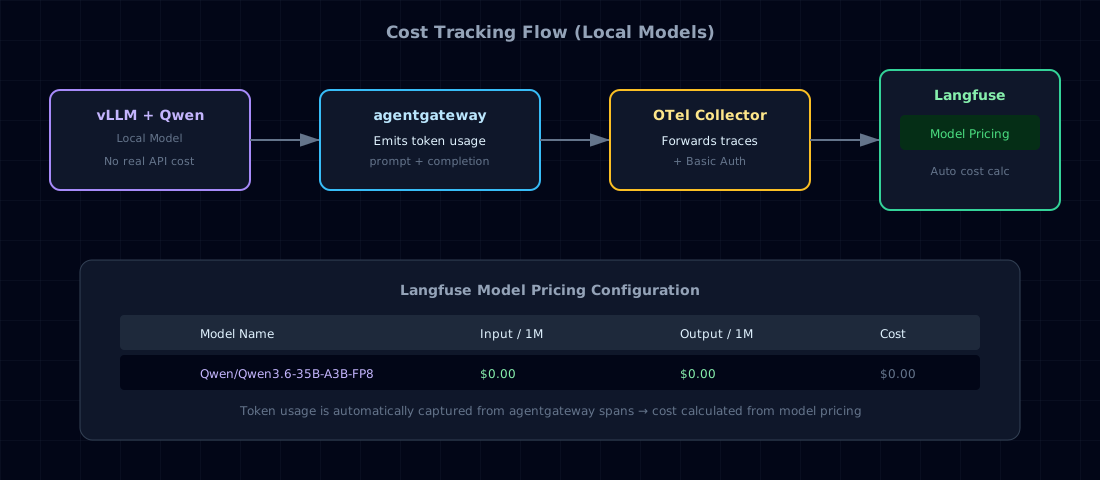
Because agentgateway already emits gen_ai.usage.prompt_tokens and gen_ai.usage.completion_tokens, Langfuse will automatically calculate cost once the model name matches.
Step 2: Verify in Langfuse UI
After sending a few requests through agentgateway you should see:
- Token usage columns populated
- Cost column showing your configured price (even if $0)
- Full prompt/completion with rich attributes
5. What You Get in Langfuse
Every request through agentgateway now appears with:
- Full prompt and completion
- Token counts (
prompt_tokens,completion_tokens) - Model name
- Cost (auto-calculated from your pricing)
- Which gateway policy ran
- MCP tool calls
- Latency breakdown
Summary
This pattern gives you production-grade observability:
- Clean auth separation via OTel Collector
- Automatic cost tracking even for local models
- No changes required in your agents
- Easy to extend to metrics and logs later
This is the exact setup running on the k8s-iceman cluster.
Would you like a version that also includes kagent traces in the same diagram?