Introduction
You’ve got Claude Code running on your laptop. You’ve got Codex open in a tab. Both are just AI coding tools, right? Wrong. Behind the scenes, they’re making raw API calls — Claude Code directly to Anthropic, Codex directly to OpenAI. No central visibility. No rate limiting. No policy enforcement. And if you’re running multiple agents, you’re scattering API keys across every machine.
Enter agentgateway.
agentgateway lets you run a local or cluster proxy that sits between your AI tools and the upstream providers. Every request goes through the gateway first, giving you a single point of control.
In this guide, I’ll walk you through two patterns for connecting Claude Code, Codex, and OpenCode to agentgateway:
- Subscription passthrough — your tool uses an Anthropic/OpenAI org subscription, no API key needed
- API key routing — you pass API keys through the gateway for auth
Both patterns are simple. The subscription approach is cleaner if your org already handles billing. The API key approach is more flexible for multi-account setups.
Let’s go.
Architecture
Here’s the full flow — your AI tools talk to localhost, the gateway routes and authenticates, upstream providers never see your machine directly.
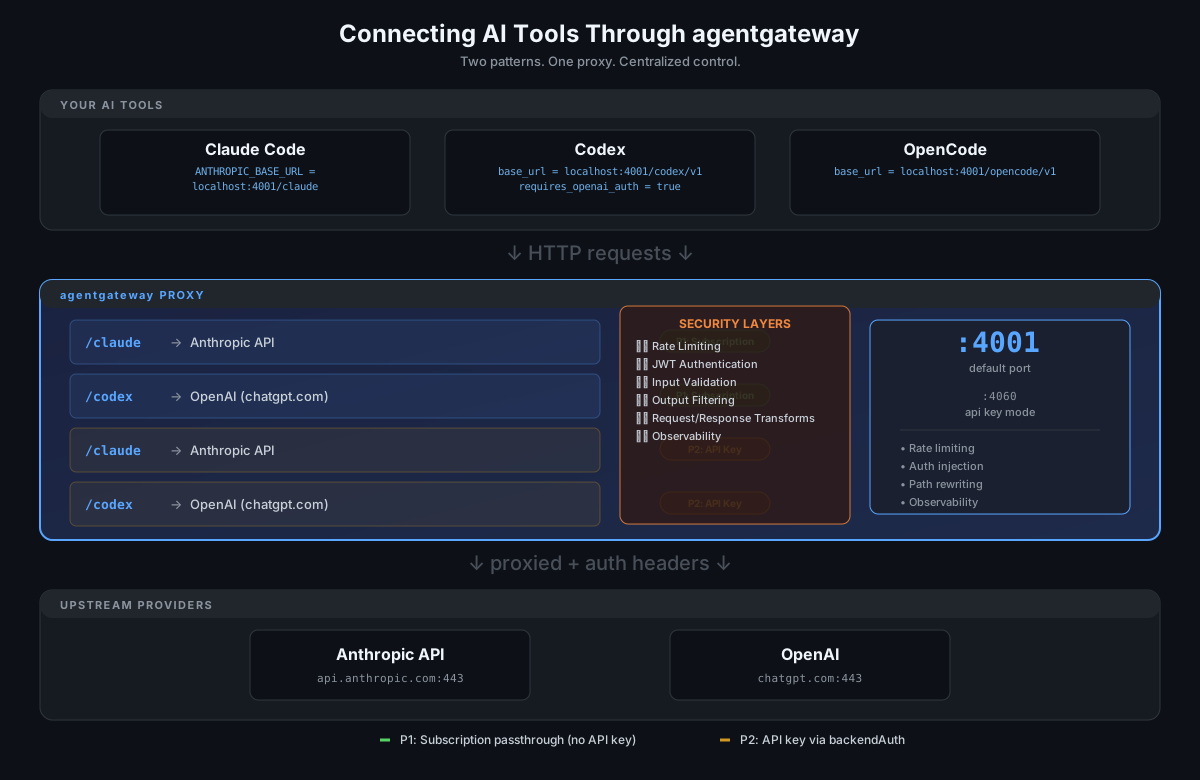
Your tools → gateway (auth + routing + security layers) → providers. One proxy, full visibility.
Pattern 1: Subscription Passthrough (No API Key)
This is the simplest setup. Your AI tools connect to agentgateway, which routes them to Anthropic or OpenAI using the organization’s subscription or embedded credentials. No API keys on your machine.
The Setup
You’re running agentgateway locally on port 4001. Claude Code and Codex both connect to it. Here’s what the config looks like:
binds:
- port: 4001

listeners:
- name: default
  protocol: HTTP

routes:
- name: claude-agent
  matches:
  - path:
      pathPrefix: /claude
  policies:
    urlRewrite:
      path:
        prefix: /
  backends:
  - ai:
      name: claude-agent
      provider:
        anthropic: {}
  policies:
    ai:
      routes:
        /v1/messages: messages
        /v1/messages/count_tokens: anthropicTokenCount
        '*': passthrough

- name: codex-agent
  matches:
  - path:
      pathPrefix: /codex
  policies:
    urlRewrite:
      path:
        prefix: /
  backends:
  - ai:
      name: codex-agent
      provider:
        openAI: {}
  policies:
    ai:
      routes:
        /v1/chat/completions: completions
        /v1/responses: responses
        /v1/embeddings: embeddings
        '*': passthrough
  hostOverride: chatgpt.com:443
  pathPrefix: /backend-api/codex
A few things to call out:
- Claude route (
/claude) — rewrites the path to/and routes to the Anthropic provider. Maps the standard Anthropic API paths like/v1/messages. - Codex route (
/codex) — this one’s slightly more complex because Codex talks to OpenAI’s chatgpt.com backend, not the regular API. We sethostOverride: chatgpt.com:443andpathPrefix: /backend-api/codexto tell the gateway exactly where to forward.
Claude Code
Configure Claude Code to point at your local gateway:
// .claude/settings.local.json
{
  "env": {
    "ANTHROPIC_BASE_URL": "http://localhost:4001/claude"
  }
}
That’s it. Claude Code will send all requests to your gateway on port 4001, and the gateway routes them to Anthropic using your org subscription. No API key in your environment variables.
Codex
Configure Codex in its config file:
# .codex/config.toml
model_provider = "agentgateway"

[model_providers]

[model_providers.agentgateway]
name = "agentgateway"
base_url = "http://localhost:4001/codex/v1"
requires_openai_auth = true
The requires_openai_auth = true flag is important — it tells Codex to send the credentials through to the proxy, so the gateway can handle the auth header.
Pattern 2: API Key Routing
This pattern is for when you want to manage API keys centrally. You store your Anthropic and OpenAI keys in environment variables, and the gateway injects them into upstream requests.
The Setup
First, set your keys:
export ANTHROPIC_API_KEY=$(cat ~/.api-keys/anthropic.txt)
export OPENAI_API_KEY=$(cat ~/.api-keys/openai.txt)
Then run agentgateway with those keys and bind on a different port (we use 4060 here so it doesn’t collide with the first pattern):
binds:
- port: 4060

listeners:
- name: default
  protocol: HTTP

routes:
- name: claude-agent
  matches:
  - path:
      pathPrefix: /claude
  policies:
    urlRewrite:
      path:
        prefix: /
  backendAuth:
    key: $ANTHROPIC_API_KEY
  backends:
  - ai:
      name: claude-agent
      provider:
        anthropic: {}
  policies:
    ai:
      routes:
        /v1/messages: messages
        /v1/messages/count_tokens: anthropicTokenCount
        '*': passthrough

- name: codex-agent
  matches:
  - path:
      pathPrefix: /codex
  policies:
    urlRewrite:
      path:
        prefix: /
  backendAuth:
    key: $OPENAI_API_KEY
  backends:
  - ai:
      name: codex-agent
      provider:
        openAI: {}
  policies:
    ai:
      routes:
        /v1/chat/completions: completions
        /v1/responses: responses
        /v1/embeddings: embeddings
        '*': passthrough
The key difference from Pattern 1 is the backendAuth block under each route’s policies.urlRewrite. This tells the gateway to inject the API key into every upstream request. Your tools themselves never see the key — they just talk to localhost.
Claude Code
// .claude/settings.local.json
{
  "env": {
    "ANTHROPIC_BASE_URL": "http://localhost:4060/claude"
  }
}
Codex
# .codex/config.toml
model_provider = "agentgateway"

[model_providers]

[model_providers.agentgateway]
name = "agentgateway"
base_url = "http://localhost:4060/codex/v1"
env_key = "OPENAI_API_KEY"
In this pattern, Codex uses env_key instead of requires_openai_auth. It’ll pull the key from the environment variable you set.
Optional: Security Layers
The patterns above cover the core routing and auth. But agentgateway also supports a full security posture — rate limiting, JWT auth, input/output validation, and more. Here’s a practical guide to layering those on top.
Rate Limiting
Stop a runaway agent from burning through tokens:
# Rate limit Claude Code to 100 requests/hour
- name: rate-limit-claude
  matches:
  - path:
      pathPrefix: /claude
  policies:
    rateLimit:
      requestsPerHour: 100
      actions:
      - reject: true
        errorCode: 429
You can do token-based limits (e.g., max 1M tokens/day) or request-based limits. Both per-route and per-identifier (IP, user, org header).
JWT Authentication
If you’re exposing agentgateway externally (not just localhost), protect it with JWT:
- name: secure-claude
  matches:
  - path:
      pathPrefix: /claude
  policies:
    auth:
      jwt:
        issuer: https://auth.yourcompany.com
        audiences:
        - agentgateway
      actions:
        onSuccess:
          requestHeaders:
          - set:
              X-Authenticated-User: \\$(request.auth.claims.email)
This validates the JWT, rejects unauthorized requests, and forwards the user’s email as a header for audit logging.
Input Validation
Guard against prompt injection and oversized payloads:
- name: validate-input
  matches:
  - path:
      pathPrefix: /claude
  policies:
    inputValidation:
      maxRequestBodySize: 1MB
      # Block requests with known injection patterns
      blockPatterns:
      - "ignore previous instructions"
      - "bypass system prompt"
Output Filtering
Prevent sensitive data from leaking back:
- name: filter-output
  matches:
  - path:
      pathPrefix: /claude
  policies:
    outputFilter:
      # Mask emails, phone numbers, SSNs in responses
      maskPatterns:
      - email
      - phone
      - ssn
Request/Response Transformation
Beyond what we showed in the config, you can strip headers, modify bodies, add middleware headers:
policies:
  urlRewrite:
    path:
      prefix: /
  requestHeaderModifier:
    set:
      X-Gateway-Version: "1.2"
      X-Request-ID: \\$(request.id)
  responseHeaderModifier:
    add:
      X-Gateway-Processed: "true"
Putting It All Together
Here’s what a production-ready route looks like when you layer it on:
- name: claude-agent-secure
  matches:
  - path:
      pathPrefix: /claude
  policies:
    urlRewrite:
      path:
        prefix: /
    auth:
      jwt:
        issuer: https://auth.yourcompany.com
        audiences:
        - agentgateway
    rateLimit:
      requestsPerHour: 200
      actions:
      - reject: true
        errorCode: 429
    inputValidation:
      maxRequestBodySize: 2MB
    transformations:
      request:
        body: toJson(json(request.body).filterKeys(k, k != "context_management"))
        headers:
          set:
            X-Authenticated-User: \\$(request.auth.claims.email)
            X-Gateway-Source: claude-code
  backends:
  - ai:
      name: claude-agent
      provider:
        anthropic: {}
  policies:
    ai:
      routes:
        /v1/messages: messages
        /v1/messages/count_tokens: anthropicTokenCount
        '*': passthrough
One route. JWT auth, rate limiting, body transformation, audit headers, and the Anthropic backend. That’s the power of agentgateway — you configure it once and every tool that connects gets the full security treatment.
Why Bother?
You could just point Claude Code and Codex at Anthropic and OpenAI directly. And you absolutely can. But here’s what you get by routing through agentgateway:
- Centralized auth — your API keys live in one place, not scattered across dev machines
- Observability — every request flows through the gateway, so you get traces, metrics, and logs for free
- Rate limiting — set per-agent limits so one noisy tool can’t drown out the others
- Policy enforcement — block certain model calls, redirect traffic, add middleware
- One proxy, multiple tools — deploy once, every AI tool on your machine connects through it
Recap
| Pattern | Auth | When to use |
|---|---|---|
| Subscription passthrough | Org subscription | Your org handles billing, no API key management needed |
| API key routing | backendAuth with env vars | Multi-account setup, or you want keys managed at the gateway |
Pick the pattern that fits your setup. Both work — the gateway handles the heavy lifting either way.
This is a living guide. If you run into issues or have a setup that works differently, drop a comment on the agentgateway GitHub repo.